


Reusable Tekton Pipelines-as-Code: From Local Gitea to On-Premises Bitbucket

Mehdi Hadeli
@mehdihadeli
On this page
Table of contents
Introduction
A reusable CI system needs a clear boundary between application policy and build implementation. Copying pipeline YAML into every repository blurs that boundary: fixing checkout logic or changing an SDK becomes a coordinated edit across applications.
This article uses a separate Tekton catalog, an application-owned PipelineRun template, and Pipelines-as-Code (PaC) to connect them. We will build a .NET 10 service on k3d, receive Gitea push events, and inspect execution. For production, the target source-control system is on-premises Bitbucket Data Center; we will cover the provider configuration, networking, and credentials that replace the local setup. GitLab and Azure Repos remain alternative migration paths.
The complete implementation is in tekton-pip-as-code-sample.
Definitions and Execution
Tekton separates reusable definitions from execution instances:
- A Task declares sequential container Steps, parameters, and workspaces.
- A Pipeline composes Tasks into a dependency graph.
- A PipelineRun supplies runtime inputs and storage; Tekton creates TaskRuns and their pods.
PaC handles Git events and prepares runnable resources. Tekton schedules their execution. The Dashboard displays runs; it is not the webhook receiver or build engine.
Repository Boundaries
flowchart LR
    Dev[Developer push or PR] --> Gitea[Gitea]
    Gitea --> Webhook[PaC webhook]
    Webhook --> PAC[Pipelines-as-Code controller]
    PAC --> AppRepo[Application .tekton/ci.yaml]
    PAC --> Catalog[Shared catalog Pipeline and Tasks]
    PAC --> PR[PipelineRun]
    PR --> Clone[git-clone TaskRun]
    Clone --> Build[dotnet-build TaskRun]
    Build --> Result[Build result and commit status]
The tekton-catalog repository owns checkout and build logic. The dotnet-tekton-sample repository owns event filters and application inputs. Commands below start in the application root, with the catalog beside it:
dotnet-tekton-sample/
├── .tekton/ci.yaml
├── deployments/repo.yaml
└── src/dotnet-tekton-sample.csproj

../tekton-catalog/
├── pipelines/dotnet-ci.yaml
└── tasks/
  └── dotnet-build.yaml
The catalog intentionally stops at checkout and build; tests, scanners, and release automation remain application-specific concerns.
Prepare Kubernetes
Use Docker Desktop, Git Bash, k3d, kubectl, and Git on Windows. A local .NET 10 SDK is optional because the build runs in a container. Registry access and dynamic PVC provisioning are required.
Check the Local Prerequisites
Install and start Docker Desktop with Linux containers and WSL2 integration, then install k3d, kubectl, and Git. Run these checks from Git Bash in the application repository root:
docker info
k3d version
kubectl version --client
git --version
k3d cluster list
If Docker cannot reach its daemon, fix that before creating the cluster. If tekton-devsecops already exists but is stopped, start it with k3d cluster start tekton-devsecops; do not recreate it. The name devsecops is a local cluster identifier, not a claim that this two-Task build performs security scanning.
Create or Reuse the Cluster
The complete cluster configuration is small:
Source: tekton-pip-as-code-sample/dotnet-tekton-sample/deployments/k3d-devsecops.yaml
apiVersion: k3d.io/v1alpha5
kind: Simple
metadata:
  name: tekton-devsecops
servers: 1
agents: 0
kubeAPI:
  hostIP: 127.0.0.1
  hostPort: '6550'
registries:
  config: |
    mirrors:
      "host.k3d.internal:3000":
        endpoint:
          - "http://host.docker.internal:3000"
options:
  kubeconfig:
    updateDefaultKubeconfig: true
    switchCurrentContext: false
The highlighted settings create one k3s server node, publish its API on loopback port 6550, and add its kubeconfig entry without switching contexts automatically. The HTTP mirror is a local Gitea registry convenience. This article's build does not push an application image, so that mirror is not part of the checkout/build contract.
Create a cluster only if you do not already have one:
k3d cluster create --config deployments/k3d-devsecops.yaml
kubectl config use-context k3d-tekton-devsecops
kubectl apply -f deployments/coredns-local-registry.yaml
kubectl rollout restart deployment/coredns -n kube-system
kubectl get nodes
kubectl wait --for=condition=Ready nodes --all --timeout=180s
kubectl rollout status deployment/coredns -n kube-system --timeout=180s
kubectl rollout status deployment/local-path-provisioner -n kube-system --timeout=180s
kubectl get storageclass
The sample's deployments/k3d-devsecops.yaml supplies the cluster name and local registry mirror. Its CoreDNS override supplies the local registry hostname mapping. Existing clusters do not need to be deleted or recreated; verify their DNS and host routing instead.
Expect a Ready node and a default StorageClass; k3s normally provides local-path. The per-run workspace PVC needs a working provisioner, not merely a StorageClass object. The CoreDNS override is k3s-specific and supports the optional local registry hostname; it is not a DNS configuration to copy into every Kubernetes distribution.
Install and Wait for Tekton
Install Pipelines, PaC, and Dashboard, following the sample's versions:
kubectl apply \
  --filename https://infra.tekton.dev/tekton-releases/pipeline/latest/release.yaml
kubectl apply \
  -f https://github.com/tektoncd/pipelines-as-code/releases/download/v0.50.2/release.k8s.yaml
kubectl apply \
  -f https://github.com/tektoncd/dashboard/releases/download/v0.74.0/release.yaml
kubectl get pods -n tekton-pipelines
kubectl get pods -n pipelines-as-code
Wait for controller readiness before creating application resources. The Pipelines latest URL is convenient, not reproducible; pin a compatible release for repeatable environments. Check the Pipelines installation requirements and PaC Kubernetes installation before upgrading.
kubectl rollout status deployment/tekton-pipelines-controller -n tekton-pipelines --timeout=300s
kubectl rollout status deployment/tekton-pipelines-webhook -n tekton-pipelines --timeout=300s
kubectl rollout status deployment/pipelines-as-code-controller -n pipelines-as-code --timeout=300s
kubectl rollout status deployment/pipelines-as-code-webhook -n pipelines-as-code --timeout=300s
kubectl rollout status deployment/pipelines-as-code-watcher -n pipelines-as-code --timeout=300s
kubectl rollout status deployment/tekton-dashboard -n tekton-pipelines --timeout=300s
kubectl get crd pipelineruns.tekton.dev repositories.pipelinesascode.tekton.dev
These commands distinguish a submitted installation manifest from running controllers. If a timeout occurs, inspect pod events for scheduling, image-pull, or certificate errors. Installation requires permissions to create cluster-scoped CRDs and RBAC; application builds should not inherit those installer privileges.
Connect Docker and Kubernetes
Run each forward in a separate terminal:
kubectl port-forward --address 0.0.0.0 \
  svc/pipelines-as-code-controller 8080:8080 \
  -n pipelines-as-code
The first accepts webhooks through Service port 8080; kubectl resolves its target port. The second exposes the Dashboard:
kubectl port-forward --address 127.0.0.1 \
  svc/tekton-dashboard 9097:9097 \
  -n tekton-pipelines
Gitea's browser address is http://localhost:3000. Pods use http://host.docker.internal:3000; Gitea delivers webhooks to http://host.docker.internal:8080. Pod localhost refers to that pod, not Windows. Verify host routing in your Docker Desktop/k3d configuration. Binding 0.0.0.0 exposes the receiver on host interfaces, so restrict it with the host firewall.
Configure Local Gitea
Use the sample's Compose file:
cd deployments/gitea-setup
docker compose up -d
cd ../..
Source: tekton-pip-as-code-sample/dotnet-tekton-sample/deployments/gitea-setup/docker-compose.yaml
name: gitea

networks:
  gitea:
    external: false

services:
  configure:
    image: python:3.12-alpine
    network_mode: none
    command: ['python', '/setup/configure.py']
    volumes:
      - gitea-data:/data
      - ./app.ini:/setup/app.ini:ro
      - ./configure.py:/setup/configure.py:ro

  server:
    image: docker.gitea.com/gitea:28.3.0
    container_name: gitea
    command:
      - /bin/sh
      - -c
      - cp /setup/bootstrap-admin.sh /etc/s6/gitea/run && chmod +x /etc/s6/gitea/run && exec /usr/bin/s6-svscan /etc/s6
    depends_on:
      configure:
        condition: service_completed_successfully
    environment:
      - USER_UID=1000
      - USER_GID=1000
      - GITEA_ADMIN_USERNAME=admin
      - GITEA_ADMIN_PASSWORD=admin
      - [email protected]
    restart: always
    networks:
      - gitea
    volumes:
      - gitea-data:/data
      - ./bootstrap-admin.sh:/setup/bootstrap-admin.sh:ro
      - /etc/timezone:/etc/timezone:ro
      - /etc/localtime:/etc/localtime:ro
    ports:
      - '127.0.0.1:3000:3000'
      - '127.0.0.1:222:22'

volumes:
  gitea-data:
The highlighted configuration service runs before Gitea and applies the tracked INI to the persistent data volume. Compose supplies the local administrator credentials and binds published HTTP/SSH ports to loopback. On Windows, remove the Linux timezone bind mounts if those host files are unavailable.
Open Gitea and sign in with username admin and password admin; no installation form is required. The bootstrap-admin.sh startup hook runs the database migration and creates the administrator only if that username is absent. Existing accounts and passwords remain unchanged.
Local development only: the sample intentionally permits a weak password. Loopback publication does not isolate Gitea from other containers on its Docker network. Replace the credentials and password policy, configure TLS, and review network exposure before using this outside a trusted local machine.
Create empty public repositories named tekton-catalog and dotnet-tekton-sample, without generated initial commits. Public access matters because the clone Task has no explicit credential setup. Commit the intended files locally before pushing; Git does not publish uncommitted changes.
For already-initialized local Git repositories, push the catalog first:
cd ../tekton-catalog
git remote add origin http://localhost:3000/admin/tekton-catalog.git
git push -u origin main

cd ../dotnet-tekton-sample
git remote add origin http://localhost:3000/admin/dotnet-tekton-sample.git
git push -u origin main
If origin exists, inspect it rather than blindly replacing it. Substitute your username consistently in remotes and manifests if it is not admin.
Keep Gitea Configuration in Git
The tracked INI contains the non-secret settings needed for this local setup:
Source: tekton-pip-as-code-sample/dotnet-tekton-sample/deployments/gitea-setup/app.ini
APP_NAME = Local Tekton Gitea
RUN_MODE = prod

[database]
DB_TYPE = sqlite3
PATH = /data/gitea/gitea.db

[repository]
ROOT = /data/git/repositories
DEFAULT_BRANCH = main

[server]
DOMAIN = host.docker.internal
ROOT_URL = http://host.docker.internal:3000/
PUBLIC_URL_DETECTION = never
HTTP_ADDR = 0.0.0.0
HTTP_PORT = 3000
SSH_DOMAIN = localhost
SSH_PORT = 222
START_SSH_SERVER = false
APP_DATA_PATH = /data/gitea

[service]
DISABLE_REGISTRATION = true

[security]
ALLOWED_HOST_LIST = host.docker.internal:8080, private:8080
INSTALL_LOCK = true
MIN_PASSWORD_LENGTH = 5
PASSWORD_COMPLEXITY = off
The highlighted server settings keep API and webhook repository URLs canonical, even when a developer pushes through localhost. Without PUBLIC_URL_DETECTION = never, Gitea 28 can derive repository URLs from the request host and cause PaC's exact Repository match to fail.
Gitea 28 places outbound permission under [security], not the legacy [webhook] section. Its egress configuration requires an IP-range permission for private destinations as well as a hostname rule. The sample permits private addresses only on port 8080, where the local PaC forward listens. This is broader than one host IP but avoids hard-coding Docker Desktop's gateway address. It does not allow every private-network port.
The configure.py service merges these settings into /data/gitea/conf/app.ini, preserves unspecified keys, removes the deprecated webhook allowlist, and backs up changed configuration inside the volume. Runtime configuration and backups can contain generated secrets; keep them out of Git. After changing the tracked INI, apply it and restart from the application root:
docker compose -f deployments/gitea-setup/docker-compose.yaml run --rm configure
docker compose -f deployments/gitea-setup/docker-compose.yaml restart server
Register the Application
Generate a token in Settings > Applications with repository write access for reading code and reporting commit status. Pull-request commenting additionally needs issue write access. Generate a separate, non-empty webhook secret and replace these placeholders privately:
kubectl create secret generic gitea-webhook-config \
  --from-literal=provider.token="<YOUR_GITEA_TOKEN>" \
  --from-literal=webhook.secret="<YOUR_WEBHOOK_SECRET>" \
  -n default
The provider token authenticates API calls; the shared webhook secret validates HMAC-SHA256 signatures. Keep both out of Git and shell history. The provider documentation retains gitea as an alias; this sample uses it with PaC v0.50.2.
The Repository CR connects repository identity, namespace, and credentials:
Source: tekton-pip-as-code-sample/dotnet-tekton-sample/deployments/repo.yaml
apiVersion: 'pipelinesascode.tekton.dev/v1alpha1'
kind: Repository
metadata:
  name: dotnet-tekton-sample
  namespace: default
spec:
  concurrency_limit: 1
  url: 'http://host.docker.internal:3000/admin/dotnet-tekton-sample' # MUST MATCH GITEA EXACTLY
  git_provider:
    type: 'gitea'
    url: 'http://host.docker.internal:3000' # This stays as host.docker.internal for API access
    secret:
      name: 'gitea-webhook-config'
      key: 'provider.token'
    webhook_secret:
      name: 'gitea-webhook-config'
      key: 'webhook.secret'
The highlighted spec.url matches Gitea's webhook payload; git_provider.url supplies pod-reachable API access. Referenced Secrets must exist in the Repository's namespace, here default. The concurrency limit queues additional runs until the current run finishes.
kubectl apply -f deployments/bootstrap.yaml
kubectl apply -f deployments/repo.yaml
kubectl get repositories -n default
The deployments/bootstrap.yaml file creates the tekton-ci service account referenced by the application PipelineRun. Without it, Tekton cannot create the TaskRun pods.
In Gitea repository Settings > Webhooks, add a Gitea webhook: target http://host.docker.internal:8080, method POST, content type application/json, the matching secret, and Push and Pull Request events. Test Delivery should return 202 Accepted; that confirms acceptance, not successful execution.
Implement Reusable Tasks
Checkout the Event Commit
The catalog references Tekton Catalog's pinned git-clone Task rather than maintaining a local wrapper. It accepts the repository URL and event revision, checks out that revision, and exposes the exact commit as a Task result. Keeping the catalog URL immutable makes the checkout implementation reproducible while allowing the application repository to provide only its own inputs.
Exact source checkout does not freeze every build dependency. NuGet packages and container images can still change, so production builds should pin those inputs separately.
Build a Parameterized Project
Source: tekton-pip-as-code-sample/tekton-catalog/tasks/dotnet-build.yaml
apiVersion: tekton.dev/v1
kind: Task
metadata:
  name: dotnet-build
spec:
  params:
    - name: sdk-image
      type: string
      description: .NET SDK container image used for the build
      default: mcr.microsoft.com/dotnet/sdk:10.0
    - name: project-directory
      type: string
      description: Directory containing the project or solution
      default: .
    - name: configuration
      type: string
      default: Release
  workspaces:
    - name: source
  steps:
    - name: build
      image: $(params.sdk-image)
      workingDir: $(workspaces.source.path)/$(params.project-directory)
      env:
        - name: CONFIGURATION
          value: $(params.configuration)
        - name: DOTNET_CLI_TELEMETRY_OPTOUT
          value: '1'
      script: |
        #!/usr/bin/env bash
        set -euo pipefail
        dotnet build --configuration "$CONFIGURATION" --warnaserror
The highlighted defaults and substitutions make SDK and source layout configurable. This application overrides the directory with src; SDK 10 supports its net10.0 target. dotnet build also performs restore unless disabled. The Task compiles only: it does not run tests, publish images, or deploy.
Compose the Catalog Pipeline
Source: tekton-pip-as-code-sample/tekton-catalog/pipelines/dotnet-ci.yaml
apiVersion: tekton.dev/v1
kind: Pipeline
metadata:
  name: dotnet-ci
  annotations:
    pipelinesascode.tekton.dev/task: https://raw.githubusercontent.com/tektoncd/catalog/112374ce1262b133a77300bd8133445722605e04/task/git-clone/0.1/git-clone.yaml
    pipelinesascode.tekton.dev/task-1: ../tasks/dotnet-build.yaml
spec:
  description: Clone a repository and build its .NET project.
  params:
    - name: repo-url
    - name: revision
    - name: project-directory
      default: src
    - name: sdk-image
      default: mcr.microsoft.com/dotnet/sdk:10.0
  workspaces:
    - name: shared-workspace
  results:
    - name: source-commit
      value: $(tasks.fetch-repository.results.commit)
  tasks:
    - name: fetch-repository
      taskRef:
        name: git-clone
      params:
        - name: url
          value: $(params.repo-url)
        - name: revision
          value: $(params.revision)
      workspaces:
        - name: output
          workspace: shared-workspace
          subPath: source
    - name: build-dotnet
      runAfter: [fetch-repository]
      taskRef:
        name: dotnet-build
      params:
        - name: sdk-image
          value: $(params.sdk-image)
        - name: project-directory
          value: $(params.project-directory)
      workspaces:
        - name: source
          workspace: shared-workspace
          subPath: source
The first annotation pins the upstream Tekton Catalog git-clone Task. The second resolves the local dotnet-build Task from the catalog. PaC fetches these definitions and embeds the resolved Task specifications into the submitted run; pre-installing catalog resources is unnecessary for this flow.
The connection between the two repositories is the application's pipelinesascode.tekton.dev/pipeline annotation, shown in the next section. On a matching webhook, PaC reads the application template, downloads the catalog Pipeline from its raw URL, and matches its metadata.name to the application's pipelineRef.name. It then resolves the Pipeline's Task annotations. The relative path ../tasks/dotnet-build.yaml starts from the catalog's pipelines/ directory, not from the application repository.
PaC submits a PipelineRun with the resolved definitions; Tekton executes those definitions. Another application can reuse the same catalog URL and supply different clone URLs, revisions, and project directories. Publishing a catalog change alone does not trigger application builds: a matching application event or an explicit rerun is still needed. Because this example follows the catalog's main branch, its next run can pick up a catalog change without any application change. Production consumers should instead pin a reviewed catalog commit.
The source workspace mappings bind each Task's workspace to the shared Pipeline workspace, while runAfter ensures that build follows fetch. The Pipeline exposes the fetched source-commit result and has only fetch and build tasks.
Parameters form the catalog's public contract. The application supplies the repository URL, event revision, SDK image, and project directory rather than editing the catalog scripts.
Bind Application Policy and Storage
The application's template selects a remote Pipeline without copying its implementation:
Source: tekton-pip-as-code-sample/dotnet-tekton-sample/.tekton/ci.yaml
apiVersion: tekton.dev/v1
kind: PipelineRun
metadata:
  name: dotnet-sample-ci
  annotations:
    pipelinesascode.tekton.dev/on-cel-expression: '(event == "push" && body.ref == "refs/heads/main") || (event == "pull_request" && body.pull_request.base.ref == "main" && body.pull_request.head.repo.id == body.repository.id)'
    pipelinesascode.tekton.dev/pipeline: http://host.docker.internal:3000/admin/tekton-catalog/raw/branch/main/pipelines/dotnet-ci.yaml
spec:
  taskRunTemplate:
    serviceAccountName: tekton-ci
  timeouts:
    pipeline: 1h0m0s
  pipelineRef:
    name: dotnet-ci
  params:
    - name: repo-url
      value: http://host.docker.internal:3000/admin/dotnet-tekton-sample.git
    - name: revision
      value: '{{ revision }}'
    - name: project-directory
      value: src
  workspaces:
    - name: shared-workspace
      volumeClaimTemplate:
        spec:
          accessModes: [ReadWriteOnce]
          resources:
            requests:
              storage: 5Gi
The highlighted CEL expression accepts pushes only to main and pull requests targeting main only when their source repository matches the application repository. CEL takes precedence over separate on-event and on-target-branch annotations, so all restrictions belong in this expression. PaC substitutes {{ revision }} with the triggering commit before submission, and the shared dotnet-ci URL plus pipelineRef selects the catalog Pipeline.
For a matching event, PaC reads the application's template at the triggering revision, resolves the catalog, and creates a uniquely named run in the Repository namespace. Tekton then creates the checkout TaskRun and waits for its success before starting the build. PaC watches the result and reports commit status through the provider API; webhook delivery history remains a separate record.
The workspace binding creates a fresh 5Gi PVC per run. Separate TaskRun pods mount the same claim; emptyDir would not share source across pods. Omitting storageClassName uses the cluster default. ReadWriteOnce means one node can mount read/write, not necessarily one pod. Run deletion normally removes its owned PVC; underlying volume disposal depends on the StorageClass reclaim policy.
Validate an Actual Push
With the template committed on main, trigger a new event:
git commit --allow-empty -m "Validate Tekton build"
git push origin main
kubectl get pipelinerun,taskrun,pods,pvc -n default
kubectl get pipelinerun <run-name> -n default -o yaml
kubectl logs -n default <build-pod> -c step-build
Open Dashboard PipelineRuns. Require Succeeded=True, successful checkout and build TaskRuns, and a commit status in Gitea. Inspect the resolved spec and parameters to verify the event SHA and SDK.
Observed Local Run
Pushing application commit aac90e1bd558a40a6fd0b9387b650f863674b59e to local Gitea triggered dotnet-sample-ci-jq8q2. Both fetch-repository and build-dotnet succeeded, and the Pipeline's source-commit result matched that exact revision. The build reported zero warnings and zero errors, with dotnet build taking 17.67 seconds. The complete PipelineRun took about 35 seconds with container images already cached.
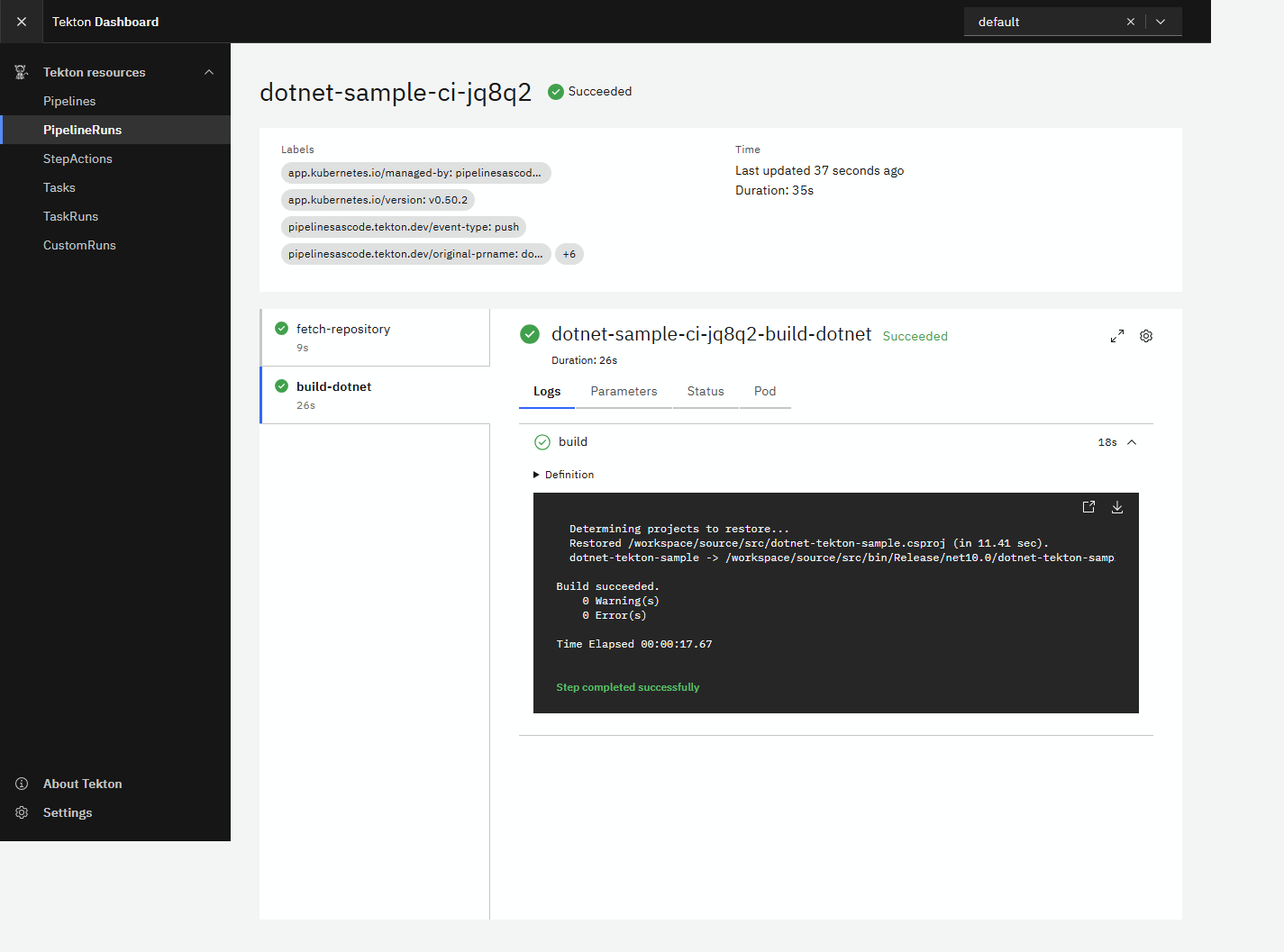
The Dashboard shows successful checkout and build TaskRuns, followed by the build output. This verifies execution of the remotely resolved catalog Pipeline, not merely webhook acceptance.
When Build Logs Are Not Available Yet
The first local run appeared stuck at build-dotnet, and the Dashboard displayed Unable to fetch log. Pod events showed that Kubernetes was still downloading mcr.microsoft.com/dotnet/sdk:10.0: the first pull took about five minutes and ten seconds. No build container logs existed until that container started. The run subsequently succeeded without a Task change; its actual dotnet build command took 19.45 seconds.
Check container state and events before treating a missing log as a compilation failure:
kubectl describe pod <build-pod> -n default
kubectl get events -n default --sort-by=.lastTimestamp
kubectl logs -n default <build-pod> -c step-build
Pulling means an image download is in progress; ErrImagePull or ImagePullBackOff indicates a pull failure that needs investigation. Once the container starts, its logs distinguish restore or compilation errors from infrastructure delays. With the Repository's concurrency limit set to one, later matching pushes remain queued until the active run finishes.
| Symptom | First check |
|---|---|
| No PipelineRun | Webhook delivery, Repository URL match, PaC controller logs |
| Catalog 404 | Raw URL, branch, relative Task paths |
| Pending pod | PVC binding, scheduling and image-pull events |
MSB1003 | Project directory contains a project or solution |
Use kubectl describe pod <pod-name> -n default for scheduling and image errors. PaC resolution failures can happen before a PipelineRun exists; consult controller logs then.
Move From k3d to Production Kubernetes
Source control and Kubernetes hosting are independent choices. Our production source control is on-premises Bitbucket Data Center, which has a native PaC integration. Tekton can run on a self-managed on-premises cluster, OpenShift, or managed Kubernetes such as AKS, EKS, or GKE, provided it can reach Bitbucket and Bitbucket can deliver webhooks to it. Choosing Bitbucket does not require a particular Kubernetes provider. GitLab and Azure Repos are alternatives discussed later, not prerequisites for production.
The earlier screenshot proves the local Gitea/k3d path. The following production examples are migration guidance, not deployments validated by this sample.
Replace the Cluster, Not the Build Logic
k3d runs k3s inside Docker for local development. In production, provision the chosen Kubernetes service or distribution through your platform's infrastructure workflow, obtain its kubeconfig, and select its context. Do not run k3d cluster create against that environment or apply the local registry/CoreDNS configuration there.
| Target | What replaces the local setup | Checks before installing CI |
|---|---|---|
| AKS | Managed Kubernetes, Linux worker pools, Azure-supported storage and networking | CSI provisioning, workload identity where needed, registry access, and reachable webhook ingress |
| EKS | Managed Kubernetes, worker pools, AWS-supported storage and networking | Storage driver IAM permissions, volume topology, registry access, and load balancer routing |
| GKE | Managed Kubernetes and supported node/workload configuration | Storage provisioning, workload security constraints, registry access, and ingress routing |
| OpenShift | Cluster and platform-managed Operators where appropriate | Supported OpenShift Pipelines/PaC versions, Routes, security constraints, and storage permissions |
| Self-managed Kubernetes | Your control plane, workers, CNI, CSI, and ingress or gateway implementation | Control-plane availability, upgrades, backup, certificates, DNS, storage, and node recovery |
Managed Kubernetes does not automatically install Tekton or make your CI production-ready. Check the chosen Tekton release's Kubernetes requirements and the hosting platform's admission policies, including any restrictions on injected init containers and Task security contexts.
Proceed in this order:
- Select the production kubeconfig context explicitly and verify nodes, capacity, DNS, and the intended StorageClass. Use Linux workers compatible with the sample's container images. Keep build capacity separate from sensitive production application workloads where possible.
- Install a tested, pinned combination of Tekton Pipelines and PaC. The Tekton installation guide describes direct release manifests as a quick start and points to the Operator for lifecycle management. Use a supported Operator or reviewed, versioned manifests managed through your platform's GitOps process; do not combine competing installation owners.
- Configure storage for the per-run PVC. Choose the StorageClass explicitly in the production PipelineRun, or deliberately manage the cluster default. Check access modes, encryption, quotas, reclaim policy, and multi-zone scheduling.
WaitForFirstConsumercan coordinate topology-aware provisioning; a multi-node RWO workflow also needs compatible Task placement. The locallocal-pathvolume is not a shared, highly available production storage design. - Publish the webhook receiver through a stable HTTPS endpoint such as
https://ci.example.com. For on-premises Bitbucket, this can be an internal endpoint reachable from the Bitbucket servers; public Internet exposure is not required. Configure DNS, certificate renewal, and routing to the PaC controller Service in its namespace. Use your platform's supported Ingress, Gateway, or OpenShift Route configuration; do not expose the Kubernetes API or admission webhook Service as the Git webhook receiver. Test reachability from the Git provider, not only from a pod. - Create a dedicated CI namespace, service account, quotas, and credentials. Replace the sample's
defaultnamespace consistently in the Repository, service accounts, Secrets, and run resources. The sample bootstrap manifest hard-codes local namespaces; adapt it rather than applying it unchanged. Keep Dashboard behind authenticated access, separately from the webhook URL. - Connect the chosen Git provider, run the acceptance checks below, and enable its required merge/status policies only after success and failure reporting both work.
Select the target context and inspect the cluster after acquiring your production kubeconfig; replace the example context name:
kubectl config use-context your-production-context
kubectl config current-context
kubectl get nodes
kubectl get storageclass
kubectl get pods -n tekton-pipelines
kubectl get pods -n pipelines-as-code
The local address substitutions are equally important:
| Local value | Production replacement |
|---|---|
host.docker.internal:3000 source/API URLs | Stable HTTPS Git host reachable by controllers and build pods |
host.k3d.internal:3000 HTTP registry mirror | Your approved TLS registry, authentication, and image-pull policy; unused by this build-only Pipeline |
PaC port-forward on 8080 | HTTPS webhook endpoint routed to the PaC controller |
Dashboard port-forward on 9097 | Authenticated internal Dashboard access, or retained operator-only port-forwarding |
| Docker Desktop hostname routing | Production DNS, trusted certificate chains, proxy and egress configuration |
| Per-run default local PVC | Approved CSI StorageClass and tested placement/cleanup policy |
Controllers need Git API and catalog access; Task pods need source, NuGet, and required image registry access. In private networks, provide the necessary routing and CA trust in each component. Trust configured for a controller does not automatically configure a build container or node image-pull runtime.
Use On-Premises Bitbucket Data Center in Production
Bitbucket Data Center is a native PaC provider, distinct from Bitbucket Cloud. Keep the application and catalog in separate repositories on your own Bitbucket instance. The reusable checkout/build contract stays the same, but provider credentials, repository URLs, event matching, and private checkout need production configuration.
The examples below use https://bitbucket.example.com, project key PLATFORM, and namespace ci. Replace them with your instance's canonical URLs and namespace. These are illustrative resources, not files shipped or deployments validated by the local sample.
Register the Bitbucket Application
Create the dotnet-tekton-sample and tekton-catalog repositories, push their intended contents, and protect their default branches. Use a dedicated automation identity rather than a developer's personal credentials.
The current PaC provider documentation requires an HTTP access token with PROJECT_ADMIN or REPOSITORY_ADMIN permissions. This is broader than a read-only clone token: scope it to the intended repositories, give it an expiry, and manage rotation. The documentation supports personal, repository, and project HTTP access tokens; verify the selected token type with your pinned PaC and Bitbucket versions. When using a personal token, the provider documentation also notes that its user needs the LICENSED_USER permission for group-based permission checks to work.
Provision a Secret named bitbucket-datacenter-webhook-config in ci through your secret-management process. Use keys provider.token for the HTTP access token and webhook.secret for a new, non-empty webhook secret. Keep actual values out of Git and shell history. Then create this Repository resource:
apiVersion: pipelinesascode.tekton.dev/v1alpha1
kind: Repository
metadata:
  name: dotnet-tekton-sample
  namespace: ci
spec:
  concurrency_limit: 1
  url: https://bitbucket.example.com/projects/PLATFORM/repos/dotnet-tekton-sample
  git_provider:
    type: bitbucket-datacenter
    url: https://bitbucket.example.com
    user: tekton-bot
    secret:
      name: bitbucket-datacenter-webhook-config
      key: provider.token
    webhook_secret:
      name: bitbucket-datacenter-webhook-config
      key: webhook.secret
spec.url identifies the application repository, while git_provider.url is the Bitbucket instance's base URL, without a /rest suffix. Preserve any context path used by your installation. Set user to the automation username for the illustrated personal-token setup. The Secret and build service account must already exist in ci; do not reuse the sample's local default namespace unintentionally.
Configure the webhook manually under the application repository's Settings > Webhooks. PaC's Data Center integration does not support tkn pac create repo or tkn pac bootstrap. Set its URL to the internal PaC HTTPS endpoint and its secret to the value stored under webhook.secret. The provider documentation lists these events:
- Repository: Push and Modified.
- Pull Request: Opened, Source branch updated, and Comments added.
Keep TLS verification enabled. A successful test delivery establishes receiver reachability, not a successful build. Validate actual push and pull-request events, including any comment-driven commands you permit, before enabling required merge checks.
Update the Application Template
Do not carry the local Gitea-specific body.pull_request expression into Bitbucket. Replace it with PaC's normalized event variables and update the catalog annotation:
annotations:
  pipelinesascode.tekton.dev/on-cel-expression: |
    (event == "push" && target_branch == "main") ||
    (event == "pull_request" &&
     target_branch == "main" && source_url == target_url)
  pipelinesascode.tekton.dev/pipeline: https://bitbucket.example.com/projects/PLATFORM/repos/tekton-catalog/raw/pipelines/dotnet-ci.yaml?at=CATALOG_COMMIT
Merge these annotations into the existing PipelineRun's metadata; this fragment is not a standalone resource. Replace CATALOG_COMMIT with a reviewed full catalog commit SHA. Use your instance's raw-file URL, not its HTML browse page. Verify that PaC can authenticate to the private catalog and that relative Task resolution retains the intended catalog revision. If your pinned resolver does not preserve the at revision when resolving ../tasks/dotnet-build.yaml, use an explicit commit-pinned raw URL for that Task in the production catalog instead.
The event expression allows pushes to main and same-repository pull requests targeting main. Test the normalized values against captured Bitbucket events with your pinned PaC release; do not broaden access to forks to work around a filter mismatch.
Update the application's clone URL while retaining the event revision and project directory:
params:
  - name: repo-url
    value: https://bitbucket.example.com/scm/platform/dotnet-tekton-sample.git
  - name: revision
    value: '{{ revision }}'
  - name: project-directory
    value: src
Merge this fragment into spec.params and use the exact HTTPS clone URL shown by Bitbucket. Keep pipelineRef.name: dotnet-ci, the workspace mappings, and the approved tekton-ci service account. Configure the production StorageClass and namespace policy as described above.
Separate API, Catalog, and Clone Access
There are three credential consumers: PaC's provider API client, its remote catalog resolver, and the Task pod that clones source. Configuring git_provider.secret is not proof that all three can authenticate. Grant the resolver access to the catalog as well as the application, and use an explicitly supported credential mechanism for source checkout. The sample's pinned git-clone Task has no configured private-checkout credentials; review or replace it with a supported authenticated checkout Task before using private production repositories. Keep clone credentials read-only and separate from the provider's administrative token.
For on-premises networking, allow Bitbucket servers to reach the PaC receiver and allow controllers and build pods to reach Bitbucket's API, raw files, and clone endpoint. Configure internal DNS, firewall rules, and corporate CA trust for each component. PaC's custom certificate configuration does not automatically configure Task containers or node image pulls. Do not disable TLS verification to bypass missing trust. A restricted environment also needs approved access or mirrors for the upstream checkout Task, SDK image, and NuGet dependencies; on-premises source control alone does not make the build air-gapped.
Finally, trigger a permitted push and a same-repository pull request. Confirm that the resolved catalog and Tasks use the reviewed revisions, source-commit equals the expected event SHA, both Tasks succeed, and Bitbucket receives the build status. Repeat with a deliberately failing validation change on a disposable branch or PR. Configure Bitbucket's required-build merge checks only after confirming that failed or missing checks block merging and that users can reach the authenticated run details.
Alternative: Replace Gitea With GitLab
GitLab is a native PaC provider. The shared checkout/build Pipeline and Task can remain unchanged. The application policy and provider connection cannot be copied unchanged because Gitea and GitLab send different payloads.
Register the GitLab Application
- Publish the application and catalog as separate GitLab projects. Preserve the
.tekton/directory in the application and the relativepipelines/andtasks/layout in the catalog. Review the catalog, select an immutable commit, and protect both projects' default branches. - Create a dedicated bot/service account token with the
apiscope required by PaC's GitLab integration and access limited to the intended projects. Give it an expiry and rotation procedure. Configure private catalog access separately from the checkout Task's Git credentials; the local sample has no private-repository credential wiring. - Store the API token and a newly generated GitLab webhook secret in a Kubernetes Secret named
gitlab-webhook-configin the CI namespace. Its keys areprovider.tokenandwebhook.secret. Deliver actual values through your secret-management process, not committed YAML or literal secrets in shell history. - Create the Repository resource below, replacing
example-teamwith your GitLab group. For self-managed GitLab, replace both URLs with your GitLab host. The referenced Secret must be in the same namespace.
This is an illustrative production resource, not a file shipped by the local sample:
apiVersion: pipelinesascode.tekton.dev/v1alpha1
kind: Repository
metadata:
  name: dotnet-tekton-sample
  namespace: ci
spec:
  concurrency_limit: 1
  url: https://gitlab.com/example-team/dotnet-tekton-sample
  git_provider:
    type: gitlab
    url: https://gitlab.com
    secret:
      name: gitlab-webhook-config
      key: provider.token
    webhook_secret:
      name: gitlab-webhook-config
      key: webhook.secret
The highlighted URLs identify the application and GitLab API host, while the Secret references select this provider's credentials. ci must already contain the build service account and Secret. Use a separate production resource rather than modifying the working local Gitea resource in place.
In the application project's Settings > Webhooks, configure the public PaC HTTPS URL and the matching webhook secret. Enable Push and Merge request events. Enable comments only if you also support PaC's comment-driven commands. GitLab's webhook secret is verified using GitLab's mechanism; do not assume Gitea's HMAC headers transfer to another provider. Keep TLS verification enabled.
Update the Application Template
Change the remote catalog URL to GitLab's raw-file URL pinned to a full commit SHA, for example https://gitlab.com/example-team/tekton-catalog/-/raw/CATALOG_COMMIT/pipelines/dotnet-ci.yaml. Replace CATALOG_COMMIT with the reviewed catalog SHA; it is not a literal branch name. Change repo-url to https://gitlab.com/example-team/dotnet-tekton-sample.git. Keep pipelineRef.name: dotnet-ci, the existing workspace names, project-directory: src, and revision: "{{ revision }}".
The local CEL filter reads body.pull_request, a Gitea payload field that GitLab merge requests do not provide. For provider-independent branch and same-repository matching, replace it with PaC's normalized event variables:
pipelinesascode.tekton.dev/on-cel-expression: |
  (event == "push" && target_branch == "main") ||
  (event == "pull_request" &&
   target_branch == "main" &&
   source_url == target_url)
PaC normalizes a GitLab merge request to pull_request; this is not the literal GitLab webhook header value. source_url == target_url retains the sample's same-repository restriction. Test these variables with your pinned PaC release and captured GitLab events before enabling merges. The current docs also mark matching directly against body as Technology Preview, so the Gitea-specific local expression is not a production recommendation.
Update the PipelineRun's PVC StorageClass and namespace policy for the new cluster, then push a test application commit. Verify catalog resolution, the exact source SHA, successful checkout/build, and the result in GitLab. Add a deliberately failing validation change on a disposable branch or merge request and confirm a failed required check blocks merging. Do not remove the fork restriction merely to make a demonstration run: untrusted contributions need a separate credential-free policy and execution boundary.
For private repositories, distinguish three access paths: the PaC provider API token, the controller's remote catalog resolver, and the Task pod's Git clone. They have different credential consumers. This sample's pinned checkout Task is an older catalog revision; review its actual authentication/workspace support before choosing a supported authenticated checkout Task. Do not assume changing git_provider.secret alone authenticates every Git request.
Alternative: Use Azure Repos With Tekton
Azure DevOps provides Azure Repos for source control, but the PaC provider list does not currently list Azure DevOps. There is no supported git_provider.type: azuredevops substitution for the Gitea configuration in this article. AKS does not change that limitation: cluster hosting and event-provider support are separate.
You can still reuse the Tekton Pipeline and Tasks. Choose an event integration that you will own and operate, such as an authenticated service-hook adapter or Tekton Triggers with suitable authentication and validation. This is additional infrastructure, not an already-implemented Azure extension of this sample.
Receive and Validate Azure Events
- Publish source and catalog to separate Azure Repos repositories, or keep the catalog in another approved Git host reachable by the platform. Record reviewed catalog revisions and configure clone access through a dedicated identity.
- Provide an HTTPS webhook endpoint backed by your adapter or a secured Triggers EventListener. Follow Microsoft's webhook setup: Project settings > Service hooks > Create subscription > Web Hooks. Create a Code pushed subscription, then separate Pull request created and Pull request updated subscriptions if PR validation is required.
- Configure repository/branch filters and sufficient resource details. Authenticate the request at the receiver, validate the organization/project/repository against an allowlist, and reject unsupported events. Azure service hooks can use Basic authentication over HTTPS; they do not automatically supply Gitea's webhook signature. Protect credentials, rate-limit requests, and deduplicate retries by event ID.
- Extract a validated immutable revision and construct a PipelineRun from a trusted platform template. Do not accept arbitrary Git URLs, catalog URLs, service accounts, or Kubernetes resource specifications from the webhook body. Give the receiver only the namespace permissions it needs, not cluster-admin.
The Azure service-hook event reference documents the payloads. Typical mappings are:
| Event | Validate and extract | Pipeline input |
|---|---|---|
git.push | Repository identity and each resource.refUpdates entry whose name matches the allowed branch | Matching entry's newObjectId becomes revision; ignore deleted refs with an all-zero object ID |
git.pullrequest.created or git.pullrequest.updated | Repository identity, resource.targetRefName, and permitted source repository | For source-head validation, use resource.lastMergeSourceCommit.commitId; define a separate policy if testing a merge result |
| Any accepted event | Resolve repository identity against receiver configuration | Supply the approved clone URL as repo-url, not an unchecked request URL |
A push can contain multiple ref updates, so selecting commits[0] or the first ref update is not a reliable way to choose the branch's new head. Exclude fork PRs unless an isolated untrusted-contribution policy has been implemented. Recheck fields against the API/event version you subscribe to.
Resolve the Catalog Without PaC
Tekton Triggers uses an EventListener to receive events, optional interceptors to authenticate/filter them, a TriggerBinding to extract values, and a TriggerTemplate to create the PipelineRun. A plain EventListener is not an authentication boundary by itself. A custom adapter can create the same PipelineRun through the Kubernetes API instead.
Neither approach automatically implements PaC's annotation resolver. A PipelineRun created directly through Triggers will not download the catalog merely because it contains pipelinesascode.tekton.dev/pipeline. Likewise, the Pipeline's pipelinesascode.tekton.dev/task annotations do not install missing Tasks for ordinary Tekton execution.
One explicit deployment model is to check out a reviewed catalog revision in your platform delivery process, then install its Pipeline and both referenced Tasks into the CI namespace. The following uses the real sample files and its pinned upstream checkout Task; replace that checkout Task through a reviewed change if private-repository authentication requires it:
kubectl -n ci apply -f https://raw.githubusercontent.com/tektoncd/catalog/112374ce1262b133a77300bd8133445722605e04/task/git-clone/0.1/git-clone.yaml
kubectl -n ci apply -f ../tekton-catalog/tasks/dotnet-build.yaml
kubectl -n ci apply -f ../tekton-catalog/pipelines/dotnet-ci.yaml
Here ci and the build service account must already exist, and the local catalog directory must be at the reviewed revision. The source files are pipelines/dotnet-ci.yaml and tasks/dotnet-build.yaml. The platform now owns catalog deployment and upgrade coordination; the controller no longer resolves it anew for each application event. Isolate or version installed definitions when different applications need different catalog revisions.
The trusted run template references installed dotnet-ci, assigns the approved service account and workspace PVC, and passes the clone URL, extracted commit SHA, and src. The receiver substitutes these values; PaC's {{ revision }} placeholder has no automatic meaning in this path. Another option is a separately configured Tekton remote resolver, but its API, credentials, and revision pinning are distinct from PaC annotations.
Report Results Back to Azure DevOps
Creating a PipelineRun is only half of CI integration. Your adapter or completion watcher must correlate each run with its commit/PR, report pending and terminal states through the Azure DevOps status APIs, and link to an authenticated run view. Configure Azure Repos status policies for the chosen status context, and handle failed, cancelled, and timed-out runs, not only successes. Microsoft's PR status integration guide explains this feedback path and recommends Microsoft Entra authentication for API access.
If you prefer Azure Pipelines to orchestrate rather than an inbound service-hook receiver, an Azure Pipeline can submit a Tekton run and wait for its result using a tightly scoped cluster identity. In that design, Azure Pipelines owns triggers and policy reporting while Tekton owns execution. It is not the same as native PaC support, and it still needs explicit catalog resolution and a failure-aware wait/cancellation implementation.
Production Acceptance and Operations
Before enabling production branch policies, validate the whole path on the target provider and cluster:
- A permitted push produces one run; a push to an excluded branch produces none. Replayed deliveries follow the chosen deduplication/concurrency policy.
- A same-repository PR or merge request targeting the protected branch builds the intended revision. A fork event does not gain access to trusted credentials or deployment privileges.
- The submitted run uses the reviewed catalog definition and intended Task/image revisions, and
source-commitequals the expected event SHA. - Private catalog resolution and source checkout both work with their intended credentials. A pod can restore required packages without disabling TLS verification.
- A successful and a deliberately failing validation run produce the correct provider status. A failed or missing required check prevents merging; webhook HTTP success alone never counts as CI success.
- PVCs bind on production workers, image pulls complete, and cancellation/timeouts release resources under the selected retention policy. Exercise node interruption and document rerun behavior.
Pin catalog URLs to immutable commits, images to digests, and controller releases to tested versions. Protect catalog changes as executable code: a catalog editor can change what every consumer runs. Test upgrades against representative applications and update each consumer through review. Preserve older definitions for rollback; changing a parameter or workspace name can break callers even when YAML is valid.
Use restricted service accounts, RBAC, resource requests/limits, namespace quotas, and network policies appropriate to your CNI. Keep provider credentials in controllers and avoid exposing them to arbitrary source code. Same-repository filters alone do not sandbox builds, and Tekton namespaces alone should not be treated as strong multi-tenant isolation for hostile workloads. Add a separate deployment identity and approval boundary before introducing releases.
Configure log/result retention, resource pruning, monitoring, token rotation, certificate renewal, and backup/recovery for platform configuration. Watch webhook delivery failures, resolution failures, run duration, quota exhaustion, and status-reporting errors. The current docs mark the Forgejo provider and body-payload matching as Technology Preview; review support for the exact PaC release you select. Keep the local admin credentials, weak password policy, HTTP registry mirror, and port-forward exposure out of production.
This sample remains a build-only CI example. Production delivery additionally needs application-appropriate tests, artifact publication, security checks, and deployment policy; changing its Git host or cluster provider does not add those behaviors.
Conclusion
The application controls when CI runs and supplies repository-specific inputs. The catalog controls how it runs. PaC assembles those definitions for each event; Tekton executes them with explicit dependencies and storage bindings. That separation supports reuse without hiding the operational contracts needed for production.
Moving from k3d to production Kubernetes changes the platform setup, networking, storage, and operating model rather than the build script. For our on-premises Bitbucket Data Center target, PaC provides the native event and status integration; we still need manual webhook setup, scoped credentials, private catalog and checkout access, and trusted internal HTTPS connections. GitLab is another native provider option, while Azure Repos needs an additional event/status integration. Verify the chosen provider and cluster together before enforcing production merge policies.