


GitLab CI/CD With External Git Repositories: .NET Pipelines as Code Using Gitea and Docker Compose

Mehdi Hadeli
@mehdihadeli
On this page
Table of contents
Introduction
An application does not have to move into GitLab to use GitLab CI. For a local development environment, we can keep source code and a small pipeline entry point in Gitea, put reusable pipelines and job templates in a separate Gitea repository, let GitLab receive push events, and use GitLab Runner's Docker executor for the build jobs. Docker Compose provides the services and their network; Kubernetes is not part of this setup.
This article builds that arrangement around a .NET 10 API. A real Gitea push starts four jobs: fetch the pushed commit, build, test, and publish. We then download the artifacts, start the published application in a container, and check its HTTP responses. The complete implementation is in gitlab-pipeline-as-code.
The repository boundary matters. Gitea owns executable pipeline YAML as well as application code. GitLab still needs a project to hold CI settings, trigger credentials, Runner assignment, and run history. Moving YAML out of GitLab does not remove that project or turn Runner into an independent pipeline engine.
The same division of responsibilities can support production CI with a different Git provider. Later sections explain what changes for Azure Repos and Bitbucket: event validation, exact-commit source access, pipeline configuration delivery, and status reporting. Those are migration designs, not additional provider integrations implemented or validated by this local sample.
What Runs Where
| Component | Responsibility | Default browser address |
|---|---|---|
| Gitea | Application repository, pipeline YAML, and push webhook | http://localhost:3000 |
| GitLab | External YAML loading, pipeline scheduling, variables, logs, and artifacts | http://localhost:8929 |
| GitLab Runner | Requests jobs from GitLab and creates Docker job containers | Managed through the GitLab project |
| Published application | Runs the downloaded publish output for HTTP verification | http://localhost:5080/weatherforecast |
The source repository is admin/dotnet-gitlab-sample in Gitea, and the shared catalog is admin/gitlab-templates. The private orchestration project is root/dotnet-ci in GitLab. Its Git repository contains only a README. There is no application mirror, Gitea Actions runner, webhook relay, Docker-in-Docker service, or Kubernetes cluster.
The sample has three publishable repository directories:
- gitlab-pipeline-as-code/application/ contains the application, tests, Dockerfile, and small pipeline entry point for Gitea.
- gitlab-pipeline-as-code/gitlab-templates/ contains reusable pipeline definitions and separate source-fetch, build, test, and publish job templates for its own Gitea repository.
- gitlab-pipeline-as-code/dotnet-ci/ contains the README for the GitLab orchestration repository, including safe instructions for publishing it to the existing project.
The surrounding gitlab-pipeline-as-code/ directory contains the local infrastructure and bootstrap scripts. Do not push that entire directory into either service as the application repository.
Follow One Push
- A developer pushes a commit to the configured Gitea branch,
mainby default. - Gitea sends a JSON push webhook to GitLab's project trigger endpoint.
- GitLab loads the application's raw-file YAML, follows its remote include to
gitlab-templates, and resolves the individual job templates and common .NET base. - Runner executes the fetch, build, test, and publish jobs in separate containers on the Compose network.
- Artifacts carry source and build output between jobs. The verifier downloads the final artifacts and starts the published API.
This is pipeline-as-code in the general sense. It does not use Tekton's Pipelines-as-Code controller or its repository resources. GitLab interprets the YAML and schedules jobs; Runner executes them.
Prepare The Local Environment
Use Docker Desktop with Linux containers, or Docker Engine with Compose v2. On Windows, run the shell commands in Git Bash. A host .NET SDK is optional because the jobs use the .NET SDK container image. Allow approximately 8 GB of available Docker memory for GitLab and build jobs; GitLab is the largest service in this arrangement.
From a checkout of the sample repository, enter the sample directory and check Docker before starting anything:
cd gitlab-pipeline-as-code
docker info
docker compose version
docker compose config --quiet
The first run needs registry and package access for container images, Alpine Git packages in the bootstrap image, NuGet packages, and Runner's version-matched helper image. Cached images shorten later runs but do not eliminate every external dependency.
The tracked gitlab-pipeline-as-code/.env.example records the image tags and default credentials used for this local run. These are sample inputs, not a recommendation to use those versions indefinitely:
| Component | Image used by the sample |
|---|---|
| GitLab | gitlab/gitlab-ee:19.5.5-ee.0 |
| Runner | gitlab/gitlab-runner:alpine-v19.5.3 |
| Gitea | docker.gitea.com/gitea:28.3.0 |
| .NET jobs | mcr.microsoft.com/dotnet/sdk:10.0-alpine |
| Fetch and bootstrap base | python:3.12-alpine |
The server tags are explicit, while the .NET and Python tags still float within their tagged release lines. Review availability and compatibility before changing images. For stronger reproducibility, select tested versions and immutable digests rather than assuming a tag freezes its contents.
You can copy the example to an untracked .env before first startup and edit passwords or host ports. Compose also accepts environment overrides. Changing a password setting later does not reset an existing account's password. The default SSH host port is 22222; port 2222 was reserved by Windows on the validation machine.
Local development only: the credentials below are deliberately public defaults for a disposable lab. Do not reuse them for another system. Published ports bind to loopback, but containers on the shared Docker network can still reach these services.
| Service | Username | Default password |
|---|---|---|
| Gitea | admin | GiteaLocal123! |
| GitLab | root | LocalCi!9rF7p2Q |
Start The Services And Bootstrap CI
Run the entry point from the sample root:
bash scripts/up.shSource: gitlab-pipeline-as-code/scripts/up.sh
#!/usr/bin/env bash
set -euo pipefail
cd "$(dirname "${BASH_SOURCE[0]}")/.."

export MSYS_NO_PATHCONV=1
docker compose config --quiet
docker compose up -d --wait --wait-timeout 1200 gitlab
docker compose up -d --force-recreate --always-recreate-deps --wait --wait-timeout 120 gitea
docker compose exec -T gitlab install -d -o git -g git -m 0700 /bootstrap-state
docker compose exec -T gitlab gitlab-rails runner /bootstrap/seed.rb
docker compose --profile setup build bootstrap
docker compose --profile setup run --rm --no-deps bootstrap
docker compose up -d runner
printf '\nGitea: http://localhost:%s\nGitLab: http://localhost:%s\n' "${GITEA_HTTP_PORT:-3000}" "${GITLAB_HTTP_PORT:-8929}"
The highlighted sequence waits for GitLab health, recreates Gitea after applying its configuration, prepares a private state directory, and runs both bootstrap layers before starting Runner. MSYS_NO_PATHCONV=1 prevents Git Bash from rewriting Linux container paths such as /bootstrap/seed.rb into Windows paths. The 20-minute GitLab startup allowance covers first initialization; it is not the expected duration of every run.
Understand The Compose Services
The complete gitlab-pipeline-as-code/docker-compose.yaml defines server persistence, health checks, the explicit local-gitlab-ci network, and two profiles for one-shot setup and verification. The following contiguous excerpt shows how bootstrap and Runner share state without putting the host Docker socket into build jobs:
Source: gitlab-pipeline-as-code/docker-compose.yaml
bootstrap:
  profiles: [setup]
  image: local-gitlab-ci-tools:1.0
  build:
    context: ./deployments/bootstrap
  command: ['python', '/sample/deployments/bootstrap/provision.py']
  environment:
    GITEA_ADMIN_USERNAME: ${GITEA_ADMIN_USERNAME:-admin}
    GITEA_ADMIN_PASSWORD: ${GITEA_ADMIN_PASSWORD:-GiteaLocal123!}
    DOTNET_IMAGE: ${DOTNET_IMAGE:-mcr.microsoft.com/dotnet/sdk:10.0-alpine}
    PYTHON_IMAGE: ${PYTHON_IMAGE:-python:3.12-alpine}
  volumes:
    - ./:/sample:ro
    - bootstrap-state:/state
    - runner-config:/runner
  networks: [ci]

runner:
  image: ${GITLAB_RUNNER_IMAGE:-gitlab/gitlab-runner:alpine-v19.5.3}
  volumes:
    - runner-config:/etc/gitlab-runner
    - /var/run/docker.sock:/var/run/docker.sock
  networks: [ci]
  restart: unless-stopped
Bootstrap uses a small tools image with Python and Git, mounts the sample read-only, and writes generated credentials into named volumes. Runner reads the configuration volume and uses the host Docker socket to create job containers. This socket gives the Runner service effective control over the Docker host. It is not a security boundary for hostile workloads, even though the job containers themselves are unprivileged and do not receive the socket.
The simulate service belongs to the verify profile and mounts an ignored evidence directory. The sample-app service mounts downloaded publish output and runs its assembly; it is not built from the application's Dockerfile by this pipeline.
Keep Browser Addresses Separate From Container Addresses
| Caller | Destination |
|---|---|
| Host browser | http://localhost:3000 for Gitea; http://localhost:8929 for GitLab |
| Gitea webhook | http://gitlab:8929 |
| GitLab external YAML loader | http://gitea:3000 |
| Runner and job containers | Service names on local-gitlab-ci |
| Runtime verifier | http://sample-app:8080 |
Inside a container, localhost refers to that container. A Runner job cannot reach Gitea by using the browser's localhost URL. Runner-created containers also need explicit network attachment; attaching only the Runner service to the Compose network is not enough.
Configure Gitea Without An Installation Form
The one-shot configuration service merges the tracked INI into Gitea's data volume before the server starts. The actual tracked settings are small enough to read as a whole:
Source: gitlab-pipeline-as-code/deployments/gitea/app.ini
APP_NAME = Local GitLab CI Gitea
RUN_MODE = prod

[database]
DB_TYPE = sqlite3
PATH = /data/gitea/gitea.db

[repository]
ROOT = /data/git/repositories
DEFAULT_BRANCH = main

[server]
DOMAIN = localhost
ROOT_URL = http://localhost:3000/
HTTP_ADDR = 0.0.0.0
HTTP_PORT = 3000
SSH_DOMAIN = localhost
SSH_PORT = 22222
START_SSH_SERVER = false
APP_DATA_PATH = /data/gitea

[service]
DISABLE_REGISTRATION = true

[security]
INSTALL_LOCK = true
ALLOWED_HOST_LIST = gitlab:8929, private:8929

[webhook]
DELIVER_TIMEOUT = 30

[actions]
ENABLED = false
The highlighted settings choose the repository branch, disable public signups, mark installation as complete, and permit webhook delivery to GitLab. Gitea Actions is explicitly disabled because GitLab executes this workflow. The 30-second webhook delivery timeout is separate from build execution time; Gitea waits for the trigger response, not the pipeline to finish.
Gitea 28 places the egress allowlist under [security], not the legacy [webhook] section. The sample permits both the hostname and private destination addresses on port 8929. This allows Docker-network delivery without hard-coding the network's private IP. It does not permit arbitrary private-network ports. Check the Gitea configuration reference when upgrading because this behavior is version-sensitive.
The merge implementation in gitlab-pipeline-as-code/deployments/gitea/configure.py preserves unspecified keys, including installation secrets, removes the obsolete webhook allowlist, and atomically replaces the runtime INI with restricted permissions. It also applies host-port overrides to Gitea's browser URL.
The startup hook in gitlab-pipeline-as-code/deployments/gitea/bootstrap-admin.sh migrates the database and creates the configured administrator only if absent. Existing accounts keep their passwords. Neither the generated runtime configuration nor its secrets should be committed to Git.
Configure GitLab And Its Orchestration Project
GitLab's mounted configuration disables services this sample does not need and keeps its internal HTTP port fixed:
Source: gitlab-pipeline-as-code/deployments/gitlab/gitlab.rb
external_url "http://localhost:#{ENV.fetch('GITLAB_HTTP_PORT', '8929')}"
nginx['listen_port'] = 8929
nginx['listen_https'] = false
letsencrypt['enable'] = false
gitlab_rails['initial_root_password'] = ENV.fetch('GITLAB_ROOT_PASSWORD')
gitlab_rails['gitlab_signup_enabled'] = false
gitlab_rails['time_zone'] = 'UTC'
gitlab_rails['usage_ping_enabled'] = false
gitlab_kas['enable'] = false
registry['enable'] = false
prometheus_monitoring['enable'] = false
puma['worker_processes'] = 0
puma['per_worker_max_memory_mb'] = 3072
puma['min_threads'] = 2
puma['max_threads'] = 4
sidekiq['concurrency'] = 5
The highlighted lines configure a local HTTP endpoint, disable signups and unused services, and choose a single Puma process with a 3 GB watchdog budget. This is a local resource trade-off, not production sizing guidance. The default 1.5 GB single-process watchdog caused repeated restarts during this sample's initial validation. A watchdog threshold is not a Docker memory reservation or hard container limit.
The guarded Rails bootstrap in gitlab-pipeline-as-code/deployments/gitlab/seed.rb creates a missing root account, updates its email, preserves existing CI signing keys, and creates a seven-day API token in the private bootstrap volume. Rails bootstrap runs inside this disposable GitLab instance; internal Rails services are version-sensitive and should be rechecked for another server version.
Project creation is a separate API operation. There is no supported gitlab.rb switch that creates every arbitrary project, webhook, and Runner required by this integration. The small declarative settings file supplies those identities:
Source: gitlab-pipeline-as-code/deployments/bootstrap/settings.json
{
  "gitlab": {
    "url": "http://gitlab:8929",
    "namespace": "root",
    "admin_email": "[email protected]",
    "project": "dotnet-ci",
    "description": "Docker-based CI for the application hosted in local Gitea"
  },
  "gitea": {
    "url": "http://gitea:3000",
    "repository": "dotnet-gitlab-sample",
    "description": "Application source; builds run in GitLab CI, not Gitea Actions",
    "branch": "main"
  },
  "runner": {
    "description": "local-gitea-docker-runner",
    "tags": ["docker", "dotnet"],
    "network": "local-gitlab-ci",
    "concurrent": 2
  }
}
The highlighted values distinguish the two projects and give job containers their network and scheduling tags. The default personal root namespace already belongs to the GitLab administrator. If you choose another namespace, create it before provisioning and keep repository ownership and URLs consistent.
Load Pipeline YAML Directly From Gitea
GitLab supports a full external URL in Settings > CI/CD > General pipelines > CI/CD configuration file. Its custom configuration documentation requires the external URL to end with .yml. Bootstrap sets that field through the project's ci_config_path API setting:
Source: gitlab-pipeline-as-code/deployments/bootstrap/provision.py
    config_url = f"{GITEA}/{repository_path}/raw/branch/{encoded_branch}/.gitlab-ci.yml"
    lint = gitlab.request("POST", f"/projects/{project_id}/ci/lint", {
        "content": "include:\n  - remote: " + config_url + "\n"
    })
    if not lint["valid"]:
        raise RuntimeError("Gitea pipeline configuration is invalid: " + "; ".join(lint["errors"]))
    gitlab.request("PUT", f"/projects/{project_id}", {
        "shared_runners_enabled": False, "ci_config_path": config_url
    })
The first highlighted block asks GitLab itself to retrieve and lint the remote YAML. A successful request from a bootstrap container alone would not prove that the server's outbound policy allows it. The project update then selects this external configuration and disables shared runners for the sample. The lint request uses a temporary include:remote wrapper; no wrapper YAML is stored in the GitLab repository.
With defaults, the resulting URL is:
http://gitea:3000/admin/dotnet-gitlab-sample/raw/branch/main/.gitlab-ci.ymlTo configure or check this setting in the GitLab UI:
- Open the
root/dotnet-ciproject, then go to Settings > CI/CD. - Expand General pipelines and find CI/CD configuration file.
- Enter the complete Gitea raw-file URL shown above, including the final
.gitlab-ci.ymlfilename. - Select Save changes in the General pipelines section.
The sample bootstrap already applies this value, so these steps are useful for inspecting the setup or configuring an existing project manually. Changing this field selects the pipeline definition; it does not create the Gitea webhook, CI variables, or Runner assignment.
This URL must be reachable without authentication from GitLab, so the local Gitea application repository is public. Do not embed an administrator credential or API token in the URL to make a private repository work. Private delivery requires another reviewed design.
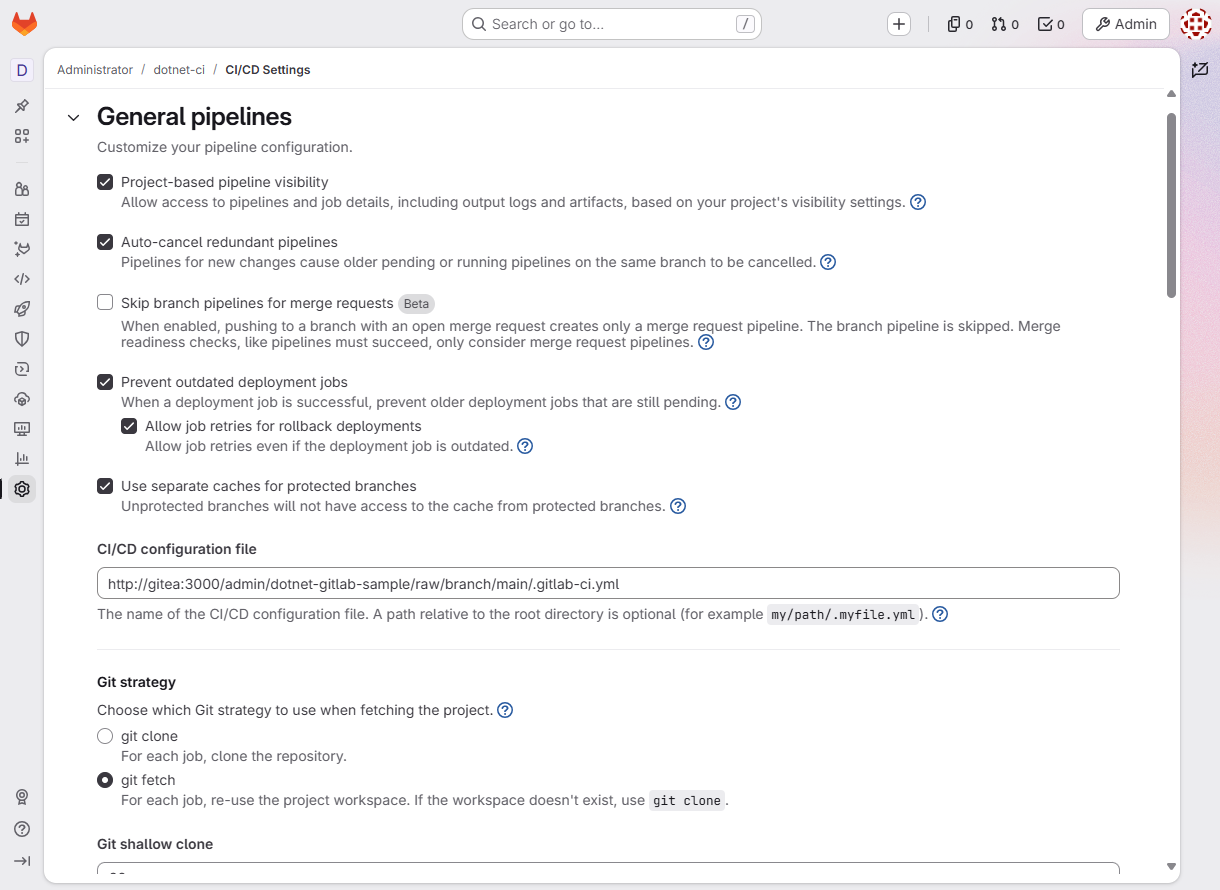
The field belongs to the GitLab orchestration project. It references Gitea's internal service name because the GitLab server, rather than the browser, retrieves the YAML.
There are two independent egress permissions. Gitea needs permission to send a webhook to GitLab; GitLab needs permission to fetch YAML from Gitea. The Rails seed adds the latter without allowing every local-network destination:
Source: gitlab-pipeline-as-code/deployments/gitlab/seed.rb
application_settings = ApplicationSetting.current
application_settings.signup_enabled = false
gitea = URI.parse(settings.fetch('gitea').fetch('url'))
application_settings.outbound_local_requests_whitelist = (
  application_settings.outbound_local_requests_whitelist + ["#{gitea.host}:#{gitea.port}"]
).uniq
application_settings.ci_jwt_signing_key ||= OpenSSL::PKey::RSA.new(2048).to_pem
application_settings.ci_job_token_signing_key ||= OpenSSL::PKey::RSA.new(2048).to_pem
application_settings.save!
The highlighted union preserves existing allowlist entries and adds gitea:3000 once. The signing-key assignments initialize missing values, not rotate existing keys. GitLab's outbound filtering documentation explains hostname-and-port entries; the allowlist should remain narrow even in a local lab.
Preserve Repository Ownership On Repeated Setup
Bootstrap seeds the template catalog before the application, importing each directory only when its Gitea branch is empty. For a populated application repository, it adds a missing entry point or migrates the exact previous monolithic sample YAML, identified by its normalized SHA-256. Customized YAML is left unchanged with a review message. After remote lint succeeds, bootstrap selects the external URL and removes an obsolete GitLab-hosted YAML file if present. It does not force-push application source or overwrite a populated catalog branch.
The local gitlab-pipeline-as-code/dotnet-ci/README.md explains how to clone the existing GitLab project and publish its documentation without discarding history. Bootstrap initially creates a generic README; it does not automatically publish that local documentation file.
Rerunning setup reuses the project, trigger, webhook, and Runner registration. Runner's existing configuration remains intact so its managed token updates are not overwritten. The bootstrap PAT, trigger token, Runner token, and manifest stay in named Docker volumes, not in this checkout.
Connect Gitea Pushes To GitLab
The bootstrap creates a pipeline trigger in the GitLab project and registers a Gitea push webhook against it. The implementation uses GitLab's webhook trigger endpoint, with the GitLab orchestration ref in the URL:
Source: gitlab-pipeline-as-code/deployments/bootstrap/provision.py
    trigger_path = STATE / "trigger.json"
    trigger = json.loads(trigger_path.read_text()) if trigger_path.exists() else None
    if trigger is None or gitlab.request("GET", f"/projects/{project_id}/triggers/{trigger['id']}", missing_ok=True) is None:
        trigger = gitlab.request("POST", f"/projects/{project_id}/triggers", {"description": "Gitea push webhook"})
        store("trigger.json", trigger)
    target = f"{GITLAB}/api/v4/projects/{project_id}/ref/main/trigger/pipeline?token={trigger['token']}"
    hooks = gitea.request("GET", f"/repos/{repository_path}/hooks")
    existing_hook = next((hook for hook in hooks if hook["config"].get("url", "").startswith(
        f"{GITLAB}/api/v4/projects/{project_id}/")), None)
    hook_data = {
        "type": "gitea", "active": True, "events": ["push"],
        "branch_filter": SETTINGS["gitea"]["branch"],
        "config": {"url": target, "content_type": "json", "http_method": "POST"}
    }
    if existing_hook:
        hook = gitea.request("PATCH", f"/repos/{repository_path}/hooks/{existing_hook['id']}", hook_data)
    else:
        hook = gitea.request("POST", f"/repos/{repository_path}/hooks", hook_data)
The first highlighted lines reuse or create the trigger and put its token in the webhook target. The remaining block updates an existing matching webhook or creates one with a push-only event list and the configured branch filter. The GitLab main ref and Gitea source branch have different responsibilities; they happen to have the same default name here.
Bootstrap also creates five project variables: GITEA_URL, GITEA_REPOSITORY, GITEA_BRANCH_REF, DOTNET_IMAGE, and PYTHON_IMAGE. These fix the allowed source identity, configured branch, and execution images outside the event payload. The archive job does not trust a payload-supplied clone URL.
The trigger token authenticates the request. This direct endpoint does not validate Gitea's HMAC signature, and the sample does not implement replay deduplication or post commit statuses back to Gitea. A webhook's successful HTTP response confirms pipeline creation, not successful execution. Keep webhook settings private because their target URL contains the trigger token.
Register A Docker Runner, Not A Gitea Actions Runner
The bootstrap uses GitLab's user Runner creation API to create a project-scoped Runner with docker and dotnet tags. It saves the returned authentication token privately and writes configuration only when absent. Here is the configuration-writing block:
Source: gitlab-pipeline-as-code/deployments/bootstrap/provision.py
    runner_config = Path("/runner/config.toml")
    if not runner_config.exists():
        runner_config.write_text(
            f"concurrent = {SETTINGS['runner']['concurrent']}\ncheck_interval = 3\n\n"
            f"[[runners]]\n  name = {json.dumps(SETTINGS['runner']['description'])}\n"
            f"  url = {json.dumps(GITLAB)}\n  token = {json.dumps(registration['token'])}\n"
            f"  executor = \"docker\"\n  [runners.docker]\n"
            f"    image = {json.dumps(os.environ['DOTNET_IMAGE'])}\n"
            f"    network_mode = {json.dumps(SETTINGS['runner']['network'])}\n"
            "    privileged = false\n    pull_policy = \"if-not-present\"\n"
            "    volumes = [\"/cache\"]\n"
        )
        runner_config.chmod(0o600)
The highlighted settings give job containers the configured Docker network, reuse locally cached images, and mount only the cache volume from this configuration. network_mode solves service-name resolution for jobs created outside Compose's service list. privileged = false and the absence of a job socket mount reduce exposure, but the Runner manager still controls the Docker daemon. Read GitLab's Docker executor documentation before adapting this to multi-user CI.
The Python image runs only the source-fetch job. The .NET SDK image runs build, test, and publish. The Runner image manages those jobs; it is not the build environment and does not need the .NET SDK installed inside it.
Compose The Pipeline From A Shared Catalog
The application owns its pipeline entry point and project paths. A separate gitlab-templates repository owns the reusable pipeline and job implementations. This is the same responsibility split as a Tekton catalog and an application-owned PipelineRun, expressed with GitLab's include:remote and extends rather than Tekton resources.
GitLab's external URL setting still selects the application file. The repository location remains the same as in this earlier monolithic-pipeline capture; its YAML contents are now the small include shown below:
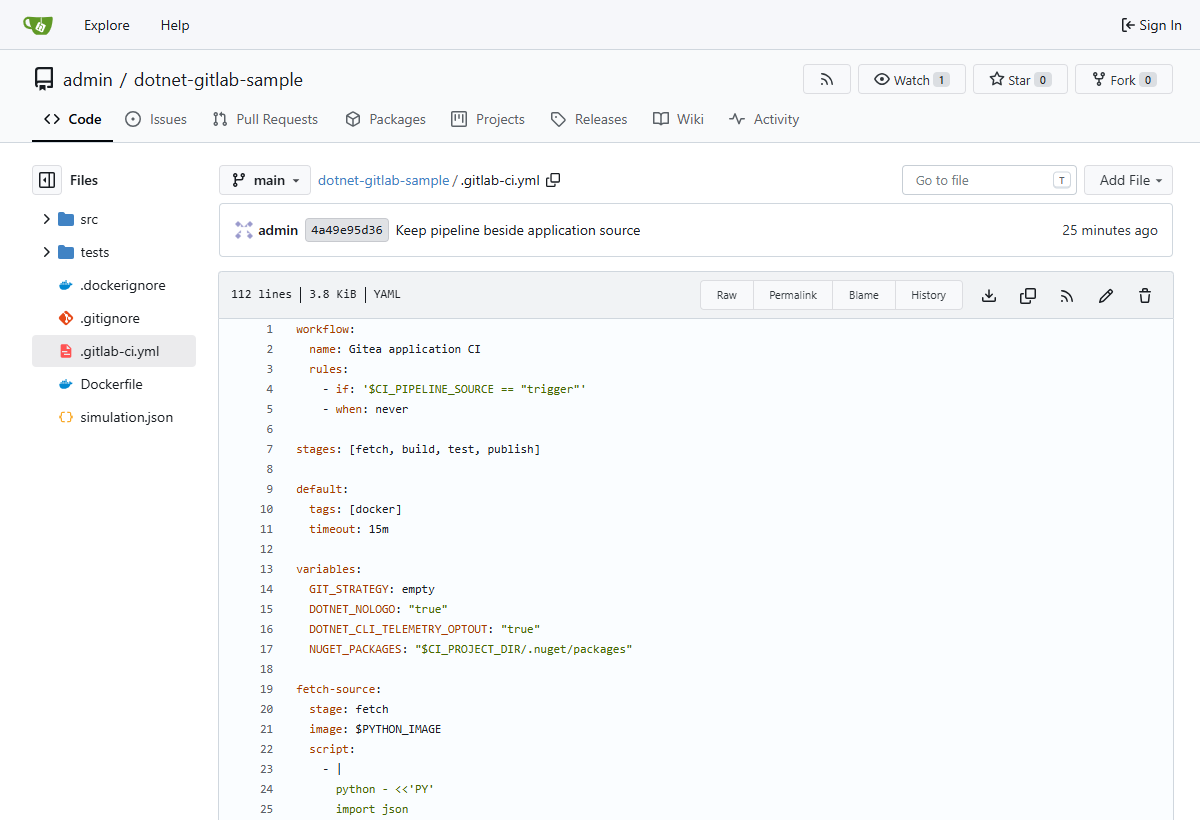
The YAML filename follows GitLab's format even though Gitea hosts it. Shared implementation changes belong in the catalog rather than being copied into every application repository.
Source: gitlab-pipeline-as-code/application/.gitlab-ci.yml
include:
  - remote: 'http://gitea:3000/admin/gitlab-templates/raw/branch/main/pipelines/dotnet-ci.yml'

variables:
  DOTNET_TEST_PROJECT: application/tests/Sample.Api.Tests.csproj
  DOTNET_APP_PROJECT: application/src/Sample.Api.csproj
The include selects the shared .NET pipeline. The variables describe this application's projects, relative to the job workspace after the source-fetch template has extracted the application into application/. GitLab merges these application variables with the included configuration.
Let The Shared Pipeline Own The Job Graph
Source: gitlab-pipeline-as-code/gitlab-templates/pipelines/dotnet-ci.yml
include:
  - remote: 'http://gitea:3000/admin/gitlab-templates/raw/branch/main/templates/gitea-source.yml'
  - remote: 'http://gitea:3000/admin/gitlab-templates/raw/branch/main/templates/dotnet-build.yml'
  - remote: 'http://gitea:3000/admin/gitlab-templates/raw/branch/main/templates/dotnet-test.yml'
  - remote: 'http://gitea:3000/admin/gitlab-templates/raw/branch/main/templates/dotnet-publish.yml'

workflow:
  name: Gitea application CI
  rules:
    - if: '$CI_PIPELINE_SOURCE == "trigger"'
    - when: never

stages: [fetch, build, test, publish]

default:
  tags: [docker]
  timeout: 15m

variables:
  GIT_STRATEGY: empty
  DOTNET_NOLOGO: 'true'
  DOTNET_CLI_TELEMETRY_OPTOUT: 'true'
  NUGET_PACKAGES: '$CI_PROJECT_DIR/.nuget/packages'

fetch-source:
  extends: .gitea-source
  stage: fetch

build:
  extends: .dotnet-build
  stage: build
  needs: [fetch-source]

test:
  extends: .dotnet-test
  stage: test
  needs: [build]

publish:
  extends: .dotnet-publish
  stage: publish
  needs:
    - job: build
      artifacts: true
    - job: test
      artifacts: false
The includes load hidden job templates; extends creates the four visible jobs. Trigger-only workflow rules and GIT_STRATEGY: empty retain the existing execution model. Pipeline dependencies stay here: publish downloads build artifacts and waits for tests without downloading test artifacts. Job files can therefore be reused in a different pipeline graph.
Keep Each .NET Job In Its Own File
Source: gitlab-pipeline-as-code/gitlab-templates/templates/dotnet-build.yml
include:
  - remote: 'http://gitea:3000/admin/gitlab-templates/raw/branch/main/templates/dotnet-base.yml'

.dotnet-build:
  extends: .dotnet
  script:
    - dotnet restore "$DOTNET_TEST_PROJECT"
    - dotnet build "$DOTNET_TEST_PROJECT" --configuration Release --no-restore
  artifacts:
    expire_in: 1 day
    paths: [application/, source.json]
The build template restores and builds the configured test project, which references the API. Its own remote include supplies the common .dotnet image/cache settings from gitlab-pipeline-as-code/gitlab-templates/templates/dotnet-base.yml, so consumers do not have to remember a separate base include.
Source: gitlab-pipeline-as-code/gitlab-templates/templates/dotnet-test.yml
include:
  - remote: 'http://gitea:3000/admin/gitlab-templates/raw/branch/main/templates/dotnet-base.yml'

.dotnet-test:
  extends: .dotnet
  script:
    - dotnet restore "$DOTNET_TEST_PROJECT"
    - dotnet test "$DOTNET_TEST_PROJECT" --configuration Release --no-build --no-restore --logger "trx;LogFileName=tests.trx" --results-directory "$CI_PROJECT_DIR/TestResults"
  artifacts:
    when: always
    expire_in: 1 day
    paths: [TestResults/]
The test template runs the existing Release build and preserves TRX output even when tests fail. It does not build first; the consuming pipeline must provide build artifacts, as our shared pipeline does through needs: [build].
Source: gitlab-pipeline-as-code/gitlab-templates/templates/dotnet-publish.yml
include:
  - remote: 'http://gitea:3000/admin/gitlab-templates/raw/branch/main/templates/dotnet-base.yml'

.dotnet-publish:
  extends: .dotnet
  script:
    - dotnet restore "$DOTNET_APP_PROJECT"
    - dotnet publish "$DOTNET_APP_PROJECT" --configuration Release --no-build --no-restore --output publish
    - echo "Published Gitea application; exact revision recorded in source.json"
  artifacts:
    expire_in: 1 day
    paths: [publish/, source.json]
Publish uses the application project path rather than the test project path and retains binaries with source provenance. The pipeline, rather than this reusable template, decides that publication must wait for successful tests.
All nested remote includes use explicit URLs. GitLab resolves them as a public user without project-variable context, so their locations cannot depend on GITEA_URL or another project variable. Both repositories and every included file must be readable by the GitLab server. See the remote-include reference for these restrictions.
Validate The Event And Fetch Its Exact Commit
Source: gitlab-pipeline-as-code/gitlab-templates/templates/gitea-source.yml
.gitea-source:
  image: $PYTHON_IMAGE
  script:
    - |
      python - <<'PY'
      import json
      import os
      from pathlib import Path
      import re
      import shutil
      import tarfile
      import tempfile
      import urllib.request

      payload = json.loads(Path(os.environ["TRIGGER_PAYLOAD"]).read_text())
      repository = os.environ["GITEA_REPOSITORY"]
      if payload.get("repository", {}).get("full_name") != repository:
          raise SystemExit("Unexpected source repository")
      expected_ref = os.environ["CI_COMMIT_REF_NAME"]
      if payload.get("ref") not in {expected_ref, "refs/heads/" + expected_ref}:
          raise SystemExit("Unexpected CI configuration branch")
      revision = payload.get("after", "")
      if not re.fullmatch(r"[0-9a-f]{40}", revision) or set(revision) == {"0"}:
          raise SystemExit("Invalid pushed commit SHA")
      archive_url = f"{os.environ['GITEA_URL']}/api/v1/repos/{repository}/archive/{revision}.tar.gz"
      with tempfile.TemporaryDirectory() as temporary:
          temporary = Path(temporary)
          archive_path = temporary / "source.tar.gz"
          with urllib.request.urlopen(archive_url, timeout=120) as response:
              with archive_path.open("wb") as output:
                  shutil.copyfileobj(response, output)
          extracted = temporary / "extracted"
          with tarfile.open(archive_path) as archive:
              archive.extractall(extracted, filter="data")
          roots = list(extracted.iterdir())
          if len(roots) != 1 or not roots[0].is_dir():
              raise SystemExit("Unexpected repository archive layout")
          shutil.move(str(roots[0]), "application")
      source = {"repository": repository, "revision": revision, "ref": os.environ["GITEA_BRANCH_REF"]}
      Path("source.json").write_text(json.dumps(source, indent=2) + "\n")
      Path("source.env").write_text(f"SOURCE_SHA={revision}\n")
      print(f"Fetched Gitea commit {revision}; pipeline YAML loaded from {os.environ['CI_CONFIG_PATH']}")
      PY
  artifacts:
    expire_in: 1 day
    paths: [application/, source.json]
    reports:
      dotenv: source.env
The highlighted checks reject the wrong source repository and invalid SHAs before downloading an archive. This provider-specific template retains the existing fetch behavior; the .NET templates do not need to understand Gitea's event payload.
GitLab exposes webhook trigger data through TRIGGER_PAYLOAD, a file-type variable. Read the file named by that variable; the variable itself is not a JSON string. The fetch job checks the expected repository identity, validates a nonzero 40-character lowercase hexadecimal after SHA, and constructs the archive URL from configured service and repository values.
The archive uses the immutable SHA, not main. Python's tar extraction uses the data filter, then requires a single top-level repository directory before moving it into the job workspace. The job writes the repository and revision to source.json and emits SOURCE_SHA as a dotenv artifact. In this pipeline, downstream steps preserve the JSON provenance file; they do not depend on re-reading a moving branch.
There is a version-specific payload detail worth making explicit. In the installed GitLab version, trigger parameters are merged before GitLab writes TRIGGER_PAYLOAD: the webhook URL's ref/main replaces Gitea's original branch ref. The code therefore validates payload.ref against the GitLab orchestration ref, while Gitea's webhook branch filter restricts the source branch.
Consequently, source.json records the configured source branch from GITEA_BRANCH_REF; it does not independently recover or verify the original Gitea payload ref. Repository identity and the after SHA remain job checks. This is a trusted-local integration, not a complete untrusted-event authorization layer.
Build, Test, And Publish Through Artifacts
The build job restores and builds the test project, which references the API project. Its artifact includes the application tree, including generated build output. The test job downloads that artifact, restores package dependencies, and runs with --no-build --no-restore, so it executes the already-built Release assembly.
The shared NuGet cache reduces repeated package downloads. Cache is an optimization, not the contract between jobs: source and binaries travel through artifacts. The explicit needs relationships control both dependencies and artifact selection. Publish receives the build artifact and waits for tests, then restores the API project and publishes with no rebuild.
The artifact policy retains publish output and provenance for one day. The test job requests artifact upload even when the script fails, which helps preserve a TRX file if the test runner produced one. Infrastructure failures before a report is written can still leave no test file.
This pipeline publishes .NET binaries. It does not build, tag, or push an application image. The separate gitlab-pipeline-as-code/application/Dockerfile is available for independent image builds, but that is not the validated workflow described here.
Distinguish Three Configuration Identities
| Value | Meaning in this setup |
|---|---|
CI_COMMIT_SHA | Commit in the README-only GitLab orchestration repository |
CI_CONFIG_PATH | External Gitea YAML URL used by GitLab |
Webhook after, recorded in source.json | Exact Gitea application commit fetched for the build |
The application entry point and catalog URLs follow branches. If another push advances either branch before GitLab loads YAML for an earlier event, the older application commit can run with newer application YAML or shared templates. Keeping the entry point with source makes review convenient, but does not by itself give this integration exact-commit YAML provenance.
The source archive remains pinned to after. Pinning pipeline configuration to the same event would require additional orchestration that safely selects an immutable definition for each event; this sample does not implement it. For versioned template releases, pin every nested URL as well as the application's outer include. An outer commit-pinned file that still includes main does not freeze the complete configuration.
The template catalog has no application webhook. Catalog changes affect future application pipelines but do not start a build themselves. A normal push to the application's configured Gitea branch, including an entry-point change, sends the webhook that starts a run.
The Small .NET Application Behind The Build
The API deliberately returns deterministic data so runtime verification can compare values rather than merely check for a successful status code:
Source: gitlab-pipeline-as-code/application/src/Program.cs
var builder = WebApplication.CreateBuilder(args);
var app = builder.Build();

app.MapGet("/health", () => TypedResults.Ok(new HealthResponse("healthy")))
    .WithName("GetHealth");

app.MapGet("/weatherforecast", () => TypedResults.Ok(new ForecastResponse[]
{
    new(1, -5, "Freezing"),
    new(2, 0, "Cold"),
    new(3, 10, "Cool"),
    new(4, 20, "Mild"),
    new(5, 30, "Warm")
})).WithName("GetWeatherForecast");

app.Run();

public sealed record HealthResponse(string Status);

public sealed record ForecastResponse(int Day, int TemperatureC, string Summary)
{
    public int TemperatureF => 32 + TemperatureC * 9 / 5;
}

public partial class Program { }
The highlighted endpoints return a stable health response and five forecasts; the record computes Fahrenheit values from Celsius. The public partial entry-point type supports the integration-test host. No database or external weather service is needed to exercise the CI path.
The three xUnit tests in gitlab-pipeline-as-code/application/tests/ForecastTests.cs use WebApplicationFactory and Shouldly assertions:
| Test | Observable behavior |
|---|---|
Should_ReturnForecastValues_When_ForecastRequested | HTTP 200 and exact day, Celsius, Fahrenheit, and summary sequences |
Should_ReturnHealthy_When_HealthRequested | HTTP 200 and the expected health record |
Should_ReturnNotFound_When_UnknownEndpointRequested | HTTP 404 for an unknown route |
These tests exercise application responses in a test host. The later HTTP checks against the published container verify a different boundary: that downloaded publish artifacts actually start and serve the intended responses.
Verify A Real Push, Not Just A Trigger API Call
With setup complete, run the verification script from the sample root:
bash scripts/simulate.shThe script delegates the push and artifact checks to a tools container, starts the published API, then makes HTTP requests from another tools-container invocation:
Source: gitlab-pipeline-as-code/scripts/simulate.sh
#!/usr/bin/env bash
set -euo pipefail
cd "$(dirname "${BASH_SOURCE[0]}")/.."

export MSYS_NO_PATHCONV=1
docker compose --profile verify run --rm --no-deps simulate
docker compose --profile verify up -d --force-recreate --wait --wait-timeout 120 sample-app
docker compose --profile verify run --rm --no-deps simulate \
    python /sample/deployments/bootstrap/simulate.py --check-runtime
printf '\nPublished application: http://localhost:%s/weatherforecast\n' "${APP_HTTP_PORT:-5080}"
The highlighted sequence matters because an already-running container can keep the previously loaded assembly even after new artifacts arrive on its mounted directory. Recreating the application container makes the runtime check exercise the newly published binaries. Its health probe uses 127.0.0.1, not localhost, to avoid an IPv6 loopback resolution mismatch observed with BusyBox wget.
Make The Event Traceable
The verifier in gitlab-pipeline-as-code/deployments/bootstrap/simulate.py clones Gitea's configured branch, commits a unique marker, and pushes it. It never directly calls GitLab's pipeline trigger endpoint:
Source: gitlab-pipeline-as-code/deployments/bootstrap/simulate.py
    with tempfile.TemporaryDirectory() as temporary:
        directory = Path(temporary)
        git(directory, "clone", "--branch", MANIFEST["branch"],
            f"{GITEA}/{MANIFEST['gitea_repository']}.git", ".", authorization=GITEA_AUTH)
        git(directory, "config", "user.name", "Local CI Simulation")
        git(directory, "config", "user.email", "[email protected]")
        marker = {"simulation": str(uuid.uuid4()), "description": "Real Gitea push triggers local GitLab CI"}
        (directory / "simulation.json").write_text(json.dumps(marker, indent=2) + "\n")
        git(directory, "add", "simulation.json")
        git(directory, "commit", "-m", "Verify Gitea push triggers GitLab Docker pipeline")
        revision = git(directory, "rev-parse", "HEAD")
        git(directory, "push", "origin", MANIFEST["branch"], authorization=GITEA_AUTH)
The highlighted clone and push establish a real Git-provider event. The UUID marker makes each simulation a new commit. The verifier records GitLab's latest pipeline ID before the push, then examines newer trigger-created pipelines until a successful fetch artifact contains the expected Gitea SHA. It does not accept an unrelated green pipeline as proof of this push.
After completion, it requires the four expected successful jobs, checks that the GitLab orchestration commit has no pipeline YAML, and confirms that the fetch log reports the configured external URL. It downloads test and publish artifact archives, rejects traversal paths before extraction, and checks both source identity and test counters:
Source: gitlab-pipeline-as-code/deployments/bootstrap/simulate.py
    source = json.loads((EVIDENCE / "source.json").read_text())
    if source["revision"] != revision or source["repository"] != MANIFEST["gitea_repository"]:
        raise RuntimeError("Published artifact source does not match pushed Gitea commit")
    counters = ET.parse(EVIDENCE / "TestResults/tests.trx").find(".//{*}Counters")
    if counters is None or any(int(counters.get(key, "-1")) != value for key, value in
                               {"total": 3, "executed": 3, "passed": 3, "failed": 0}.items()):
        raise RuntimeError("Expected exactly three passing tests in TRX report")
    if not (EVIDENCE / "publish/Sample.Api.dll").is_file():
        raise RuntimeError("Published application assembly missing")
These checks require the published artifact to name the pushed repository and commit, exactly three executed and passing tests with zero failures, and the application assembly. A success exit code with an empty or missing test report would not satisfy the verifier.
The final runtime pass checks {"status":"healthy"} from /health and the Fahrenheit sequence [23, 32, 50, 68, 86] from /weatherforecast. These are functional checks of the running published output, not merely container liveness checks.
Observed Local Runs
After provisioning the separate Gitea catalog, GitLab pipeline #13 verified the shared-template workflow on 2026-11-13. The simulation pushed application commit 1af6d3d67d1c450857609ec98ebbafbd4acbc30b to Gitea, and its webhook created the pipeline with source trigger. GitLab's remote lint resolved the catalog's six files: the composed pipeline, source-fetch template, common .NET base, and separate build/test/publish templates. Fetch job 41, build 42, test 43, and publish 44 all passed, with three passing tests, matching artifact provenance, and successful checks of the running published API.
The screenshots below capture the earlier GitLab pipeline #11, before the reusable jobs were extracted into the catalog. That run established the original external-YAML workflow with the same four visible jobs. Its source was also trigger:
| Job | Observed job ID | Result |
|---|---|---|
fetch-source | 33 | Passed |
build | 34 | Passed |
test | 35 | Passed, three tests |
publish | 36 | Passed |
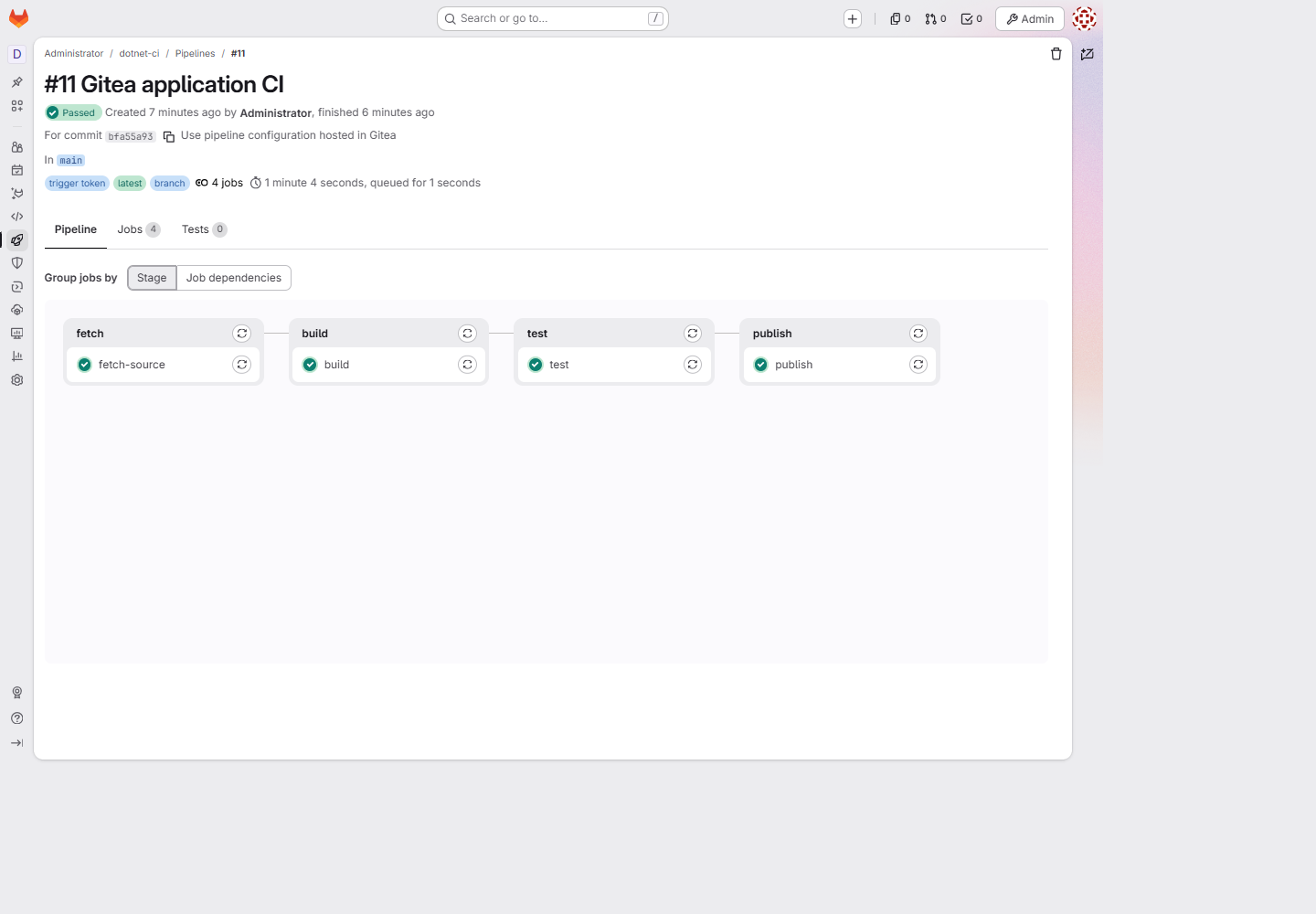
The pipeline view verifies execution across the four stages. The commit displayed in its header is the GitLab orchestration revision, bfa55a937e098291c5fd40c1791e0f0ab760d528. The application revision recorded in downloaded provenance was the different Gitea commit 0add5a496fb005ef812f8b2f09ed5b1ec937531f.

The test log and parsed TRX file establish the three-test result. The pipeline's Tests tab can still show zero: this sample uploads TRX as a regular artifact, not a GitLab reports:junit report. A passing test job, an uploaded report file, and GitLab's parsed test-report interface are separate pieces of evidence.
The verifier also confirmed the external configuration URL and the absence of a GitLab-hosted YAML file. After downloading publish output, both API checks passed. A repeated bootstrap preserved the Gitea branch commit and reused project, webhook, and Runner IDs 1, with one webhook and one Runner rather than duplicates. These are observations from this local run, not promised IDs or timings on another machine.
Inspect The Evidence Files
Successful verification writes an ignored evidence/ directory beneath the sample root:
| Local evidence | Purpose |
|---|---|
result.json | Pipeline identity and source, job results, both repository revisions, external URL, template repository and URLs, and test count |
source.json | Application repository, configured branch ref, and exact fetched SHA |
TestResults/tests.trx | Test runner's counters and individual results |
test-artifacts.zip and publish-artifacts.zip | Original downloaded GitLab artifacts |
publish/ | Binaries mounted into the published application container |
runtime.json | Verified health and forecast responses |
These are generated local outputs, not committed sample sources or permanent public download links. Run another simulation to regenerate them. Do not run simulations concurrently because they share the evidence directory and published-application container. Open the published API after a successful simulation; startup alone does not publish an application.
Troubleshoot The Boundary That Failed
| Symptom | First checks |
|---|---|
| No pipeline after a Gitea push | Repository webhook's Recent Deliveries, active push event, branch filter, target project/ref, and Gitea egress permission |
| External configuration cannot be loaded | Raw YAML URL, unauthenticated access, GitLab's Gitea host-and-port allowlist, and remote CI lint errors |
| Jobs remain pending | Runner online state, project assignment, and the required docker tag |
Fetch cannot resolve gitea or reach GitLab | Runner's Docker network_mode, not just Compose's Runner service network |
| Fetch rejects a ref | GitLab's merged trigger parameters and the distinction between orchestration ref and Gitea source branch |
| Long wait before job commands appear | Helper/build image downloads and registry connectivity |
| Test job passes but Tests tab is empty | TRX artifact versus parsed JUnit reporting |
| API remains unhealthy after publishing | Recreated container, mounted publish output, and IPv4 health probe |
From the sample root, inspect services and recent logs without printing private state-volume files:
docker compose ps
docker compose logs --tail 80 gitlab gitea runner
Gitea's recent delivery record distinguishes a network/egress error from a GitLab trigger rejection. Check it privately; redact the token-bearing target URL before sharing screenshots or logs. If GitLab accepted the trigger but a job failed, inspect that job's log rather than repeatedly changing the webhook.
Two failures during initial validation came from incomplete GitLab initialization. An unsuitable initial root password prevented normal seeding, and later Runner trace/API requests failed with CI job token signing key is not set. The guarded Rails seed initializes missing keys without replacing existing ones. Repeating startup is appropriate after correcting initialization; deleting data volumes or rotating all signing keys is not the first troubleshooting step.
Gitea configuration is reapplied and its container recreated by startup. For edits to GitLab's mounted configuration, restart GitLab so its container startup reconfigures the server, then rerun the setup entry point:
docker compose restart gitlab
bash scripts/up.sh
This changes service availability temporarily but preserves named volumes. To stop the local environment without deleting repositories and history, use docker compose stop. Avoid volume-removal commands unless you intend to discard that state.
Take The Architecture Into Production
We can use this approach for production CI: keep application code and pipeline definitions with the team's chosen Git provider, use GitLab to orchestrate pipelines, and run jobs on dedicated Runner infrastructure. Gitea makes the walkthrough self-contained, but it is not a requirement of that architecture. Azure Repos, Bitbucket, or another Git host can own the source repository instead.
What we promote is the separation of responsibilities, not the workstation's Compose deployment unchanged. This example verifies a trusted local push-to-artifact workflow. It does not implement production event authentication, pull-request validation, required status checks, or deployment automation. Production CI also does not imply deploying the built application to production; that needs its own release process and approvals.
Before exposing this environment beyond a trusted workstation:
- Replace disposable credentials and root-based bootstrap with appropriately scoped operational identities. Use TLS, controlled ingress, and managed secret delivery. Loopback bindings do not protect against a hostile process on the host or Docker network.
- Authenticate and authorize incoming events. If using a relay, validate the provider signature, allowlist repository and branch identity, bound payload sizes, and handle replay/retry behavior. Do not assume possession of a trigger token proves an event's contents are genuine.
- Separate trusted and untrusted execution. Restrict changes to pipeline YAML as executable code and use dedicated Runner infrastructure appropriate to the workload. An unprivileged job on a host-socket-controlled Runner is not sufficient isolation for hostile contributions.
- Decide source and configuration provenance explicitly. Pin reviewed images, dependencies, and reusable configuration; address the branch-URL race if event-matched YAML is required. Do not describe this sample's
CI_COMMIT_SHAas the application revision. - Add provider feedback and test both success and failure paths before enabling branch policies. Gitea commit statuses and PR checks need their own integration; GitLab's green pipeline does not automatically create them.
- Design artifact retention, cache trust, backup, token rotation, cancellation, and recovery policies. The local one-day artifact retention and single Docker host are demonstration choices.
A future application-image build would also need a reviewed registry authentication and build-isolation design. It should not be added by casually mounting the Docker socket into every job or enabling privileged mode globally.
Replace Gitea With Azure Repos Or Bitbucket
Choose the source host based on existing repositories, access policies, code review workflows, and operational needs. The .NET build, test, and publish commands can stay largely unchanged. Repository provisioning, webhook handling, source retrieval, external YAML delivery, and status reporting are provider-specific.
In particular, changing GITEA_URL alone will not migrate this sample. Its gitlab-pipeline-as-code/deployments/bootstrap/provision.py uses the Gitea API, and gitlab-pipeline-as-code/gitlab-templates/templates/gitea-source.yml expects a Gitea push payload and archive endpoint. Both must be adapted, along with catalog include URLs if its hosting changes.
| Integration concern | Current Gitea sample | Azure Repos adaptation | Bitbucket Cloud adaptation |
|---|---|---|---|
| Push delivery | Branch-filtered repository webhook | Azure DevOps service hook for git.push | Repository webhook for repo:push |
| Source revision | Validated webhook after SHA | Matching entry in resource.refUpdates, using name and newObjectId | Commit hash from each accepted changed branch |
| Source access | Public exact-SHA archive | Authenticated Git fetch or provider API pinned to the accepted commit | Authenticated Git fetch or provider API pinned to the accepted commit |
| Pipeline YAML | Public Gitea raw-file branch URL | Reviewed configuration delivery accessible to the GitLab server | Reviewed configuration delivery accessible to the GitLab server |
| Review feedback | Not implemented | Commit or pull-request statuses and branch policies | Commit build statuses and applicable merge checks |
These columns describe adaptation work, not additional integrations shipped with this repository. Only the Gitea path was exercised end to end.
Keep The No-Mirror Design
For a production version of this design, a small provider adapter can receive events, authenticate them, resolve an allowlisted repository and branch, and trigger the GitLab orchestration project. It should retain the original event identity and accepted source SHA so pipeline results can be correlated with the correct source revision. Do not copy arbitrary webhook fields into privileged pipeline variables or fetch arbitrary payload-supplied URLs.
The adapter needs durable deduplication and retry handling. A delivery can contain multiple reference changes, and providers can retry deliveries. Accept only supported branch updates, skip deletions, and create work once for each accepted event and reference. The GitLab trigger's orchestration ref is separate from the source branch, as it is in our local setup.
Azure DevOps Services and Bitbucket Cloud cannot call a Docker-only hostname such as gitlab or reach your workstation's loopback address. Provide a reviewed, reachable HTTPS endpoint, then use controlled connectivity from that endpoint to GitLab. This adapter is an addition to the production design; the demonstrated local Gitea setup deliberately has no relay.
Azure Repos
In Azure DevOps, create a Web Hooks subscription under Project settings > Service hooks, select Code pushed, and filter it to the intended repository and branch. The service hook event reference documents the git.push payload. Resolve the matching resource.refUpdates entry rather than selecting a commit from a human-readable event message. If the subscription sends reduced resource details, retrieve the missing data through an authenticated API call before accepting the event.
Use the authentication supported by the selected service hook consumer and endpoint. For the Web Hooks consumer, Microsoft documents HTTPS and Basic authentication; do not assume it sends the same HMAC header as Gitea or Bitbucket. Store and rotate endpoint credentials separately from the identity used to read repository content or publish statuses.
For pull-request validation, subscribe to the relevant pull-request events, decide whether to test the source commit or a merge result, and associate the result with that revision or iteration. Azure Repos supports external pull-request statuses and status policies. A successful GitLab pipeline alone does not satisfy those policies without a status publisher. Review the matching documentation for Azure DevOps Server if that is your deployment rather than Azure DevOps Services.
Bitbucket Cloud
Create a repository webhook for push events and configure a webhook secret. Validate the X-Hub-Signature against the raw request body before processing it, following Atlassian's webhook security guidance. Use constant-time signature comparison and separately validate repository identity, event type, and branch eligibility.
Normalize each accepted branch change to its exact commit hash, then fetch that commit using a scoped identity and the provider's supported authentication. Do not build the current branch head later: another push might have moved it since the event arrived.
Publish pending and final results through Bitbucket's commit build-status API, linking back to the GitLab run. Include the pull request's source branch in refname when associating a status with a pull request, and configure the applicable merge checks separately. Bitbucket Data Center has different webhook and API contracts; it needs its own adapter rather than the Cloud implementation with a different hostname.
Resolve Private YAML Access Separately
The build job's repository credentials do not solve external configuration loading. GitLab must read the YAML before it can create jobs, so a private Azure Repos or Bitbucket repository cannot be made usable merely by adding a checkout token to a job. Our current external URL works because the Gitea file is publicly readable inside the Compose network.
Choose and review a configuration-delivery mechanism that the GitLab server supports. For example, an internal delivery service could retrieve approved configuration using a scoped source identity and expose it under controlled network access. Such a service becomes a trusted executable-configuration boundary and must restrict repositories, paths, revisions, and callers. Do not place long-lived source credentials in a raw-file URL or mutate the shared project's configuration path per event, which introduces races between concurrent pushes.
If the requirement is to run the YAML from the same commit as the application, design per-run immutable configuration delivery and record its revision or digest. A new provider's branch-based raw URL does not fix the source/configuration race described earlier. This sample does not implement that delivery mechanism.
Consider GitLab's Mirroring Integration As An Alternative
GitLab also provides CI/CD for external repositories, including a documented Bitbucket Cloud integration. That workflow creates a repository mirror in GitLab. It differs from our README-only orchestration project and explicit source-fetch job; adopting it changes the architecture rather than configuring another webhook URL.
The external-repository feature is documented for Premium and Ultimate. Check your GitLab version, license, provider support, and mirroring constraints before choosing it. Where mirroring is acceptable, evaluate the native integration first. Where keeping source out of GitLab is a requirement, retain the no-mirror approach and implement the provider-specific controls above. Neither choice makes pull-request behavior identical across providers automatically.
Further Reading
The implementation relies on the official references for custom GitLab CI configuration, webhook pipeline triggers and payloads, Docker executor behavior, outbound request filtering, and Gitea configuration.
Related walkthroughs such as TestDriven.io's self-hosted GitLab Runner guide, OneUptime's Gitea and Drone Compose setup, and an on-premises GitLab and Runner setup provide useful comparisons. Their executor privileges, Runner registration methods, image versions, and source-hosting choices differ; do not combine their commands with this sample without reviewing those differences.
Conclusion
Gitea can own application code and pipeline YAML while GitLab provides CI orchestration. The GitLab project remains necessary even when its Git repository contains only documentation. Runner executes jobs; it does not replace the GitLab server.
The local run proved a real push, external YAML loading, exact application-SHA retrieval, four successful jobs, three passing tests, and a working published API. It also exposed the important limits: branch-based configuration is not event-pinned, the direct trigger does not verify Gitea signatures, and GitLab results do not automatically become Gitea required checks.
We can take the same architecture into production and replace Gitea with Azure Repos, Bitbucket, or another Git provider according to the team's needs. Preserve the responsibility boundaries, adapt the provider-specific integration, and validate authentication, provenance, isolation, and review feedback before enforcing it for production work. The local sample supplies a working Gitea baseline; the production and alternative-provider sections describe the engineering needed beyond that baseline.