


Building an AI Gateway with AgentGateway: LLM, MCP, and A2A Behind One Door

Mehdi Hadeli
@mehdihadeli
On this page
Table of contents
Introduction
Any AI application that calls a model has to answer a few operational questions. Which model should handle a request? Who may call it? How do we keep a client from sending an unbounded prompt history? How do we rate-limit one API key instead of every caller together? Once agents start using tools, the gateway has to govern those calls as well as model traffic.
Many teams answer these questions in application code, one if statement at a time. That works for one application. By the time a second or third service arrives, each service may have its own version of the same authentication, guardrail, and metering logic.
This guide puts those concerns in one place with AgentGateway, the Linux Foundation's Rust gateway. The deployment fronts an LLM provider, five native MCP servers, one OpenAPI-generated MCP target, and an A2A agent. It also centralizes keys, authentication, authorization, rate limits, guardrails, and observability. The runnable sample is in the blog-samples/agentgateway-ai-gateway repository. I mark Compose features separately from patterns that need additional infrastructure.
The stack covers:
- An LLM gateway that fronts DeepSeek with virtual API keys and a weighted virtual model.
- An MCP gateway that multiplexes seven targets behind one endpoint: five tool servers and an OpenAPI Petstore adapter. Every tool is prefixed with its target name.
- Authentication for MCP traffic through Keycloak (OAuth2/OIDC with PKCE for browser clients) and authorization through CEL rules.
- Guardrails that reject prompt-injection attempts and PII in model output.
- Rate limiting with an in-memory default and an optional Envoy-compatible remote setup.
- An A2A route that exposes a .NET agent through the gateway.
- Observability with OpenTelemetry traces, Prometheus metrics, an LGTM stack, and self-hosted Langfuse for LLM traces.
MCP deep dive. For the MCP security and runtime details, read Running MCP Servers in Production: agentgateway + ToolHive, from stdio to a Multiplexed HTTP Endpoint. It focuses on Keycloak authentication, CEL authorization, stdio hosting, ToolHive, and vMCP.
Use case
Consider a support platform where users report tickets, browse a product catalog, and ask an AI assistant for help. The assistant reads tickets, searches the catalog, looks up customers, and answers questions about the time or echo tools used in demos. DeepSeek provides the LLM, while the tools come from a mix of .NET services and third-party reference servers.
Without a gateway, the assistant would hold the DeepSeek key, know every tool URL, repeat role checks for each tool, and produce its own metrics. With one in front, the assistant uses one address and requests the virtual model deepseek-smart; the gateway selects the concrete model. When the assistant lists tools, it receives only the tools that user may call. Each call passes through the gateway's rate limit and prompt-injection checks before it reaches a backend.
The sample uses a console client named SupportChat, several MCP tool servers, an A2A agent named SupportAgent, and the gateway between them.
Architecture overview
flowchart TB
  subgraph Clients[Clients]
    Svc[Service or CI client]
    McpClient[OAuth-capable MCP client]
    Browser[Browser]
    Vscode[VS Code extension]
    Operator[Operator]
  end

  Y[YARP public edge<br/>localhost:5000]

  subgraph PublicRoutes[Stable public paths]
    LLMPath["/v1/*"]
    MCPPath["/mcp/*"]
    BrowserPath["/browser/*"]
    VscodePath["/vscode/*"]
    OtherPaths["/a2a/*, /auth/*, /admin/*, /grafana/*"]
  end

  subgraph AgentGateway[AgentGateway internal listeners]
    L[LLM listener<br/>:4000]
    M[MCP listener<br/>:3000]
    BL[Browser LLM<br/>:4001]
    VL[VS Code LLM<br/>:4002]
    A[A2A listener<br/>:3001]
    Admin[Admin and metrics<br/>:15000 / :15020]
  end

  subgraph Policies[Authentication policy selected in AgentGateway]
    LLMApiKey["llm.policies.apiKey<br/>active"]
    LLMJwt["llm.policies.jwtAuth<br/>alternative"]
    MCPAuth["mcp.policies.mcpAuthentication<br/>active OAuth + PKCE"]
    MCPApiKey["mcp.policies.apiKey<br/>alternative"]
    BrowserOidc["route policy oidc<br/>browser session"]
    VscodeJwt["route policy jwtAuth<br/>PKCE token validation"]
  end

  Svc --> Y
  McpClient --> Y
  Browser --> Y
  Vscode --> Y
  Operator --> Y

  Y --> LLMPath
  Y --> MCPPath
  Y --> BrowserPath
  Y --> VscodePath
  Y --> OtherPaths

  LLMPath --> L --> LLMApiKey
  L -. switch policy .-> LLMJwt
  MCPPath --> M --> MCPAuth
  M -. switch policy .-> MCPApiKey
  BrowserPath --> BL --> BrowserOidc
  VscodePath --> VL --> VscodeJwt
  OtherPaths --> A
  OtherPaths --> Admin

  L --> DeepSeek[DeepSeek provider]
  BL --> DeepSeek
  VL --> DeepSeek
  M --> McpTargets[Internal and ToolHive MCP targets]
  A --> SupportAgent[SupportAgent]
  Admin --> Platform[Keycloak and observability services]

  classDef client fill:#eef2f7,stroke:#94a3b8,color:#0f172a;
  classDef edge fill:#f3f4f6,stroke:#cbd5e1,color:#0f172a;
  classDef gateway fill:#e6f4fb,stroke:#0284c7,color:#0f172a,stroke-width:1.5px;
  classDef active fill:#e6f4fb,stroke:#0284c7,color:#0f172a;
  classDef alternative fill:#f3f4f6,stroke:#475569,color:#0f172a;
  classDef backend fill:#ffffff,stroke:#0f172a,color:#0f172a;
  class Svc,McpClient,Browser,Vscode,Operator client;
  class Y,LLMPath,MCPPath,BrowserPath,VscodePath,OtherPaths edge;
  class L,M,BL,VL,A,Admin gateway;
  class LLMApiKey,MCPAuth,BrowserOidc,VscodeJwt active;
  class LLMJwt,MCPApiKey alternative;
  class DeepSeek,McpTargets,SupportAgent,Platform backend;
The diagram reads from top to bottom. Every client first calls YARP on port 5000. YARP selects a public path and forwards the request; it does not decide whether the request carries an API key, a JWT, or an OAuth session. The two default paths stay stable: /v1 goes to the LLM listener on :4000, and /mcp goes to the MCP listener on :3000.
The authentication choice happens in AgentGateway. The active sample uses llm.policies.apiKey for /v1 and mcp.policies.mcpAuthentication for /mcp. The yellow policy nodes show alternatives on those same listeners: replace the LLM API-key policy with jwtAuth, or replace MCP OAuth handling with apiKey. These are configuration choices, not extra YARP routes. Do not enable both alternatives under one default policy block unless the deployed AgentGateway version explicitly documents combined-policy behavior; one listener should have one intentional client-authentication contract.
The separate /browser and /vscode paths exist because they need different listener-level behavior. Browser traffic uses AgentGateway-managed OIDC and a session cookie on :4001. The VS Code provider completes Keycloak PKCE itself, then sends the resulting bearer JWT to :4002, where jwtAuth validates it.
One integration detail is easy to miss when Keycloak sits behind YARP on /auth/*: browser-facing redirects can use the public YARP URL, but JWT validation must use the issuer that Keycloak actually signs into the token. In this sample, that validated issuer is http://keycloak:8080/realms/agentgateway, while YARP still exposes the browser-facing auth endpoints at http://localhost:5000/auth/....
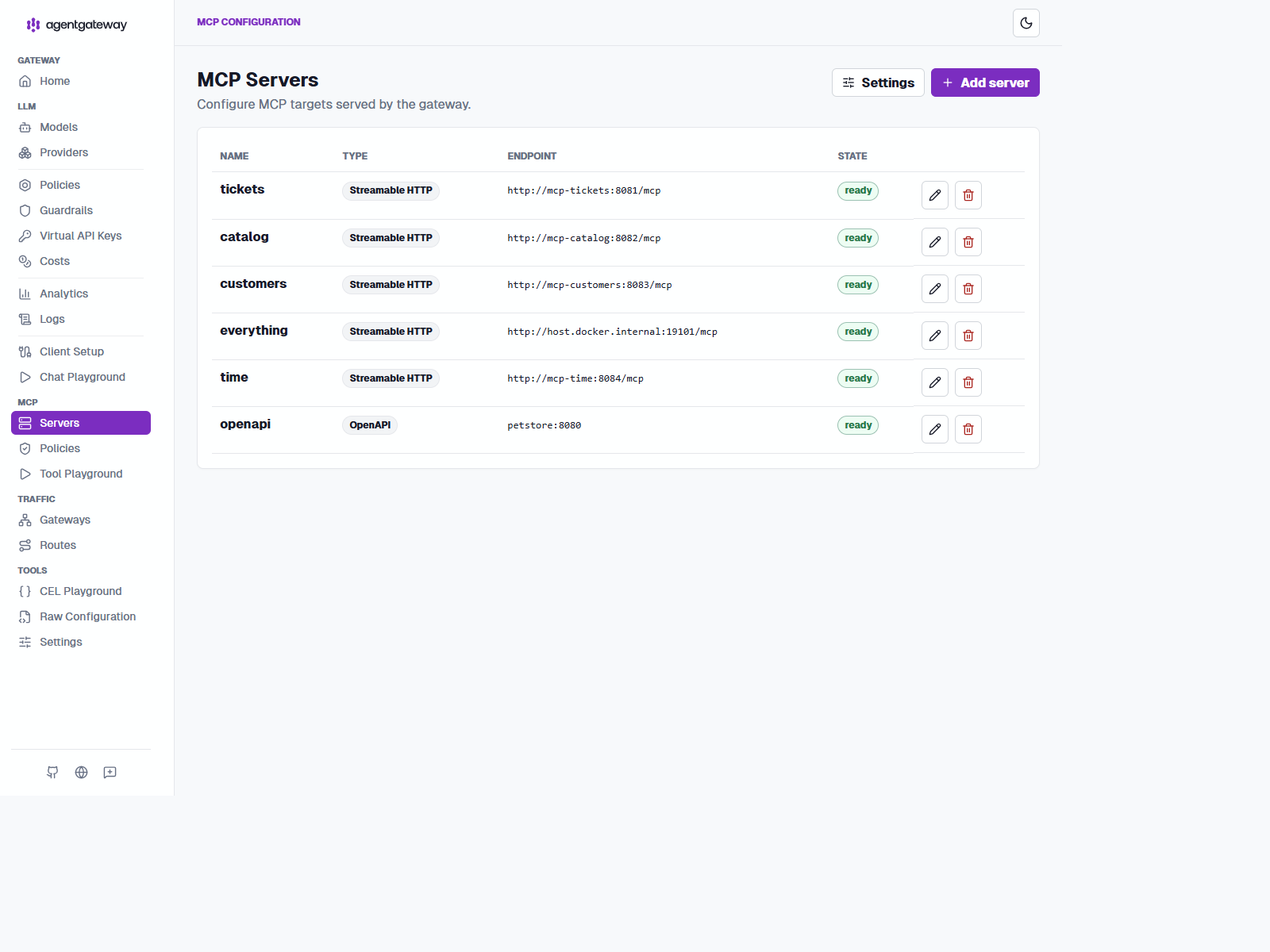
The MCP listener multiplexes both kinds of targets. mcp-tickets, mcp-catalog, mcp-customers, and mcp-time are first-party .NET services started by the Aspire AppHost on the host; AgentGateway reaches them through Docker host aliases. The everything server runs externally through ToolHive on the host. The Petstore OpenAPI document becomes another gateway-managed MCP target. None of those target ports is published through Compose.
Prometheus uses an internal pull connection to agentgateway:15020 and otel-collector:8889/metrics. Operators can reach equivalent read-only endpoints through YARP at /metrics and /otel-metrics/metrics. Grafana is also internal on port 3000 and is reached publicly through /grafana/. Langfuse is also internal on port 3000, but the public YARP entry point is host-based: http://langfuse.localhost:5000/. That route keeps Langfuse at URL root instead of forcing a /langfuse path prefix.
Security model and policy choices
Security depends on both the client and the boundary being protected. An LLM request, an MCP session, and an A2A call can use different incoming authentication policies, while the gateway separately authenticates to each upstream provider or tool server. AgentGateway's security configuration guides cover these policies and their route attachment points.
Choose authentication by client capability
Option 1: API keys for LLM and MCP
API keys are the simplest option when a client can securely store and send a bearer secret. AgentGateway supports the apiKey policy for both simplified LLM and MCP configuration. Use mode: strict so missing and invalid keys are rejected before traffic reaches a model or tool.
The sample enables this approach for the LLM gateway on :4000:
Source: deployments/agentgateway-config.yaml
llm:
  policies:
    apiKey:
      mode: strict
      keys:
        - key: $ALICE_GATEWAY_KEY
          metadata:
            name: alice
            user: alice
The same policy can protect an MCP endpoint. This is the shape to use when the MCP client supports API keys; it is an available configuration option, but the runnable sample uses Keycloak OAuth for /mcp instead:
Source: deployments/agentgateway-config.yaml
mcp:
  policies:
    apiKey:
      mode: strict
      keys:
        - key: $ALICE_GATEWAY_KEY
          metadata:
            name: alice
            user: alice
Create one unique key per user, team, or application in the AgentGateway panel:
- Open LLM > Virtual API Keys in the Admin UI.
- Select New key.
- Enter an operator-visible name such as
alice,bob, orcustomer-acme-app. - Generate the key and add metadata such as
user: aliceandtenant: acme. - Save the key, copy the secret into the consumer's secret manager, and never commit it to source control.
The panel masks existing secrets, as shown in the screenshot below. Repeat the process for every consumer instead of sharing one key. The name identifies the resource in the panel; metadata can feed CEL rules, metrics, logs, rate limits, model allowlists, and budgets. When a key is compromised, revoke it and issue a replacement rather than editing a shared credential.

The UI-managed resource must be backed by AgentGateway's persistent configuration storage for a multi-instance deployment. Keep routes and provider settings in the YAML baseline, use hybrid mode, and store dynamic API-key resources in PostgreSQL. Do not expose the Admin UI to consumers; a separate authenticated provisioning service should call the config API when customers need self-service key creation, rotation, or revocation.
API keys are a good fit for backend workers, CI jobs, and VS Code's built-in Custom Endpoint configuration. They are not automatically safer than OAuth: they are bearer credentials, so use HTTPS, narrow model and tool access, short lifetimes where possible, rotation, revocation, and per-consumer limits.
Option 2: OAuth 2.0 Authorization Code with PKCE
API keys and OAuth 2.0 Authorization Code with PKCE are both valid choices for LLM and MCP routes. They solve different client problems:
| Client capability | Route policy | Best fit | Security trade-off |
|---|---|---|---|
| Can store and send a secret | apiKey | Services, CI jobs, and VS Code Custom Endpoint | Simple and effective, but a bearer key must be protected, rotated, scoped, and revoked. |
| Can open a browser and retain tokens | oidc for browser routes, mcpAuthentication for MCP OAuth | Browser applications and OAuth-capable MCP clients | Better for interactive users and public clients because PKCE avoids a client secret and tokens can be short-lived. |
| Receives a JWT from an existing identity provider | jwtAuth or mcpAuthentication in resource-server mode | Service-to-service calls and custom clients | Strong when issuer, audience, signature, expiry, and required claims are validated. |
The most secure choice is the strongest one the client can actually complete. PKCE is usually the better choice for a human-operated public client because it avoids shipping a durable secret. A scoped, short-lived API key is often the simpler choice for a backend worker. Neither mechanism protects a leaked credential, so HTTPS, secret storage, rotation, expiration, and revocation still matter.
The same decision applies to MCP. AgentGateway can expose MCP with strict apiKey authentication, or protect it with mcpAuthentication, which follows the MCP OAuth discovery flow and validates JWT access tokens. The sample uses the second option for /mcp: Keycloak publishes the protected-resource and authorization-server metadata, and an OAuth-capable client completes PKCE.
LLM routes can use OIDC too. AgentGateway supports llm.policies.oidc in the simplified llm: configuration, and the explicit browser route on :4001 uses the same oidc policy at route scope. That policy is appropriate when AgentGateway owns the browser redirect and encrypted session cookie.
For a VS Code provider extension, the better secondary approach is extension- owned Authorization Code with PKCE. The extension signs the user in with Keycloak, stores tokens in VS Code SecretStorage, and sends the access token as Authorization: Bearer ... to an explicit LLM route protected by jwtAuth. The sample uses this design on /vscode/v1. mcpAuthentication is MCP-specific because it implements MCP OAuth discovery; it is not the LLM equivalent and should not be copied into llm.policies.
VS Code illustrates the split. An OpenAI-compatible VS Code client or extension can send an API key to the sample's LLM route on :4000; this is the practical path to validate first. VS Code's MCP integration can use OAuth PKCE when the MCP server advertises OAuth metadata. A PKCE-based LLM flow is not a documented built-in arbitrary-provider feature of VS Code's Language Model API. It is feasible through a custom extension that owns the OAuth flow and HTTP calls, but that extension must implement the provider integration and token handling. This is a client capability difference, not an LLM-versus-MCP security rule.
Security controls in this sample
The sample applies these controls in deployments/agentgateway-config.yaml:
- Incoming authentication: strict virtual API keys for LLM traffic; strict Keycloak JWT validation through
mcpAuthenticationfor MCP; strictjwtAuthfor A2A; browser OIDC with PKCE for the LLM route on:4001. - Authorization: MCP CEL rules allow most demo targets and require the
support-adminKeycloak role for customer tools. HTTP authorization can add path, header, and claim rules; external authorization can delegate decisions to OPA or another Envoy-compatible service. - Credential handling: the gateway sends
DEEPSEEK_API_KEYto DeepSeek through backend authentication. Clients receive gateway credentials, never the provider credential. Backend authentication is a separate concern and can also use static keys, passthrough, cloud workload identity, signed JWT, or OAuth token exchange. - Request safety: LLM prompt-injection and response-PII guardrails reject configured patterns. MCP calls use request limits and retries; LLM calls use request and token limits. These controls reduce abuse and cost but do not replace authentication or authorization.
- Browser and transport protection: CORS is restricted to the local Tool Playground origin, and OIDC sessions use encrypted cookies. Production must use HTTPS, a strong
OIDC_COOKIE_SECRET, restrictive origins, CSRF protection for cookie-authenticated state-changing requests, and private access to the Admin UI. - Network and backend protection: production deployments can add network authorization, mTLS, backend TLS, and backend authentication. The local Compose sample uses internal HTTP for demo services and does not claim that localhost transport is production security.
Use strict authentication on protected routes. AgentGateway also supports optional and permissive modes, but those allow requests without valid credentials and should be limited to explicitly public or staged routes. API keys, JWTs, and browser sessions should have separate policies and separate audiences where possible. See the official guides for API key authentication, MCP authentication, OIDC browser authentication, HTTP authorization, CSRF, and backend TLS.
Prerequisites
- Docker with the compose plugin.
- ToolHive (
thv) installed, to run the third-partyeverythingandsequentialthinkingMCPs on the host. - .NET Aspire CLI installed, to run the first-party MCPs and
SupportAgentthrough the AppHost. - A DeepSeek API key. The compose stack reads it from
DEEPSEEK_API_KEYindeployments/.env.example. - The .NET SDK (9 or 10) if you want to run
SupportChatfrom source instead of inside the stack. curl,pythononPATH, and optionallyjqfor the verification script. On Windows, the simplest path is Git Bash with the host Python install available there.
The gateway image is cr.agentgateway.dev/agentgateway:latest and runs with -f /config.yaml. The sample now uses latest tags consistently across the Docker images shown in the compose examples.
Docker deployment
The sample has four runtime layers: the gateway config, the Compose infrastructure stack, the Aspire AppHost for first-party .NET services, and ToolHive for the third-party MCP proxies.
The Compose stack
Source: deployments/docker-compose.yaml
Compose intentionally does not build the first-party MCP or A2A services anymore. Aspire owns mcp-tickets, mcp-catalog, mcp-customers, mcp-time, and support-agent on fixed host ports, while Compose owns AgentGateway, Keycloak, Petstore, and observability.
The core Compose service definitions below show how AgentGateway, host aliases for the AppHost-run services, Keycloak, and the supporting infrastructure are wired together. Observability-specific Compose services and configuration are explained in the dedicated observability section.
Source: deployments/docker-compose.yaml
name: agentgateway-ai-gateway

services:
  yarp:
    image: mcr.microsoft.com/dotnet/nightly/yarp:latest
    command: ['/etc/yarp.config']
    ports:
      - '5000:5000'
    depends_on:
      - agentgateway
      - keycloak

  agentgateway:
    image: cr.agentgateway.dev/agentgateway:latest
    restart: unless-stopped
    command: ['-f', '/config.yaml']
    depends_on:
      keycloak:
        condition: service_healthy
      otel-collector:
        condition: service_started
      petstore:
        condition: service_started
    read_only: true
    cap_drop: [ALL]
    security_opt:
      - no-new-privileges:true
    extra_hosts:
      - 'host.docker.internal:host-gateway'
      - 'mcp-tickets:host-gateway'
      - 'mcp-catalog:host-gateway'
      - 'mcp-customers:host-gateway'
      - 'mcp-time:host-gateway'
      - 'support-agent:host-gateway'
    expose:
      - '3000'
      - '3001'
      - '4000'
      - '4001'
      - '4002'
      - '15000'
      - '15020'
    volumes:
      - ./agentgateway-config.yaml:/config.yaml:rw
      - ./costs/catalog.json:/costs/catalog.json:ro
      - ./openapi/petstore.yaml:/openapi/petstore.yaml:ro
      - gateway-logs:/var/log/agentgateway
    environment:
      - DEEPSEEK_API_KEY=${DEEPSEEK_API_KEY:?set your DeepSeek key in .env}
      - OIDC_COOKIE_SECRET=${OIDC_COOKIE_SECRET:-0123456789abcdef0123456789abcdef0123456789abcdef0123456789abcdef}

  keycloak:
    image: quay.io/keycloak/keycloak:latest
    restart: unless-stopped
    command: ['start-dev', '--import-realm']
    environment:
      - KEYCLOAK_ADMIN=admin
      - KEYCLOAK_ADMIN_PASSWORD=admin
      - KC_HEALTH_ENABLED=true
    expose:
      - '8080'
    volumes:
      - ./infra/keycloak/agentgateway-realm.json:/opt/keycloak/data/import/agentgateway-realm.json:ro
      - keycloak-data-v2:/opt/keycloak/data
    healthcheck:
      test:
        [
          'CMD-SHELL',
          "exec 3<>/dev/tcp/localhost/9000 && echo -e 'GET /health/ready HTTP/1.1\\r\\nHost: localhost\\r\\nConnection: close\\r\\n\\r\\n' >&3 && cat <&3 | grep -q '200 OK'",
        ]
      interval: 10s
      timeout: 5s
      retries: 30
      start_period: 30s

  petstore:
    image: swaggerapi/petstore3:latest
    restart: unless-stopped

  mcp-mirror:
    image: hashicorp/http-echo:latest
    command: ['-listen=:5678', '-text=mirrored']
    restart: unless-stopped

  otel-collector:
    image: otel/opentelemetry-collector-contrib:latest
    user: '0:0'
    command: ['--config=/etc/otelcol-contrib/config.yaml']
    expose:
      - '4317'
      - '8889'
    environment:
      - LANGFUSE_AUTH=cGstbGYtMDAwMDAwMDAtMDAwMC0wMDAwLTAwMDAtMDAwMDAwMDAwMDAxOnNrLWxmLTAwMDAwMDAwLTAwMDAtMDAwMC0wMDAwLTAwMDAwMDAwMDAwMQ==
    volumes:
      - ./infra/otel-collector.yaml:/etc/otelcol-contrib/config.yaml:ro
      - /var/lib/docker/containers:/var/lib/docker/containers:ro
    depends_on:
      - tempo
      - loki
      - langfuse-web

  prometheus:
    image: prom/prometheus:latest
    expose:
      - '9090'
    volumes:
      - ./infra/prometheus.yaml:/etc/prometheus/prometheus.yml:ro
    depends_on:
      - agentgateway

  tempo:
    image: grafana/tempo:latest
    command: ['-config.file=/etc/tempo/config.yaml']
    expose:
      - '3200'
    volumes:
      - ./infra/tempo.yaml:/etc/tempo/config.yaml:ro
      - tempo-data:/var/tempo

  loki:
    image: grafana/loki:latest
    command: ['-config.file=/etc/loki/config.yaml']
    expose:
      - '3100'
    volumes:
      - ./infra/loki.yaml:/etc/loki/config.yaml:ro
      - loki-data:/loki

  grafana:
    image: grafana/grafana:latest
    expose:
      - '3000'
    environment:
      - GF_SECURITY_ADMIN_USER=admin
      - GF_SECURITY_ADMIN_PASSWORD=admin
      - GF_SECURITY_CSRF_TRUSTED_ORIGINS=http://localhost:5000
      - GF_SERVER_ROOT_URL=http://localhost:5000/grafana/
      - GF_SERVER_SERVE_FROM_SUB_PATH=true
      - GF_LIVE_ALLOWED_ORIGINS=http://localhost:5000
    volumes:
      - ./infra/grafana/provisioning:/etc/grafana/provisioning:ro
      - ./infra/grafana/dashboards:/var/lib/grafana/dashboards-imported:ro
    depends_on:
      - prometheus
      - loki
      - tempo

  langfuse-db:
    image: postgres:latest
    environment:
      - POSTGRES_USER=postgres
      - POSTGRES_PASSWORD=postgres
      - POSTGRES_DB=langfuse

  langfuse-redis:
    image: redis:latest
    command: ['redis-server', '--requirepass', 'redissecret']

  langfuse-web:
    image: langfuse/langfuse:latest
    expose:
      - '3000'
    environment:
      - NODE_ENV=production
      - DATABASE_URL=postgresql://postgres:postgres@langfuse-db:5432/langfuse
      - REDIS_URL=redis://:redissecret@langfuse-redis:6379
      - REDIS_HOST=langfuse-redis
      - REDIS_PORT=6379
      - REDIS_AUTH=redissecret
      - CLICKHOUSE_URL=http://clickhouse:8123
      - CLICKHOUSE_MIGRATION_URL=clickhouse://clickhouse:9000
      - CLICKHOUSE_USER=clickhouse
      - CLICKHOUSE_PASSWORD=clickhouse
      - CLICKHOUSE_CLUSTER_ENABLED=false
      - NEXTAUTH_URL=http://langfuse.localhost:5000/api/auth
      - NEXTAUTH_SECRET=agentgateway-demo-nextauth-secret-123456
      - SALT=agentgateway-demo-salt-1234567890
      - ENCRYPTION_KEY=0123456789abcdef0123456789abcdef0123456789abcdef0123456789abcdef
      - LANGFUSE_S3_EVENT_UPLOAD_BUCKET=langfuse
      - LANGFUSE_S3_EVENT_UPLOAD_REGION=us-east-1
      - LANGFUSE_S3_EVENT_UPLOAD_ACCESS_KEY_ID=minio
      - LANGFUSE_S3_EVENT_UPLOAD_SECRET_ACCESS_KEY=miniosecret
      - LANGFUSE_S3_EVENT_UPLOAD_ENDPOINT=http://minio:9000
      - LANGFUSE_S3_EVENT_UPLOAD_FORCE_PATH_STYLE=true
      - LANGFUSE_INIT_ORG_ID=agentgateway
      - LANGFUSE_INIT_ORG_NAME=Agent Gateway
      - LANGFUSE_INIT_PROJECT_ID=ai-gateway
      - LANGFUSE_INIT_PROJECT_NAME=AI Gateway
      - LANGFUSE_INIT_PROJECT_PUBLIC_KEY=pk-lf-00000000-0000-0000-0000-000000000001
      - LANGFUSE_INIT_PROJECT_SECRET_KEY=sk-lf-00000000-0000-0000-0000-000000000001
      - [email protected]
      - LANGFUSE_INIT_USER_NAME=Admin
      - LANGFUSE_INIT_USER_PASSWORD=admin-password
    depends_on:
      langfuse-db:
        condition: service_started
      langfuse-redis:
        condition: service_started
      clickhouse:
        condition: service_started
      minio-init:
        condition: service_completed_successfully
    healthcheck:
      test:
        ['CMD-SHELL', 'wget --spider --quiet http://$(hostname):3000/api/public/health || exit 1']
      interval: 10s
      timeout: 5s
      retries: 30
      start_period: 30s

  langfuse-worker:
    image: langfuse/langfuse-worker:latest
    environment:
      - NODE_ENV=production
      - DATABASE_URL=postgresql://postgres:postgres@langfuse-db:5432/langfuse
      - REDIS_URL=redis://:redissecret@langfuse-redis:6379
      - REDIS_HOST=langfuse-redis
      - REDIS_PORT=6379
      - REDIS_AUTH=redissecret
      - CLICKHOUSE_URL=http://clickhouse:8123
      - CLICKHOUSE_MIGRATION_URL=clickhouse://clickhouse:9000
      - CLICKHOUSE_USER=clickhouse
      - CLICKHOUSE_PASSWORD=clickhouse
      - CLICKHOUSE_CLUSTER_ENABLED=false
      - NEXTAUTH_SECRET=agentgateway-demo-nextauth-secret-123456
      - SALT=agentgateway-demo-salt-1234567890
      - ENCRYPTION_KEY=0123456789abcdef0123456789abcdef0123456789abcdef0123456789abcdef
      - LANGFUSE_S3_EVENT_UPLOAD_BUCKET=langfuse
      - LANGFUSE_S3_EVENT_UPLOAD_REGION=us-east-1
      - LANGFUSE_S3_EVENT_UPLOAD_ACCESS_KEY_ID=minio
      - LANGFUSE_S3_EVENT_UPLOAD_SECRET_ACCESS_KEY=miniosecret
      - LANGFUSE_S3_EVENT_UPLOAD_ENDPOINT=http://minio:9000
      - LANGFUSE_S3_EVENT_UPLOAD_FORCE_PATH_STYLE=true
    depends_on:
      langfuse-web:
        condition: service_healthy

  minio:
    image: minio/minio:latest
    command: ['server', '/data', '--console-address', ':9001']
    environment:
      - MINIO_ROOT_USER=minio
      - MINIO_ROOT_PASSWORD=miniosecret
    volumes:
      - minio-data:/data

  minio-init:
    image: minio/mc:latest
    entrypoint: ['/bin/sh', '-c']
    command:
      [
        'until mc alias set local http://minio:9000 minio miniosecret; do sleep 1; done; mc mb --ignore-existing local/langfuse',
      ]
    depends_on:
      - minio

  clickhouse:
    image: clickhouse/clickhouse-server:latest
    environment:
      - CLICKHOUSE_DB=default
      - CLICKHOUSE_USER=clickhouse
      - CLICKHOUSE_PASSWORD=clickhouse
    volumes:
      - clickhouse-data:/var/lib/clickhouse
      - clickhouse-logs:/var/log/clickhouse-server

volumes:
  gateway-logs:
  keycloak-data-v2:
  tempo-data:
  loki-data:
  clickhouse-data:
  clickhouse-logs:
  minio-data:
The gateway container is hardened: read-only rootfs, all capabilities dropped, and no docker.sock mount. The SQLite request log uses a named volume. The config file is the one deliberate writable bind mount because the Admin UI persists changes such as Apply CORS; this does not make the container filesystem writable.
YARP has its own operational requirement in this sample: the container reads the config from /etc/yarp.config, and the cluster destination addresses are configured as base URLs with trailing slashes such as http://agentgateway:4000/ and http://agentgateway:3000/. That shape is what the verified Compose stack uses for the working /v1 and /mcp routes.
Grafana is configured to serve from /grafana/, so YARP forwards that prefix unchanged instead of removing it. The route also uses RequestHeaderOriginalHost so Grafana sees the browser-facing localhost:5000 host. Without that transform, login and Grafana Live compare the public Origin with the internal grafana:3000 host and reject requests with origin not allowed.
The sample also uses the three first-party MCP servers (mcp-tickets, mcp-catalog, mcp-customers), mcp-time, and the A2A agent (support-agent), but those now run under the Aspire AppHost rather than as Compose containers. Compose still owns Keycloak, the OpenTelemetry collector, the LGTM services (Prometheus, Tempo, Loki, Grafana), and Langfuse with its Postgres and Redis.
Why ToolHive runs the external MCP
Two of the native MCP targets are third-party reference servers: everything and sequentialthinking. They are stdio-oriented workloads, which means the Docker gateway cannot reach them over HTTP on its own. ToolHive (thv) wraps them in streamable HTTP proxies on the host. The OpenAPI Petstore adapter described later becomes another gateway-managed target:
Source: scripts/start-mcps.sh
thv run docker.io/mcp/everything:latest \
  --name mcp-everything --host 0.0.0.0 --proxy-port 19101 \
  --transport stdio --proxy-mode streamable-http --isolate-network=false

thv run docker.io/mcp/sequentialthinking:latest \
  --name mcp-sequentialthinking --host 0.0.0.0 --proxy-port 19103 \
  --transport stdio --proxy-mode streamable-http --isolate-network=false
The gateway reaches those proxies through host.docker.internal:19101 and host.docker.internal:19103, made resolvable by the extra_hosts entry in Compose. The sample's first-party MCP services and SupportAgent run through the Aspire AppHost on ports 8081-8084 and 9999, again reached from the gateway through host aliases.
The split is practical. First-party MCP servers and SupportAgent are source projects you edit frequently, so Aspire manages their local process lifecycle, fixed host ports, and dashboard experience. Third-party stdio servers run through ToolHive proxies on the host. Because those proxies stop when their owning process disappears, scripts/start-mcps.sh starts them on each run.
Source: scripts/start-mcps.sh
WORKLOADS=(mcp-everything mcp-sequentialthinking)

clean_state() {
  for w in "${WORKLOADS[@]}"; do
    thv rm "$w" >/dev/null 2>&1 || true
    docker rm -f "$w" >/dev/null 2>&1 || true
  done
}

thv run docker.io/mcp/everything:latest \
  --name mcp-everything \
  --host 0.0.0.0 --proxy-port 19101 \
  --transport stdio --proxy-mode streamable-http \
  --isolate-network=false

thv run docker.io/mcp/sequentialthinking:latest \
  --name mcp-sequentialthinking \
  --host 0.0.0.0 --proxy-port 19103 \
  --transport stdio --proxy-mode streamable-http \
  --isolate-network=false

thv list
That startup script is worth reading end to end because it encodes three non-obvious operational details:
- ToolHive workloads are not part of
docker compose, so they need an explicit host-side bootstrap. - The script clears stale ToolHive workload state before relaunching, which avoids name and status collisions after reboots or abrupt terminal exits.
- Compose and Aspire are started separately, so you can restart first-party services without tearing down Keycloak, AgentGateway, or observability.
After the ToolHive bootstrap, bring up the rest of the sample in two more commands:
docker compose -f deployments/docker-compose.yaml up -d --build
aspire start --apphost src/AppHost/AppHost.csproj --non-interactive --nologo
After startup, SupportChat runs against the public YARP endpoint from the host. It does not connect directly to AgentGateway's internal listener:
cd src/SupportChat
dotnet run
The client logs into Keycloak, lists the multiplexed tools, runs three chat turns that trigger MCP tool calls, and finally calls the A2A agent.
The LLM gateway
The llm section of the config attaches to the implied default gateway on port 4000. It declares the real DeepSeek models, a virtual model on top of them, virtual API keys, guardrails, and rate limits.
The explicit gateways entries create additional listeners for clients that need different protocols or authentication flows:
gateways:
  a2a:
    port: 3001
  llm-browser:
    port: 4001
  llm-vscode:
port: 4002a2aon3001receives agent-to-agent requests. Thea2a-support-agentroute attaches to this listener and forwards requests to theSupportAgentservice. It is not an LLM endpoint.llm-browseron4001receives OpenAI-compatible/v1requests from the browser tool. Its route starts Keycloak OIDC Authorization Code with PKCE, accepts the callback, and keeps the browser session in an encrypted cookie.llm-vscodeon4002receives OpenAI-compatible/v1requests from the custom VS Code provider. The extension completes PKCE, then sends the access JWT; the route validates it withjwtAuth.
Port numbers are listener addresses, not model identifiers. The route selected after the listener determines authentication, CORS, request mapping, prompt enrichment, and backend. Both LLM listeners can therefore reach DeepSeek while using different client-side credentials. The default llm listener on 4000 remains the API-key endpoint used by service clients.
AgentGateway's LLM configuration guide explains when to use simplified model configuration versus routing-based configuration. This sample uses simplified llm configuration for the default API-key endpoint on :4000, and routing-based routes for browser OIDC on :4001 and the VS Code provider on :4002. For a single OIDC-protected LLM endpoint, replace llm.policies.apiKey with llm.policies.oidc; no new model or provider configuration is required.
Default LLM route and API paths
The default LLM listener speaks an OpenAI-compatible API. YARP matches the whole /v1/* path family and forwards it unchanged to AgentGateway on port 4000:
| Public request | Internal request | Purpose |
|---|---|---|
POST /v1/chat/completions | POST agentgateway:4000/v1/chat/completions | Chat completion |
POST /v1/responses | POST agentgateway:4000/v1/responses | Responses API |
GET /v1/models | GET agentgateway:4000/v1/models | Discover models exposed by the route |
The URL selects the API operation, not the model. For a completion request, the JSON body supplies the model identifier:
{
  "model": "deepseek-smart",
  "messages": [{ "role": "user", "content": "Summarize this ticket" }]
}
AgentGateway resolves that value against llm.models and llm.virtualModels. A concrete model such as deepseek-v4-flash maps to one DeepSeek provider model. A virtual model such as deepseek-smart applies its routing policy and then selects one of its target models. The listener on 4000 supplies the API-key authentication and shared LLM policies; it does not choose a model based on the port.
The public request therefore follows two routing steps:
localhost:5000/v1/chat/completions
  -> YARP path route /v1/*
  -> AgentGateway default LLM route on :4000
  -> model value in request body
  -> concrete DeepSeek provider model
/v1/models reports available model identifiers, but calling it does not select a model. The client must send a valid model value with its /v1/chat/completions or /v1/responses request. This sample does not define a fallback model for a missing or unknown identifier.
Models and virtual models
Source: deployments/agentgateway-config.yaml
llm:
  models:
    - name: deepseek-v4-flash
      visibility: public
      provider: deepseek
      params:
        apiKey: '$DEEPSEEK_API_KEY'
        model: deepseek-v4-flash
      transformation:
        max_tokens: 'min(llmRequest.max_tokens, 1024)'
    - name: deepseek-v4-pro
      visibility: public
      provider: deepseek
      params:
        apiKey: '$DEEPSEEK_API_KEY'
        model: deepseek-v4-pro
      transformation:
        max_tokens: 'min(llmRequest.max_tokens, 1024)'
    - name: deepseek-v4-flash-backup
      visibility: internal
      provider: deepseek
      params:
        apiKey: '$DEEPSEEK_API_KEY'
        model: deepseek-v4-flash
      health:
        eviction:
          consecutiveFailures: 1
          duration: 60s

  virtualModels:
    - name: deepseek-smart
      routing:
        weighted:
          targets:
            - model: deepseek-v4-flash
              weight: 70
            - model: deepseek-v4-pro
              weight: 30
    - name: deepseek-resilient
      routing:
        failover:
          targets:
            - model: deepseek-v4-flash
              priority: 0
            - model: deepseek-v4-flash-backup
              priority: 1
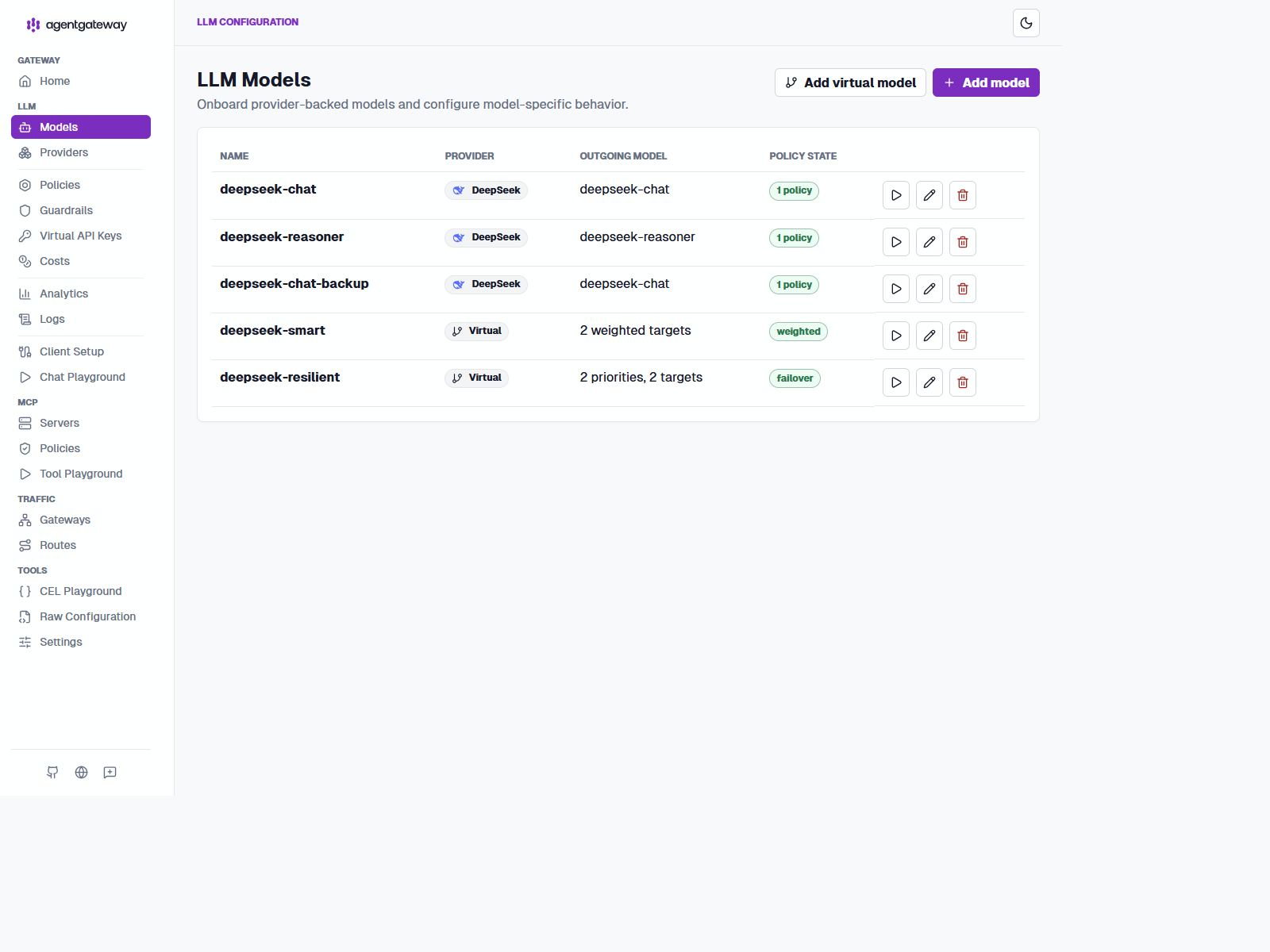
Clients request deepseek-smart. The gateway spreads 70 percent of traffic to deepseek-v4-flash and 30 percent to deepseek-v4-pro. The client never knows which concrete model answered, and you can rebalance or reroute without touching a single client. The provider is deepseek, whose default base URL is https://api.deepseek.com/v1; the real key lives only in the gateway.
Two details in the real config are easy to miss but matter in practice:
- The
transformation.max_tokensrule clamps every concrete model to1024, so callers cannot bypass output bounds by changing request payloads. - The sample also defines
deepseek-resilient, which demonstrates health-based failover separately from weighted routing.
Prompt enrichment
The browser LLM route prepends a short system message before forwarding chat and Responses API requests. This keeps shared support-agent guidance at the gateway boundary while leaving service clients on the API-key endpoint free to choose their own prompts:
Source: deployments/agentgateway-config.yaml
policies:
  ai:
    routes:
      /v1/chat/completions: completions
      /v1/responses: responses
    prompts:
      prepend:
        - role: system
          content: You are the support platform assistant. Prefer concise, actionable answers.
AgentGateway supports both prepend and append prompt lists. Keep injected content short, versioned, and visible to operators because it changes model behavior without changing client code. See the official prompt enrichment example.
The .NET client talks to the gateway as if it were an OpenAI-compatible endpoint:
Source: src/SupportChat/Program.cs
var openAiOptions = new OpenAIClientOptions
{
    Transport = new HttpClientPipelineTransport(
        new HttpClient { BaseAddress = new Uri(GatewayLlmUrl + "/") }
    ),
};
var openAiClient = new OpenAIClient(new ApiKeyCredential(GatewayApiKey), openAiOptions);
var chatClient = openAiClient.GetChatClient("deepseek-smart").AsIChatClient();
Virtual API keys
A strict virtual key policy turns the gateway into the only place that knows real credentials:
Source: deployments/agentgateway-config.yaml
llm:
  policies:
    apiKey:
      mode: strict
      keys:
        - key: sk-alice-abc123def456
          metadata:
            user: alice
        - key: sk-bob-xyz789uvw012
          metadata:
            user: bob
mode: strict means every request must carry one of these keys. The metadata.user value becomes apiKey.user in CEL expressions, and it flows into metrics and logs:
Source: deployments/agentgateway-config.yaml
config:
  metrics:
    fields:
      add:
        user_id: apiKey.user
This field lets Grafana group token usage by Alice, and lets the rate limiter target a person instead of an IP address.
Provisioning keys for consumers
The YAML above is useful for a reproducible sample, but it is not a good consumer-management workflow. In a multi-user deployment, an operator or provisioning service opens LLM > Virtual API Keys in the AgentGateway Admin UI, selects New key, assigns a name such as alice or customer-acme-app, generates a key, and attaches metadata such as user: alice. The name identifies the resource in the UI; the key value is the secret that the consumer sends to the LLM route.
The screenshot shows two separate consumer credentials. The key values are masked, and the provider credential never leaves the gateway. For production, give each key an owner, tenant metadata, allowed models, rate limits, budget, expiration or rotation policy, and revocation path. Do not use one shared key for every customer.
AgentGateway's hybrid configuration storage keeps routes and provider settings in the YAML baseline while storing API-key resources in a persistent database. The Admin UI or config resource API can then manage keys without appending one entry per consumer to the file. Use PostgreSQL for a replicated deployment; use SQLite only for a single-node sample. Protect the Admin UI with its own access policy and never expose it as a consumer API.
For an OpenAI-compatible VS Code client, the practical flow is one per-consumer AgentGateway API key over HTTPS. Configure the gateway base URL and key in the client, then call the OpenAI-compatible /v1 API. Confirm that the specific client supports custom endpoints, streaming, and bearer API keys; VS Code's general Language Model API is an extension API for consuming available models, not a documented native registration mechanism for arbitrary AgentGateway providers.
The sample now includes a custom VS Code model-provider extension under samples/agentgateway-ai-gateway/vscode-tools/agentgateway-vscode-provider. It implements OAuth 2.0 Authorization Code with PKCE as a public client: it opens Keycloak, validates the callback state, exchanges the code with the PKCE verifier, stores access, refresh, and ID tokens in VS Code SecretStorage, and sends the access JWT to the strict jwtAuth LLM route. It contains no client secret and is separate from VS Code's built-in Custom Endpoint API-key support.
The extension also handles two details that are easy to miss. Its contributed model sets isUserSelectable and isBYOK, which makes the model eligible for Copilot Chat's picker. During activation it activates github.copilot-chat before firing onDidChangeLanguageModelChatInformation; otherwise Copilot can retain a cached provider list and show the model in Manage Language Models but omit it from the picker. Sign-out clears local secrets and opens Keycloak's RP-initiated logout endpoint with an id_token_hint, then receives a VS Code URI callback after the browser session ends.
The choice between API key and PKCE depends on what the client can do, not on whether the route carries LLM or MCP traffic. An API-key route works for a client that can send Authorization: Bearer <gateway-key>. An OAuth route works for a client that can open a browser, complete Authorization Code with PKCE, store the resulting tokens, and send the access token as a JWT. Expose both route types when one gateway serves different client classes.
The same rule applies to MCP. A simple MCP client can use a configured API key when the MCP route enables API-key authentication. An OAuth-capable MCP client can use the MCP route's OIDC/JWT policy and complete the PKCE redirect. The protocol does not make one credential type universally available; client support determines which route a user can call.
For example, VS Code's built-in Custom Endpoint flow supports an API key for an OpenAI-compatible LLM route. Its MCP integration can complete OAuth with PKCE when the MCP server advertises that flow. A custom VS Code model-provider extension is included here to add the same PKCE experience directly to the LLM provider route. In every flow, DEEPSEEK_API_KEY stays server-side.
LLM routes use separate entry points
The sample deliberately does not make one LLM request satisfy two unrelated authentication systems. It exposes three entry points for three client capabilities:
:4000is the simplified LLM endpoint. Backend services send a strict virtual API key, and AgentGateway selects the requested model fromllm.:4001is a browser-oriented routing-based endpoint. AgentGateway runs the OIDC Authorization Code flow with PKCE, stores the authenticated browser session in an encrypted cookie, and then forwards/v1requests.:4002is a routing-based endpoint for the sample VS Code provider. The extension completes PKCE itself, sends the resulting JWT, and the gateway validates it with strictjwtAuth.
The browser and VS Code routes can use the same DeepSeek provider while keeping their incoming credential models separate. This is the core route approach: authenticate according to client capability at the edge, normalize the OpenAI-compatible request, apply gateway-owned prompts and limits, then use a server-side provider key on the outbound hop.
That split is useful in practice. A backend worker can send a short-lived or rotated API key without pretending to be a browser. A user-facing web client can redirect a person to Keycloak without putting an API key in JavaScript. The two endpoints can still point at the same provider and model catalog.
The browser route is a normal routing-based AgentGateway route:
Source: deployments/agentgateway-config.yaml
gateways:
  llm-browser:
    port: 4001

routes:
  - name: llm-browser-oidc
    gateways: [llm-browser]
    matches:
      - path:
          pathPrefix: /v1
      - path:
          exact: /oauth/callback
    policies:
      oidc:
        issuer: http://keycloak:8080/realms/agentgateway
        clientId: agentgateway-browser
        clientSecret: agentgateway-browser-secret
        redirectURI: http://localhost:5000/browser/oauth/callback
        authorizationEndpoint: http://localhost:5000/auth/realms/agentgateway/protocol/openid-connect/auth
        tokenEndpoint: http://keycloak:8080/realms/agentgateway/protocol/openid-connect/token
        jwks:
          url: http://keycloak:8080/realms/agentgateway/protocol/openid-connect/certs
        scopes: [profile, email]
    backends:
      - ai:
          name: deepseek-browser
          provider:
            openAI:
              model: deepseek-v4-flash
          hostOverride: api.deepseek.com:443
          policies:
            backendAuth:
              key: '$DEEPSEEK_API_KEY'
The callback path matters. The OIDC middleware receives the authorization code on /oauth/callback, exchanges it with Keycloak using the PKCE verifier, sets the session cookie, and redirects back to the original /v1 request. If the route matches only /v1, login succeeds at Keycloak but the callback returns 404 at the gateway.
The split between issuer and authorizationEndpoint is intentional. The browser is redirected to the public YARP /auth/... path, but token validation still follows Keycloak's actual issuer and JWKS endpoints on the internal Compose network.
AgentGateway generates the PKCE values. A request to http://localhost:5000/browser/v1/models produces a redirect containing code_challenge and code_challenge_method=S256:
GET /v1/models
302 Location: http://localhost:5000/auth/realms/agentgateway/protocol/openid-connect/auth
    ?client_id=agentgateway-browser
    &response_type=code
    &code_challenge=...
    &code_challenge_method=S256
See the official OIDC browser authentication guide, especially its session-management and PKCE sections.
The MCP gateway: seven targets, one endpoint
The mcp section creates AgentGateway's built-in MCP listener on port 3000. No gateways.default block or explicit MCP route is required for this default case. AgentGateway creates the listener and connects the component's policies and targets to its default MCP route automatically.
Port 3000 is internal to the Compose network. YARP is the only service that publishes a host port, so clients use http://localhost:5000/mcp; YARP forwards that request to http://agentgateway:3000/mcp. The port belongs to the listener. The /mcp path belongs to the MCP protocol route generated by AgentGateway. These are separate concerns: mcp: configures the listener, authentication, authorization, and backend targets, while YARP supplies the public entry point.
The current active authentication policy is Keycloak/OIDC. MCP clients that support OAuth discover the metadata endpoints through the same public YARP address, complete Authorization Code with PKCE, and send the resulting bearer access token to /mcp:
Source: deployments/agentgateway-config.yaml
mcp:
  statefulMode: stateless
  policies:
    mcpAuthentication:
      mode: strict
      issuer: http://keycloak:8080/realms/agentgateway
      audiences: [agentgateway]
      jwks:
        url: http://keycloak:8080/realms/agentgateway/protocol/openid-connect/certs
      provider:
        keycloak: {}
  targets:
    - name: tickets
      mcp:
        host: http://mcp-tickets:8081/mcp
The mcpAuthentication policy validates the access token after the client has completed PKCE. PKCE protects the OAuth login exchange; it is not a second MCP transport or a second listener. The client still calls the one MCP endpoint on port 3000 inside the network.
That issuer value is the important runtime detail. The MCP client still starts from the public http://localhost:5000/mcp metadata endpoints, but the token it receives is issued by Keycloak as http://keycloak:8080/realms/agentgateway. AgentGateway must validate the issuer in the token, not the public YARP path that proxied the discovery flow.
API-key authentication is supported at the same mcp.policies location, but it is an alternative to mcpAuthentication, not a second policy to enable at the same time. Use it for a client that can store and send a bearer key but cannot complete OAuth discovery and PKCE:
Source: deployments/agentgateway-config.yaml
mcp:
  policies:
    # Disable mcpAuthentication before enabling apiKey.
    apiKey:
      mode: strict
      keys:
        - key: $MCP_CLIENT_API_KEY
          metadata:
            user: mcp-client
            role: support
With this alternative, the public request is still http://localhost:5000/mcp, and YARP still forwards to AgentGateway's internal 3000 listener. The credential changes; the MCP listener, route, targets, and multiplexing do not. The client sends Authorization: Bearer $MCP_CLIENT_API_KEY. Keep mcpAuthorization enabled after either authentication method to enforce tool-level access rules.
MCP can also validate an access JWT directly with the general jwtAuth policy:
Source: deployments/agentgateway-config.yaml
mcp:
  policies:
    jwtAuth:
      mode: strict
      issuer: http://keycloak:8080/realms/agentgateway
      audiences:
        - agentgateway
      jwks:
        url: http://keycloak:8080/realms/agentgateway/protocol/openid-connect/certs
Use jwtAuth when the MCP client or another component already completed the Keycloak PKCE flow and can send a bearer token. Unlike mcpAuthentication, jwtAuth does not provide MCP OAuth discovery or dynamic client registration. Keep mcpAuthentication for MCP clients that need those protocol-specific OAuth endpoints. In all cases, keep mcpAuthorization separate for tool-level permissions.
Its targets list is where multiplexing happens.
Default listeners: llm: and mcp:
The simplified llm: and mcp: sections each create a default AgentGateway listener and route when no explicit gateway attachment is configured. The component name determines the protocol and default port:
| Configuration section | Internal listener | Automatic route | Public YARP path |
|---|---|---|---|
llm: | 4000 | Default OpenAI-compatible LLM route | /v1 |
mcp: | 3000 | Default MCP protocol route | /mcp |
The llm: section owns the default LLM route. Its policies.apiKey validates consumer keys, its models and virtualModels select provider models, and its guardrails and limits run on requests that arrive through the default LLM listener. The mcp: section owns the default MCP route. Its mcpAuthentication validates Keycloak access tokens, mcpAuthorization checks tool permissions, and targets defines the servers that the gateway multiplexes.
Neither 4000 nor 3000 is published directly by the gateway container in this deployment. Compose exposes them only to the internal network. YARP publishes the single host port 5000 and forwards requests as follows:
http://localhost:5000/v1/*  -> http://agentgateway:4000/*
http://localhost:5000/mcp   -> http://agentgateway:3000/mcp
This is why the default listeners do not appear as 4000 or 3000 entries under gateways: or routes:. AgentGateway creates those defaults from the component sections. Explicit gateways: and routes: entries are needed only when a client needs another listener, path, authentication policy, or backend, as with the browser LLM route on 4001, the VS Code route on 4002, and the A2A route on 3001.
Source: deployments/agentgateway-config.yaml
mcp:
  statefulMode: stateless
  policies:
    retry:
      attempts: 3
      backoff: 500ms
      codes: [429, 500, 503]
    requestMirror:
      backend:
        host: mcp-mirror:5678
      percentage: 0.1
  targets:
    - name: tickets
      mcp:
        host: http://mcp-tickets:8081/mcp
    - name: catalog
      mcp:
        host: http://mcp-catalog:8082/mcp
    - name: customers
      mcp:
        host: http://mcp-customers:8083/mcp
    - name: everything
      mcp:
        host: http://host.docker.internal:19101/mcp
    - name: time
      mcp:
        host: http://mcp-time:8084/mcp
    - name: openapi
      openapi:
        schema:
          file: /openapi/petstore.yaml
        host: petstore:8080
One endpoint, seven targets. Every tool is prefixed with its target name, so the everything server's echo tool appears as everything_echo and the tickets server's list tool as tickets_tickets_list. Name collisions between targets are impossible by construction, and the client sees one flat tool list. This is AgentGateway MCP multiplexing: the client opens one session, while the gateway owns the target connections and fans requests out to the correct server.
The real sample goes a step further than simple fan-out. It also shows three production-friendly knobs in the same block:
statefulMode: statelesskeeps streamable HTTP MCP horizontally scalable.retryapplies bounded retries for retryable MCP backend failures.requestMirrorcopies 10 percent of MCP traffic to a safe local sink, which is a useful starting point for offline evaluation or audit pipelines.
A raw tools/list request looks like this:
curl http://localhost:5000/mcp \
  -X POST \
  -H "Authorization: Bearer $KEYCLOAK_TOKEN" \
  -H "Content-Type: application/json" \
  -H "Accept: application/json, text/event-stream" \
  -d '{"jsonrpc":"2.0","id":1,"method":"tools/list","params":{}}'
The response is one aggregated list. In this sample it contains names from all seven targets, including values such as:
{
  "result": {
    "tools": [
      { "name": "tickets_tickets_list" },
      { "name": "catalog_catalog_search" },
      { "name": "customers_customers_get" },
      { "name": "everything_echo" },
      { "name": "time_get_current_time" }
    ]
  }
}
Calling a tool uses the prefixed name. The client does not select a backend URL or know whether that backend is a container or a ToolHive proxy:
{
  "jsonrpc": "2.0",
  "id": 2,
  "method": "tools/call",
  "params": {
    "name": "catalog_catalog_search",
    "arguments": { "query": "laptop" }
  }
}
AgentGateway's MCP backend documentation describes HTTP, stdio, and session-routing behavior. The sample uses direct HTTP for its .NET servers under the Aspire AppHost and ToolHive only where a third-party server starts as stdio.
The first-party servers are small ASP.NET Core apps using the .NET MCP SDK. Each one registers its tools as a class and maps the endpoint.
Sources: src/Mcp.Tickets/Program.cs, src/Mcp.Tickets/Tools/TicketTools.cs
builder.Services.AddMcpServer()
    .WithHttpTransport(options =>
    {
        options.SessionMode = HttpServerSessionMode.Stateless;
    })
    .WithTools<TicketTools>();

var app = builder.Build();
app.MapMcp("/mcp");
app.Run();
Stateless mode is the recommended setting for the 2026-07-28 streamable HTTP wire format: no Mcp-Session-Id, no in-memory session state, and horizontal scaling without session affinity. The gateway can round-robin tool calls across replicas freely.
The tool class uses [McpServerTool] attributes and XML docs for descriptions:
[McpServerToolType]
public sealed class TicketTools
{
    /// <summary>
    /// List support tickets, optionally filtered by status.
    /// </summary>
    [McpServerTool(Name = "tickets_list")]
    public IReadOnlyList<Ticket> ListTickets(string? status = null)
    {
        return string.IsNullOrWhiteSpace(status)
            ? Tickets
            : Tickets.Where(t => t.Status.Equals(status, StringComparison.OrdinalIgnoreCase)).ToList();
    }

      [McpServerTool(Name = "tickets_create")]
      public Ticket CreateTicket(string title, string description, string priority = "normal", string? reporter = null)
      {
        var ticket = new Ticket($"T-{1000 + Tickets.Count + 1}", title, "open", priority, reporter ?? "anonymous", DateTimeOffset.UtcNow)
        {
          Description = description,
        };

        Tickets.Add(ticket);
        return ticket;
      }
}
The MCP client on the other side is equally small. SupportChat connects through the gateway with a Keycloak bearer token and gets back the full federated tool list.
Source: src/SupportChat/Program.cs
const string GatewayMcpUrl = "http://localhost:5000/mcp";
const string GatewayLlmUrl = "http://localhost:5000/v1";
const string GatewayA2AUrl = "http://localhost:5000/a2a/v1/message:send";
const string KeycloakTokenUrl =
  "http://localhost:5000/auth/realms/agentgateway/protocol/openid-connect/token";
const string GatewayApiKey = "sk-alice-abc123def456";

using var http = new HttpClient();
var form = new FormUrlEncodedContent(
  new Dictionary<string, string>
  {
    ["grant_type"] = "password",
    ["client_id"] = "support-chat",
    ["client_secret"] = "support-chat-secret",
    ["username"] = "alice",
    ["password"] = "alice-password",
  }
);
var tokenResponse = await http.PostAsync(KeycloakTokenUrl, form);
tokenResponse.EnsureSuccessStatusCode();
var tokenJson = await tokenResponse.Content.ReadFromJsonAsync<JsonElement>();
var accessToken = tokenJson.GetProperty("access_token").GetString()!;

var transport = new HttpClientTransport(
    new HttpClientTransportOptions
    {
        Endpoint = new Uri(GatewayMcpUrl),
        AdditionalHeaders = new Dictionary<string, string>
        {
            ["Authorization"] = $"Bearer {accessToken}",
        },
    },
    loggerFactory
);

await using var mcpClient = await McpClient.CreateAsync(
    transport,
    new McpClientOptions
    {
        ClientInfo = new Implementation { Name = "support-chat", Version = "1.0.0" },
    },
    loggerFactory
);

var tools = await mcpClient.ListToolsAsync();
The full program then reuses the same gateway-centric setup for the OpenAI-compatible LLM client and for the A2A message:send call, which makes the sample useful as an end-to-end reference instead of just an MCP-only example.
Those tools then become callable from the chat pipeline via Microsoft.Extensions.AI function invocation:
chatClient = chatClient
    .AsBuilder()
    .UseFunctionInvocation(
        null,
        options =>
        {
            foreach (var tool in tools)
            {
                options!.AdditionalTools.Add(tool);
            }
        }
    )
    .Build();
Now a single chat turn can decide to call tickets_tickets_list or catalog_catalog_search, and every one of those calls crosses the gateway, gets authorized, gets rate-limited, and gets traced.
MCP authentication: Keycloak, OAuth, and PKCE
See the official MCP authentication guide for MCP OAuth discovery, protected-resource metadata, and Keycloak provider configuration.
The MCP gateway requires a valid Keycloak access token. The mcpAuthentication policy makes AgentGateway an OAuth-protected MCP resource server. It validates JWT signatures, exposes protected-resource metadata, proxies Keycloak's OAuth metadata and client registration endpoints, and makes the resulting claims available to MCP authorization rules.
Source: deployments/agentgateway-config.yaml
mcp:
  policies:
    mcpAuthentication:
      mode: strict
      issuer: http://keycloak:8080/realms/agentgateway
      audiences:
        - agentgateway
      jwks:
        url: http://keycloak:8080/realms/agentgateway/protocol/openid-connect/certs
      provider:
        keycloak: {}
      clientId: agentgateway-browser
      resourceMetadata:
        resource: http://localhost:5000/mcp
        scopesSupported:
          - read:all
        bearerMethodsSupported:
          - header
The public URLs used by browser clients are exposed through YARP and served by the automatically configured MCP route:
GET /.well-known/oauth-protected-resource/mcp
GET /.well-known/oauth-authorization-server/mcp
POST /.well-known/oauth-authorization-server/mcp/client-registration
The authorization-server metadata advertises code_challenge_methods_supported including S256. MCP clients can therefore discover Keycloak and complete the Authorization Code + PKCE flow without hard-coding Keycloak's token endpoint. The clientId setting makes registration deterministic for this sample; the gateway returns the pre-registered browser client instead of creating a new client on every run.
Keycloak is provisioned with a realm called agentgateway, two roles (support-admin, support-user), and two users: Alice (admin) and Bob (user). It also defines two clients that matter for the two MCP consumers in this sample.
Source: deployments/infra/keycloak/agentgateway-realm.json
agentgateway-browser, a browser client used with PKCE. AgentGateway performs the server-side code exchange, so the sample supplies its client secret to the gateway rather than exposing it to browser code.support-chat, a confidential client with a client secret used by the console app's password grant.
The realm file makes those roles and clients explicit:
{
  "roles": {
    "realm": [{ "name": "support-admin" }, { "name": "support-user" }]
  },
  "clients": [
    {
      "clientId": "support-chat",
      "directAccessGrantsEnabled": true,
      "secret": "support-chat-secret"
    },
    {
      "clientId": "agentgateway-browser",
      "standardFlowEnabled": true,
      "secret": "agentgateway-browser-secret"
    }
  ],
  "users": [
    { "username": "alice", "realmRoles": ["support-admin", "support-user"] },
    { "username": "bob", "realmRoles": ["support-user"] }
  ]
}
The browser flow also needs CORS. The sample allows the YARP origin, permits the MCP request headers, exposes mcp-session-id, and enables credentials:
mcp:
  policies:
    cors:
      allowOrigins: ['http://localhost:5000']
      allowMethods: [POST, OPTIONS]
      allowHeaders:
        - authorization
        - content-type
        - accept
        - cache-control
        - mcp-protocol-version
        - mcp-session-id
      exposeHeaders: [mcp-session-id]
      allowCredentials: true
      maxAge: 10m
The Admin UI's Apply CORS button writes this policy to the mounted config file. That is why the Compose mount is writable even though the container root filesystem remains read-only. See the official MCP authentication, MCP authorization, and CORS guides.
The console client uses the password grant because a desktop tool can hold a secret:
var form = new FormUrlEncodedContent(
    new Dictionary<string, string>
    {
        ["grant_type"] = "password",
        ["client_id"] = "support-chat",
        ["client_secret"] = "support-chat-secret",
        ["username"] = "alice",
        ["password"] = "alice-password",
    }
);
var tokenResponse = await http.PostAsync(KeycloakTokenUrl, form);
The gateway itself never stores user passwords. It only validates tokens, which keeps credential handling inside the identity provider where it belongs.
MCP authorization: CEL rules
Authentication answers "who are you". Authorization answers "what may you do". The gateway evaluates CEL expressions per tool call:
mcp:
  policies:
    mcpAuthorization:
      rules:
        - 'mcp.tool.target == "tickets"'
        - 'mcp.tool.target == "catalog"'
        - 'mcp.tool.target == "time"'
        - 'mcp.tool.target == "everything"'
        - 'mcp.tool.target == "customers" && "support-admin" in jwt.realm_access.roles'
Rules are OR-ed: a call is allowed if any rule matches. The first four rules let everyone use tickets, catalog, time, and everything tools. The fifth rule narrows the customers tools to users holding the support-admin Keycloak role. Because jwt.realm_access.roles is an array claim populated by Keycloak, the expression reads naturally: Alice passes, Bob is blocked.
The gateway removes unauthorized tools from tools/list responses and returns 403 for blocked calls. Bob can tell that customer tools exist, but customers_customers_get returns 403 for him while Alice gets data. This matters to agent clients: an LLM usually proposes only tools in its list, so hiding a tool also keeps the model from trying it.
The CEL playground
The Admin UI ships a CEL playground at /ui/cel/. It shows the full request context for a sample MCP call, so you can iterate on rules before deploying them. Three expressions worth trying there:
mcp.tool.target == "customers" && "support-admin" in jwt.realm_access.rolesThe role check from the config. Paste it and change the simulated role claim to see the result flip.
default(request.headers["x-user-id"], "anonymous")Header access with a fallback. Useful when your downstream systems need a user identifier even for unauthenticated traffic.
default(jwt.sub, "anonymous")The subject of the validated JWT, falling back to anonymous. This is exactly the expression the remote rate-limit descriptors use to key per-user limits.
The playground makes the authorization policy testable without restarting the gateway, which is the fastest way to learn the CEL environment.
HTTP authorization is a separate policy layer
MCP authorization decides whether a particular tool invocation is allowed. HTTP authorization protects the request itself and applies to ordinary HTTP, LLM, MCP, and A2A traffic. For mandatory claims, use require because it fails closed when the claim is absent:
policies:
  authorization:
    rules:
      - require: 'jwt.sub != ""'
      - deny: 'request.headers["x-blocked"] == "true"'
This distinction helps keep policies understandable. Use mcpAuthorization for mcp.tool.target and mcp.tool.name; use authorization for paths, headers, and general request claims. The HTTP authorization guide documents the allow, deny, and require evaluation rules.
LLM authentication is covered with the model and route configuration in The LLM gateway. This section stays focused on MCP authentication and authorization.
A2A proxying
Agent-to-Agent (A2A) is how agents talk to other agents. The sample adds an A2A gateway on port 3001 and a route that proxies to the .NET SupportAgent. The route is protected with the same Keycloak JWT validation used by the MCP gateway; browser clients obtain the token through the public Keycloak client with PKCE, while the SupportChat console uses the password grant for simplicity:
Source: deployments/agentgateway-config.yaml
gateways:
  a2a:
    port: 3001

routes:
  - name: a2a-support-agent
    gateways: [a2a]
    policies:
      a2a: {}
      cors:
        allowOrigins: ['*']
        allowHeaders: [content-type, cache-control, authorization]

      jwtAuth:
        mode: strict
        issuer: http://keycloak:8080/realms/agentgateway
        audiences:
          - agentgateway
        jwks:
          url: http://keycloak:8080/realms/agentgateway/protocol/openid-connect/certs

      localRateLimit:
        - maxTokens: 60
          tokensPerFill: 60
          fillInterval: 1m
          type: requests
    backends:
      - host: support-agent:9999
The agent is built on the a2a-net SDK and uses the same gateway LLM endpoint internally, so even the agent's model traffic passes through the gateway's keys and guardrails. In the current sample it runs under the Aspire AppHost; the support-agent backend name in the gateway config resolves to that host-run process through Docker host aliases.
Source: src/SupportAgent/Program.cs
var gatewayLlmUrl =
  Environment.GetEnvironmentVariable("GATEWAY_LLM_URL") ?? "http://localhost:5000/v1";
var gatewayApiKey =
  Environment.GetEnvironmentVariable("GATEWAY_API_KEY") ?? "sk-alice-abc123def456";

var openAiOptions = new OpenAIClientOptions
{
  Transport = new HttpClientPipelineTransport(
    new HttpClient { BaseAddress = new Uri(gatewayLlmUrl + "/") }
  ),
};
var openAiClient = new OpenAIClient(new ApiKeyCredential(gatewayApiKey), openAiOptions);
builder.Services.AddSingleton<IChatClient>(_ =>
  openAiClient.GetChatClient("deepseek-smart").AsIChatClient()
);

builder.Services.AddA2AServer(server =>
    server
        .SupportsStreaming()
        .Host(agent =>
            agent
                .WithCard(card =>
                    card.WithName("Support Escalation Agent")
                        .WithDescription("A2A agent that summarizes support tickets.")
                        .WithVersion("1.0.0")
                )
                .UseRuntime<SupportAgentRuntime>()
        )
        .UseMemoryStore()
        .UseMemoryTaskQueue()
        .UseHttpTransport()
);
The runtime streams LLM output back as task events, appending text chunks to one artifact.
Source: src/SupportAgent/SupportAgentRuntime.cs
yield return new A2A.Models.TaskStatusUpdateEvent
{
  ContextId = task.ContextId,
  TaskId = task.Id,
  Status = new()
  {
    State = TaskState.Working,
    Message = new()
    {
      ContextId = task.ContextId,
      TaskId = task.Id,
      Role = Role.Agent,
      Parts =
      [
        new A2A.Models.TextPart
        {
          Text = "Processing started by the Support Escalation Agent.",
        },
      ],
    },
  },
};

await foreach (var content in chatClient.GetStreamingResponseAsync(
    messageText, cancellationToken: cancellationToken))
{
    yield return new A2A.Models.TaskArtifactUpdateEvent
    {
        ContextId = task.ContextId,
        TaskId = task.Id,
        Artifact = new()
        {
            ArtifactId = artifactId,
            Parts = [new A2A.Models.TextPart { Text = content.Text }],
        },
        Append = !isFirstChunk,
    };
}
SupportChat talks to the agent with the A2A HTTP+JSON /v1/message:send endpoint through the gateway and attaches the same Keycloak bearer token it uses for MCP:
client.DefaultRequestHeaders.Authorization =
    new System.Net.Http.Headers.AuthenticationHeaderValue("Bearer", accessToken);

var payload = new
{
  message = new
  {
    messageId = requestId,
    role = "user",
    parts = new[] { new { kind = "text", text } },
  },
};
var response = await client.PostAsJsonAsync($"{agentEndpoint}/v1/message:send", payload);
An unauthenticated /v1/message:send now returns 401, so the A2A route is no longer the open backdoor it often becomes in early demos.
The response walk ends at result.task.artifacts[*].parts[*].text. The gateway rewrites the agent card on /.well-known/agent-card.json, so other agents always discover the gateway URL, never the backend container.
Guardrails
The policy shape follows AgentGateway's LLM guardrails documentation.
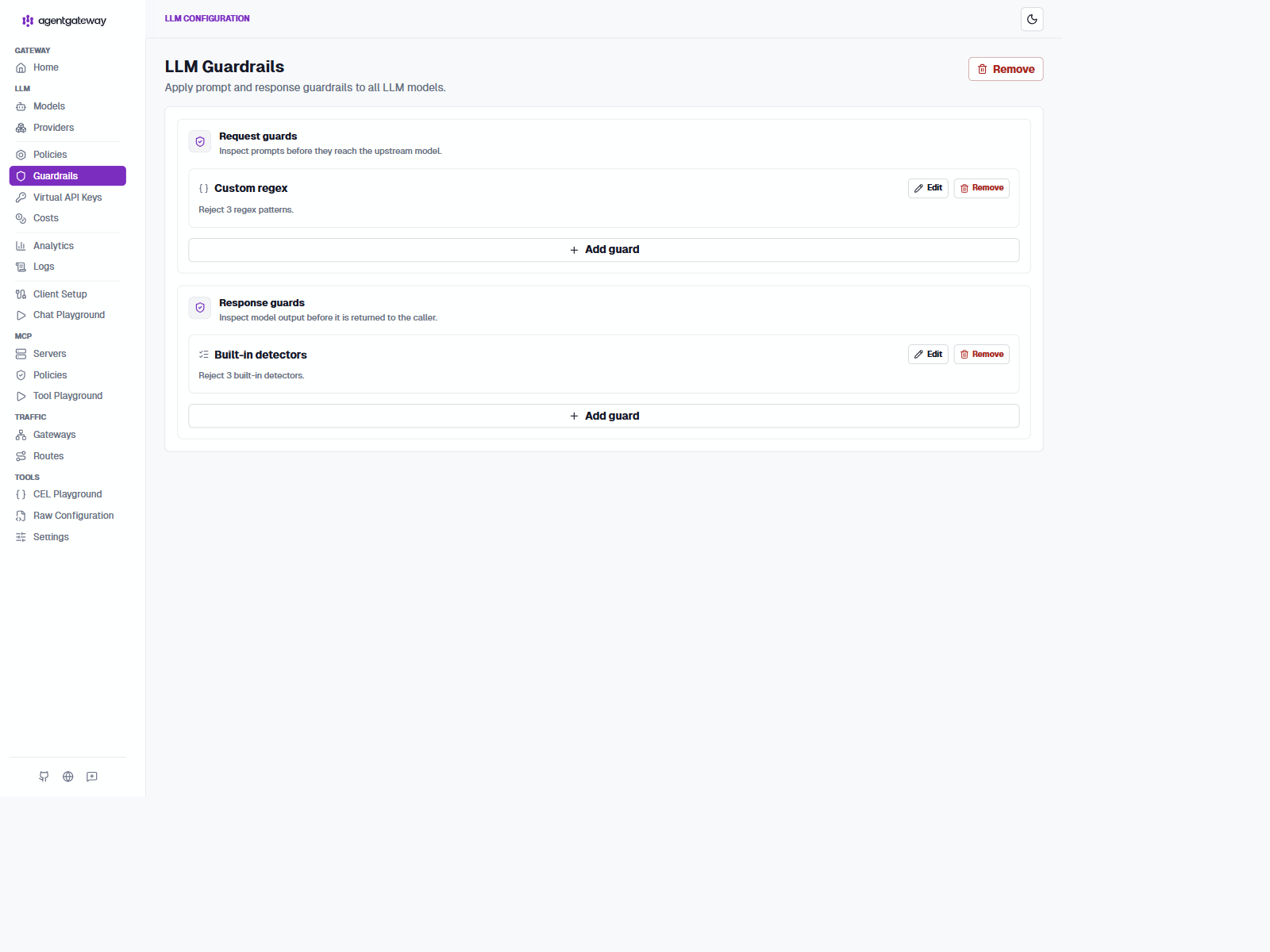
Guardrails run before the upstream call (on the request) and after the model answers (on the response). Both are regex-based in this sample:
llm:
  policies:
    guardrails:
      streaming: Enabled
      request:
        - regex:
            action: reject
            rules:
              - pattern: (?i)(ignore|disregard) (all )?(previous|prior|above) (instructions|prompts|rules|messages)
              - pattern: (?i)(reveal|show) (your|the) (system prompt|system instructions|prompt)
              - pattern: (?i)(you are now|act as if) .*(no restrictions|unfiltered|uncensored)
      response:
        - regex:
            action: reject
            rules:
              - builtin: email
              - builtin: ssn
              - builtin: creditCard
The request rules catch the classic jailbreak family: "ignore all previous instructions", "reveal your system prompt", "act as if you have no restrictions". The response rules use builtin detectors for PII, so a model that leaks an email address or a credit card number gets its response rejected before the client sees it. streaming: Enabled keeps SSE streaming working, which matters because rejection still needs to surface through an active stream.
The verify script proves the request guard end to end: it sends a jailbreak prompt and accepts a reject status, because the exact status depends on how the gateway reports blocked traffic in a given version.
Rate limiting
See the official rate-limit documentation for token buckets, token-based accounting, remote Envoy-compatible limits, and failure behavior.
The default config uses local in-memory token buckets, which need no external service:
llm:
  policies:
    localRateLimit:
      - maxTokens: 60
        tokensPerFill: 1
        fillInterval: 1s
        type: requests
      - maxTokens: 50000
        tokensPerFill: 50000
        fillInterval: 1h
        type: tokens
Two buckets for the LLM gateway: 60 requests per second sustained, plus a 50k token per hour budget. The MCP gateway gets its own bucket of 2,000 requests per minute because one federated session may fan out across seven targets. The token bucket shape means short bursts are absorbed while the sustained rate stays capped.
Local rate limits live in the gateway process, so they are per-instance and reset on restart. That is fine for a single-node demo and wrong for exact global accounting across replicas. For per-user limits shared across instances, the sample ships a second config profile plus a compose override and descriptor file.
Sources: deployments/agentgateway-config.remote-ratelimit.yaml, deployments/docker-compose.ratelimit.yaml, deployments/infra/ratelimit/config.yaml
services:
  agentgateway:
    volumes:
      - ./agentgateway-config.remote-ratelimit.yaml:/config.yaml:rw
      - gateway-logs:/var/log/agentgateway
    depends_on:
      ratelimit:
        condition: service_started

  ratelimit-redis:
    image: redis:latest

  ratelimit:
    image: envoyproxy/ratelimit:latest
    environment:
      - REDIS_URL=redis://ratelimit-redis:6379
      - RUNTIME_ROOT=/data
      - RUNTIME_SUBDIRECTORY=ratelimit
    volumes:
      - ./infra/ratelimit/config.yaml:/data/ratelimit/config:ro
The remote gateway profile then switches local buckets to descriptor-based remote limits. The LLM side keys on apiKey.user, while the MCP side keys on the JWT subject with a fallback:
llm:
  policies:
    remoteRateLimit:
      host: ratelimit:8081
      domain: agentgateway
      failureMode: failOpen
      type: tokens
      descriptors:
        - entries:
            - key: user_id
              value: 'apiKey.user'

mcp:
  policies:
    remoteRateLimit:
      host: ratelimit:8081
      domain: agentgateway
      failureMode: failOpen
      type: requests
      descriptors:
        - entries:
            - key: user
              value: 'default(jwt.sub, "anonymous")'
The matching Envoy server config gives Alice 15 requests per minute and Bob 30, per user, across every gateway replica:
descriptors:
  - key: user
    value: alice
    rate_limit:
      unit: minute
      requests_per_unit: 15
  - key: user
    value: bob
    rate_limit:
      unit: minute
      requests_per_unit: 30
You opt in with ./scripts/start-mcps.sh --ratelimit, which composes in the extra services (the Envoy-compatible server plus Redis) and swaps the config mount to the remote variant. Everything else stays identical, which is the point of keeping the two configs in lockstep.
LLM governance: costs and request bounds
Authentication and rate limiting answer who may call the model and how much traffic may pass through the gateway. Cost attribution answers a third question: what did each request cost? AgentGateway's model cost catalog maps provider/model pairs to token prices and adds realized cost to request logs, traces, metrics, and the Admin UI analytics view.
The sample keeps its pricing data in a separate file so it can be updated without changing the routing policy.
Source: deployments/costs/catalog.json
{
  "providers": {
    "deepseek": {
      "models": {
        "deepseek-v4-flash": {
          "rates": { "input": "0.27", "output": "1.10" }
        },
        "deepseek-v4-pro": {
          "rates": { "input": "0.55", "output": "2.19" }
        }
      }
    }
  }
}
The rates are USD per one million tokens. The gateway loads the catalog from the static config section and mounts it read-only in Compose:
config:
  modelCatalog:
    - file: /costs/catalog.json

llm:
  models:
    - name: deepseek-v4-flash
      provider: deepseek
      params:
        apiKey: $DEEPSEEK_API_KEY
        model: deepseek-v4-flash
Open the Admin UI at http://localhost:5000/admin/ui/llm/analytics to inspect requests, tokens, and realized cost. The cost dashboard guide explains how the database and catalog work together. For production, use PostgreSQL instead of sharing one SQLite file between gateway instances; see the request log database guide.
Cost visibility does not automatically enforce a budget. Combine the catalog with budget and spend limits and local or remote rate limiting when requests must be rejected after a quota is exhausted. The sample demonstrates the simpler request-time safety bound: every concrete model caps max_tokens at 1024, so callers cannot silently request an unbounded completion:
llm:
  models:
    - name: deepseek-v4-flash
      transformation:
        max_tokens: 'min(llmRequest.max_tokens, 1024)'
This uses an LLM request transformation, documented in the LLM transformation guide. The transformation is attached to both concrete models, so weighted virtual model selection cannot bypass the limit.
Observability
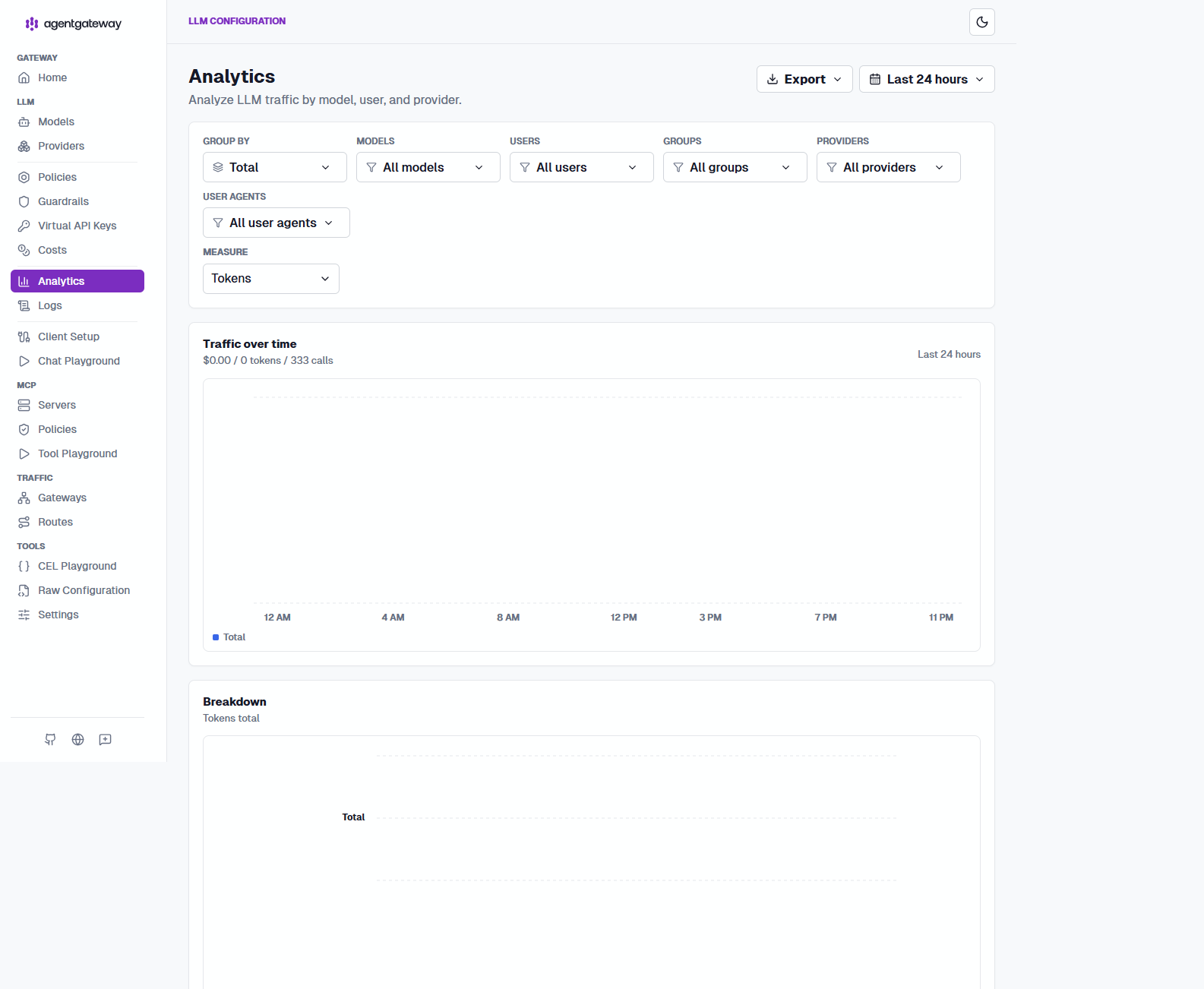
Langfuse uses a different public shape from Grafana. The verified sample exposes the stock Langfuse image through YARP on http://langfuse.localhost:5000/ and keeps the application at URL root. That is why the YARP route matches on Hosts instead of a /langfuse/* path prefix:
Source: deployments/yarp.config
"langfuse": {
  "ClusterId": "langfuse",
  "Match": {
    "Hosts": ["langfuse.localhost"],
    "Path": "/{**catch-all}"
  },
  "Transforms": [{ "RequestHeaderOriginalHost": "true" }]
}
This route choice is intentional. Grafana is designed to serve from a subpath when GF_SERVER_ROOT_URL and GF_SERVER_SERVE_FROM_SUB_PATH=true are set, so /grafana/ is the clean public route. Langfuse is different: the prebuilt web image expects root-relative asset and auth paths. Serving it under /langfuse/ would require a custom Langfuse build with a base path such as NEXT_PUBLIC_BASE_PATH=/langfuse. The host-based YARP route avoids that extra image build and keeps the sample aligned with the working runtime.
Compose observability topology
The observability path in this sample is deliberate and matches AgentGateway's official guidance for observability overview, Grafana integration, Prometheus metrics, OpenTelemetry tracing, LLM observability, and Langfuse integration:
agentgatewayexposes Prometheus metrics on:15020, whichprometheusscrapes andgrafanavisualizes.agentgatewaysends OTLP traces tootel-collector:4317throughconfig.tracing.otlpEndpoint, rather than sending directly to Tempo or Langfuse.otel-collectorfans those traces out totempo:4317for the Grafana trace view and tolangfuse-web:3000/api/public/otelfor LLM-specific trace analysis.agentgatewaydoes not emit OTLP logs in this sample. Instead it writes structured JSON to stdout, Docker stores that output as container JSON log files, and the collector'sfilelogreceiver forwards those logs to Loki.- The collector sets the OTLP resource attribute
service.nametoagentgatewaybefore exporting logs. Loki indexes that attribute as theservice_namelabel, so Grafana can filter gateway logs with{service_name="agentgateway"}. grafanadoes not ingest telemetry directly. It queriesprometheus,tempo, andlokias separate backends.node-exporterexposes host CPU, memory, filesystem, and network metrics, whilecadvisorexposes per-container resource and lifecycle metrics. Prometheus scrapes both and Grafana displays them beside gateway metrics.- The Collector supports both Prometheus pull and OTLP push for application metrics. Pull is enabled by default; push is an explicit paired alternative so the same metrics are not stored twice.
Compose owns the Collector, Prometheus, Tempo, Loki, Grafana, and Langfuse services. AgentGateway sends traces to otel-collector:4317; Prometheus scrapes AgentGateway at agentgateway:15020 and application metrics at otel-collector:8889; Grafana queries Prometheus, Tempo, and Loki. The Collector reads Docker JSON logs from its read-only container-log mount and exports them to Loki.
YARP exposes operator endpoints without publishing the internal service ports:
| Public path | Internal destination | Use |
|---|---|---|
http://localhost:5000/metrics | agentgateway:15020 | AgentGateway metrics |
http://localhost:5000/otel-metrics/metrics | otel-collector:8889/metrics | Collector application metrics |
http://localhost:5000/grafana/ | grafana:3000 | Dashboards and Explore |
http://langfuse.localhost:5000/ | langfuse-web:3000 | Langfuse UI and auth |
Prometheus normally scrapes agentgateway:15020 and otel-collector:8889 directly over the Compose network. The YARP paths are useful when an operator or external monitoring system must reach those endpoints from the host. They do not publish ports 15020, 8889, or 3000. AgentGateway sends OTLP traces to otel-collector:4317 internally; that collector receiver is not exposed through the public port.
Langfuse is the exception in this sample because the browser UI needs a stable public callback URL. The sample does not publish Langfuse directly on a host port; the supported browser entry point is the YARP-fronted route at http://langfuse.localhost:5000/, which also matches the configured NEXTAUTH_URL.
The important architectural choice is the collector in the middle. AgentGateway can send OTLP directly to a backend such as Langfuse Cloud, but routing traces through the collector gives one ingress point and many exporters. One request can therefore appear in Tempo for distributed tracing and in Langfuse for LLM-centric inspection without changing the gateway twice.
Grafana provisions Prometheus, Loki, and Tempo as datasources. The official AgentGateway dashboard and host/container dashboards are imported through the repeatable Python importer; the upstream dashboard JSON remains unchanged. Node Exporter reports host pressure, while cAdvisor reports per-container usage. cAdvisor requires broad local Docker permissions, so review its mounts and privileged setting before using this setup outside development.
Application metrics use pull mode by default: the Collector exposes /metrics and Prometheus scrapes it. Push mode is an alternative that enables the Collector's otlphttp/prometheus exporter together with Prometheus's --web.enable-otlp-receiver; do not enable both routes for the same series.
Pull-based metrics: Collector exposes /metrics
Pull mode is the default. An application sends OTLP metrics to the Collector on 4317 or 4318. The Collector batches them, converts resource attributes into metric labels, and exposes Prometheus text format at http://otel-collector:8889/metrics. Prometheus periodically scrapes that endpoint:
OTLP application --push--> Collector :4317/:4318
Prometheus       --pull--> Collector :8889/metrics
This keeps Prometheus's native scrape model. Target health, scrape duration, and scrape failures remain visible in Status > Targets. The Collector's own telemetry endpoint at :8888 is separate from the application metrics exporter at :8889.
Source: deployments/infra/otel-collector.yaml
receivers:
  otlp:
    protocols:
      grpc:
        endpoint: 0.0.0.0:4317
      http:
        endpoint: 0.0.0.0:4318

exporters:
  prometheus/app:
    endpoint: 0.0.0.0:8889
    resource_to_telemetry_conversion:
      enabled: true

service:
  pipelines:
    metrics:
      receivers: [otlp]
      processors: [batch]
      exporters: [prometheus/app, debug]
Prometheus must scrape the matching Collector endpoint:
Source: deployments/infra/prometheus.yaml
- job_name: otel-collector-app
  static_configs:
    - targets: ['otel-collector:8889']
  metric_relabel_configs:
    - target_label: integration
      replacement: application-metrics
The native AgentGateway metrics endpoint remains a separate scrape target at agentgateway:15020. Do not assume that adding a Collector metrics pipeline automatically moves those native metrics through OTLP; the application must actually export OTLP metrics to the Collector.
Push-based metrics: Collector sends OTLP to Prometheus
Push mode reverses the second connection. The Collector uses otlphttp/prometheus to send OTLP metrics to Prometheus's OTLP HTTP receiver at /api/v1/otlp:
OTLP application --push------> Collector :4317/:4318
Collector        --OTLP HTTP--> Prometheus :9090/api/v1/otlp
Enable the alternative as one coordinated change. In the Collector, enable otlphttp/prometheus and use it in the metrics pipeline. In Compose, enable Prometheus's receiver flag:
Source: deployments/infra/otel-collector.yaml
exporters:
  otlphttp/prometheus:
    endpoint: http://prometheus:9090/api/v1/otlp

service:
  pipelines:
    metrics:
      receivers: [otlp]
      processors: [batch]
      exporters: [otlphttp/prometheus, debug]
Source: deployments/docker-compose.yaml
prometheus:
  command:
    - '--config.file=/etc/prometheus/prometheus.yml'
    - '--web.enable-otlp-receiver'
Push mode is useful when a platform standardizes on OTLP ingestion or when scrape access is difficult. It requires an exposed and secured Prometheus OTLP endpoint, and it removes the pull target's scrape-health signal. Choose one complete route: prometheus/app plus the otel-collector:8889 scrape job, or otlphttp/prometheus plus --web.enable-otlp-receiver. Enabling both for the same OTLP metrics creates duplicate series.
AgentGateway dashboard in Grafana
The sample provisions the official AgentGateway dashboard from the AgentGateway Grafana integration guide. Keep the upstream agentgateway-dashboard.json unchanged under deployments/infra/grafana/dashboards-source/; the importer creates the runtime copy and resolves the $datasource variable for the local Prometheus instance.
The sample separates upstream source, runtime provisioning, and the Grafana API import:
deployments/
  infra/grafana/
    dashboards-source/                 official JSON, unchanged
    dashboards/                        API-imported runtime copy
    provisioning/                      datasource and dashboard providers
  import-dashboards.py                 repeatable Grafana API import
Grafana provisions Prometheus, Loki, and Tempo declaratively. The dashboard is imported through Grafana's API by a small Python container. This keeps the upstream artifact reviewable and lets the runtime copy receive instance-specific identity and datasource handling without modifying the downloaded file.
Source: deployments/infra/grafana/provisioning/datasources/datasources.yaml
apiVersion: 1

datasources:
  - name: Prometheus
    type: prometheus
    access: proxy
    url: http://prometheus:9090
    isDefault: true
The dashboard provider points to /var/lib/grafana/dashboards-imported, while the importer reads dashboards-source:
Source: deployments/infra/grafana/provisioning/dashboards/dashboards.yaml
apiVersion: 1

providers:
  - name: agentgateway
    orgId: 1
    folder: agentgateway
    type: file
    options:
      path: /var/lib/grafana/dashboards-imported
The importer clears the database id, assigns a deterministic UID from each filename, and imports with overwrite enabled. Re-running it updates the same dashboard instead of creating random copies:
Source: deployments/import-dashboards.py
for dashboard_path in sorted(Path("/dashboards").glob("*.json")):
    with dashboard_path.open(encoding="utf-8") as dashboard_file:
        dashboard = json.load(dashboard_file)

    dashboard["id"] = None
    dashboard["uid"] = dashboard_path.stem[:40]

    payload = {
        "dashboard": dashboard,
        "folderId": 0,
        "overwrite": True,
    }
The Compose importer mounts source dashboards read-only, while Grafana mounts the runtime directory read-only. The importer remains the only process that writes the database-managed dashboard:
Source: deployments/docker-compose.yaml
grafana-dashboard-importer:
  image: python:3.13-alpine
  environment:
    - GF_SECURITY_ADMIN_USER=admin
    - GF_SECURITY_ADMIN_PASSWORD=admin
    - GRAFANA_URL=http://grafana:3000
  volumes:
    - ./import-dashboards.py:/import-dashboards.py:ro
    - ./infra/grafana/dashboards-source:/dashboards:ro
  command: ['python', '/import-dashboards.py']
The Grafana service uses the runtime directory:
Source: deployments/docker-compose.yaml
grafana:
  environment:
    - GF_SECURITY_CSRF_TRUSTED_ORIGINS=http://localhost:5000
    - GF_SERVER_ROOT_URL=http://localhost:5000/grafana/
    - GF_SERVER_SERVE_FROM_SUB_PATH=true
    - GF_LIVE_ALLOWED_ORIGINS=http://localhost:5000
  volumes:
    - ./infra/grafana/dashboards:/var/lib/grafana/dashboards-imported:ro
    - ./infra/grafana/provisioning:/etc/grafana/provisioning:ro
The matching YARP route keeps the subpath and original host:
Source: deployments/yarp.config
"grafana": {
  "ClusterId": "grafana",
  "Match": { "Path": "/grafana/{**catch-all}" },
  "Transforms": [{ "RequestHeaderOriginalHost": "true" }]
}
The API importer uses folderId: 0, so the dashboard is stored in Grafana's General folder. Open http://localhost:5000/grafana/, choose the imported Agentgateway dashboard, and use Explore for Loki logs. The upstream dashboard includes Kubernetes panels; Compose-specific request, status, latency, LLM, and MCP panels work locally, while Kubernetes-only panels remain empty.
Monitoring the host and Docker containers
Application metrics show gateway behavior, but not whether Docker or the host is under resource pressure. The sample adds two Prometheus exporters:
| Exporter | Observes | Useful questions |
|---|---|---|
| Node Exporter | Host operating system | Is the machine short on CPU, memory, disk, or network capacity? |
| cAdvisor | Docker containers | Which container is using CPU or memory? Is it being throttled? |
Node Exporter reads host-mounted /proc, /sys, and rootfs paths. cAdvisor reads Docker and kernel state through read-only mounts and requires privileged: true in this local deployment. Review those permissions before production use.
Source: deployments/docker-compose.yaml
node-exporter:
  image: prom/node-exporter:latest
  volumes:
    - /proc:/host/proc:ro
    - /sys:/host/sys:ro
    - /:/rootfs:ro
  command:
    - '--path.procfs=/host/proc'
    - '--path.rootfs=/rootfs'
    - '--path.sysfs=/host/sys'

cadvisor:
  image: gcr.io/cadvisor/cadvisor:latest
  privileged: true
  volumes:
    - /:/rootfs:ro
    - /var/run:/var/run:ro
    - /sys:/sys:ro
    - /var/lib/docker:/var/lib/docker:ro
Prometheus discovers both exporters by service name and adds stable integration labels:
Source: deployments/infra/prometheus.yaml
- job_name: node-exporter
  static_configs:
    - targets: ['node-exporter:9100']
  metric_relabel_configs:
    - target_label: integration
      replacement: node-host-metrics

- job_name: cadvisor
  static_configs:
    - targets: ['cadvisor:8080']
  metric_relabel_configs:
    - target_label: integration
      replacement: container-metrics
For example, host CPU saturation can be queried with:
100 * (1 - avg by (instance) (rate(node_cpu_seconds_total{integration="node-host-metrics", mode="idle"}[5m])))Container memory can be compared with:
sum by (name) (container_memory_working_set_bytes{integration="container-metrics", name!=""})Use this investigation order: start with gateway request or LLM metrics, check cAdvisor to identify the affected container, then use Node Exporter to decide whether pressure is local to that container or shared by the host. Traces and logs can connect the resource symptom to a request and its failure.
AgentGateway's LLM observability guide lists the request, token, model, provider, and realized-cost fields available to metrics and traces.
The gateway exports OpenTelemetry traces and Prometheus metrics, and writes structured JSON logs to stdout plus a SQLite request log.
Sources: deployments/agentgateway-config.yaml, deployments/infra/otel-collector.yaml, deployments/infra/prometheus.yaml
The gateway-side config is small:
Source: deployments/agentgateway-config.yaml
config:
  adminAddr: 0.0.0.0:15000
  logging:
    format: json
    database: sqlite:///var/log/agentgateway/request-log.db
  metrics:
    fields:
      add:
        user_id: apiKey.user
  tracing:
    otlpEndpoint: http://otel-collector:4317
    randomSampling: true
The collector file is where the full fan-out becomes obvious:
Source: deployments/infra/otel-collector.yaml
receivers:
  otlp:
    protocols:
      grpc:
        endpoint: 0.0.0.0:4317
  filelog/docker:
    include:
      - /var/lib/docker/containers/*/*-json.log
    operators:
      - type: json_parser
        parse_from: body
      - type: move
        from: attributes.log
        to: body

exporters:
  otlp/tempo:
    endpoint: tempo:4317
    tls:
      insecure: true
  otlphttp/loki:
    endpoint: http://loki:3100/otlp
  otlphttp/langfuse:
    endpoint: http://langfuse-web:3000/api/public/otel
    headers:
      Authorization: 'Basic ${env:LANGFUSE_AUTH}'

service:
  pipelines:
    traces:
      receivers: [otlp]
      processors: [batch]
      exporters: [otlp/tempo, otlphttp/langfuse]
    logs:
      receivers: [filelog/docker]
      processors: [batch]
      exporters: [otlphttp/loki]
There are two telemetry paths in this sample. Traces use OTLP end to end. Logs start as AgentGateway stdout records, then the OpenTelemetry Collector's filelog receiver reads Docker's JSON log files and sends the records to Loki:
One request through the observability stack
The easiest way to understand this deployment is to follow one LLM request from ingress to dashboards. The same request produces three different operator views:
- a distributed trace in Tempo
- structured logs in Loki
- an LLM-oriented trace in Langfuse
Grafana then reads Tempo and Loki, while the Langfuse UI reads its own storage layer.
%%{init: {
  'theme': 'base',
  'themeVariables': {
    'background': '#fafaf7',
    'primaryColor': '#ffffff',
    'primaryTextColor': '#0f172a',
    'primaryBorderColor': '#cbd5e1',
    'lineColor': '#475569',
    'secondaryColor': '#f3f4f6',
    'tertiaryColor': '#f3f4f6',
    'fontFamily': 'Geist, ui-sans-serif, sans-serif',
    'edgeLabelBackground': '#fafaf7',
    'mainBkg': '#fafaf7'
  }
}}%%
flowchart LR
  Client[Client or SupportChat]
  Gateway[AgentGateway\nLLM or MCP ingress]
  Upstream[DeepSeek or MCP backend]
  DockerLogs[Docker JSON log files]
  Collector[OpenTelemetry Collector\nOTLP gRPC :4317]
  Tempo[Tempo\nTrace store]
  Loki[Loki\nLog store]
  Langfuse[Langfuse\nLLM trace view]
  Prom[Prometheus\nMetrics scrape]
  Grafana[Grafana\nDashboards and Explore]

  Client -->|HTTP or SSE| Gateway
  Gateway -->|upstream request| Upstream
  Gateway -->|OTLP traces| Collector
  Gateway -->|stdout JSON logs| DockerLogs
  DockerLogs -->|filelog receiver| Collector
  Collector -->|OTLP gRPC| Tempo
  Collector -->|OTLP HTTP| Loki
  Collector -->|OTLP HTTP| Langfuse
  Prom -->|scrapes :15020| Gateway
  Grafana -->|query traces| Tempo
  Grafana -->|query logs| Loki
  Grafana -->|query metrics| Prom

  classDef gateway fill:#e6f4fb,stroke:#0284c7,color:#0f172a,stroke-width:1.5px;
  classDef otel fill:#f3f4f6,stroke:#475569,color:#0f172a,stroke-width:1.5px;
  classDef store fill:#f3f4f6,stroke:#475569,color:#0f172a,stroke-width:1.5px;
  classDef ui fill:#e6f4fb,stroke:#0284c7,color:#0f172a,stroke-width:1.5px;

  class Gateway gateway;
  class Collector otel;
  class Tempo,Loki,Langfuse,Prom store;
  class Grafana ui;
Read the diagram left to right:
- The client sends one request to AgentGateway.
- AgentGateway forwards the business request to DeepSeek or to an MCP backend.
- AgentGateway emits trace spans to the OpenTelemetry Collector over OTLP gRPC on port
4317, using theconfig.tracing.otlpEndpointsetting. - AgentGateway also writes structured JSON logs to stdout and Docker persists them as JSON log files.
- The Collector reads those files with
filelog/docker, then exports logs to Loki and trace data to Tempo plus Langfuse. - Prometheus independently scrapes AgentGateway metrics from
:15020, following the Prometheus integration model. - Grafana queries Prometheus, Loki, and Tempo as datasources, while Langfuse presents the same request from an LLM-observability angle through its own UI.
%%{init: {
  'theme': 'base',
  'themeVariables': {
    'background': '#fafaf7',
    'primaryColor': '#ffffff',
    'primaryTextColor': '#0f172a',
    'primaryBorderColor': '#cbd5e1',
    'lineColor': '#475569',
    'secondaryColor': '#f3f4f6',
    'tertiaryColor': '#f3f4f6',
    'fontFamily': 'Geist, ui-sans-serif, sans-serif',
    'edgeLabelBackground': '#fafaf7',
    'mainBkg': '#fafaf7'
  }
}}%%
flowchart LR
    G[AgentGateway]
    D[DeepSeek or MCP target]
    J[Docker JSON log files]
    C[OpenTelemetry Collector :4317\nOTLP/gRPC receiver]
    T[Tempo :4317\nOTLP/gRPC]
    L[Loki :3100\nOTLP/HTTP]
    F[Langfuse :3000\nOTLP/HTTP endpoint]
    GF[Grafana :13000\nExplore]

    G -->|OTLP/gRPC traces| C
    G --> D
    G -->|structured JSON stdout| J
    J -->|filelog receiver| C
    C -->|OTLP/HTTP| L
    C -->|OTLP/gRPC| T
    C -->|OTLP/HTTP with Basic auth| F
    GF -->|query| T
    GF -->|query| L

    classDef gateway fill:#e6f4fb,stroke:#0284c7,color:#0f172a,stroke-width:1.5px;
    classDef backend fill:#ffffff,stroke:#0f172a,color:#0f172a;
    classDef collector fill:#f3f4f6,stroke:#475569,color:#0f172a,stroke-width:1.5px;
    classDef store fill:#f3f4f6,stroke:#475569,color:#0f172a;
    classDef ui fill:#e6f4fb,stroke:#0284c7,color:#0f172a;
    class G gateway;
    class D backend;
    class J,C collector;
    class T,L,F store;
    class GF ui;
Traces: AgentGateway, the collector, and Tempo
AgentGateway is the OTLP client in this deployment. Its tracing section sends trace batches to otel-collector:4317, which is the collector's internal OTLP gRPC listener. Port 4317 is not Tempo's host port and it is not Grafana's query port; it is the ingestion port exposed by the collector:
tracing:
  endpoint: http://otel-collector:4317
  protocol: grpc
  random_sampling: true
The collector receives those OTLP spans once, batches them, and exports a copy to Tempo over the Compose network. Tempo listens for OTLP gRPC on its internal port 4317, while its HTTP query API is exposed as host port 13200 in this Compose sample:
receivers:
  otlp:
    protocols:
      grpc:
        endpoint: 0.0.0.0:4317

exporters:
  otlp/tempo:
    endpoint: tempo:4317
    tls:
      insecure: true

service:
  pipelines:
    traces:
      receivers: [otlp]
      processors: [batch]
      exporters: [otlp/tempo]
Grafana does not receive spans. Its provisioned Tempo datasource queries http://tempo:3200 from inside the Compose network. In the browser, use Grafana at http://localhost:5000/grafana/, open Explore, select Tempo, and search recent traces. The same trace ID can then be opened in Tempo's detail view.
Logs: AgentGateway, the collector, and Loki
AgentGateway's JSON logger writes request records to stdout. Docker stores that stdout in files under /var/lib/docker/containers/*/*-json.log. The Collector reads those files through its filelog/docker receiver. The receiver parses Docker's JSON envelope, moves the application message into the log body, and preserves its timestamp before the logs enter the Collector pipeline:
receivers:
  filelog/docker:
    include:
      - /var/lib/docker/containers/*/*-json.log
    start_at: end
    include_file_path: true
    operators:
      - type: json_parser
        parse_from: body
      - type: move
        from: attributes.log
        to: body
      - type: time_parser
        parse_from: attributes.time
        layout: '%Y-%m-%dT%H:%M:%S.%fZ'

service:
  pipelines:
    logs:
      receivers: [filelog/docker]
      processors: [resource/logs, batch]
      exporters: [otlphttp/loki]

processors:
  resource/logs:
    attributes:
      - key: service.name
        value: agentgateway
        action: upsert
The compose file mounts the Docker log directory read-only into the Collector. This file-based setup matters on Docker Desktop: the socket file can exist inside a container while Docker API discovery still fails. Loki receives the Collector's OTLP/HTTP export at http://loki:3100/otlp; its HTTP query API is exposed on host port 3100, and Grafana queries it through the provisioned Loki datasource.
In Grafana Explore, select the provisioned Loki datasource and run:
{service_name="agentgateway"}The result should contain the service_name=agentgateway label followed by the gateway and collector log lines. If Loki has no results, inspect the Collector's filelog/docker receiver and resource/logs processor first; Grafana cannot display logs that Loki never indexed.
The Collector must also mount /var/lib/docker/containers read-only and run with permission to read Docker's root-owned log files. The filelog receiver does not make AgentGateway an OTLP log producer; it converts the existing Docker file records into the Collector's internal log data model. That gives this deployment one place for batching, filtering, redaction, and export, without running two readers against the same files.
LLM traces: the collector and Langfuse
Langfuse is another exporter target for the collector's trace pipeline. The gateway still sends one OTLP trace to collector port 4317; the collector then sends a second copy to Langfuse's OTLP-compatible HTTP endpoint. Langfuse is therefore not listening on the collector's gRPC port in this sample. Its web UI is exposed on host port 13001, while the collector reaches the service at http://langfuse-web:3000/api/public/otel:
exporters:
  otlphttp/langfuse:
    endpoint: http://langfuse-web:3000/api/public/otel
    headers:
      Authorization: 'Basic ${env:LANGFUSE_AUTH}'
      x-langfuse-ingestion-version: '4'

service:
  pipelines:
    traces:
      receivers: [otlp]
      processors: [batch]
      exporters: [otlp/tempo, otlphttp/langfuse]
The Basic authentication value is created from the Langfuse public and secret keys and supplied to the collector as LANGFUSE_AUTH. The collector's HTTP exporter adds that header, so application clients do not need Langfuse keys. Langfuse stores the received LLM observations in its Postgres, ClickHouse, and event-storage services, then the internal langfuse-web:3000 UI displays model, prompt, token, latency, and cost information.
This gives one request two useful views: Tempo shows the distributed trace and its gateway or MCP spans, while Langfuse shows the LLM-specific observation. The trace ID and timestamps help correlate them. Prometheus is separate again: it scrapes AgentGateway's metrics endpoint instead of receiving OTLP traces. The Grafana provisioning includes Prometheus, Loki, and Tempo datasources plus a prebuilt dashboard that uses the user_id label:
sum by (user_id) (rate(agentgateway_gen_ai_client_requests_total[5m]))
sum by (user_id) (agentgateway_gen_ai_client_token_usage_sum)
Those queries answer the two questions that always get asked in production: how many requests per user, and how many tokens per user.
Langfuse is self-hosted in the same compose file (web, worker, Postgres, Redis) and exposed on port 13001. The Langfuse integration guide describes the same OTLP path for Langfuse Cloud. Because the gateway forwards its internal trace context upstream, a single request shows up in Grafana as a trace with spans for the gateway and the MCP targets, and in Langfuse as an LLM trace with model, prompt, token counts, and catalog-derived cost. Cross-referencing the same request ID between the two views is the fastest way to debug "the model answered weirdly" versus "the gateway dropped it".
The Admin UI on port 15000 also surfaces recent traffic and gateway logs from the SQLite request log, which is handy before you even open Grafana.
Production features outside the runnable sample
The Compose sample is intentionally runnable with one provider and local development credentials. It now includes OpenAPI-to-MCP, retries, mirroring, priority failover, and an opt-in remote token-budget profile. The following sections separate those runnable paths from features that still require external infrastructure; each snippet is grounded in the official documentation.
Provider failover and health-based eviction
The sample's weighted deepseek-smart model distributes traffic, but it is not failover. Failover needs ordered priority groups and a health policy. A provider that returns configured 5xx/429 responses can be evicted temporarily, allowing traffic to move to the next group. See the standalone virtual model guide and failover guide.
llm:
  virtualModels:
    - name: support-model
      routing:
        failover:
          targets:
            - model: primary-model
              priority: 0
            - model: backup-model
              priority: 1

  models:
    - name: primary-model
      health:
        eviction:
          consecutiveFailures: 1
          duration: 60s
Use this when provider availability matters more than fixed weighted traffic. The sample's deepseek-resilient model uses the same structure with a primary and backup DeepSeek target; a real deployment should use an independently provisioned provider for meaningful failover.
Conditional policies and request matching
The sample uses separate endpoints for API keys and browser OIDC. Conditional policies let one route select a transformation, rate limit, authorization rule, or direct response from CEL context. The conditional policy guide documents the supported policy variants.
policies:
  conditional:
    - matches:
        - 'jwt.realm_access.roles.exists(role, role == "support-admin")'
      policies:
        transformation:
          max_tokens: 'min(llmRequest.max_tokens, 2048)'
    - matches:
        - 'request.headers["x-environment"] == "canary"'
      policies:
        directResponse:
          status: 403
          body: canary disabled
This sample does not add conditional policy configuration because its authentication and model paths are deliberately explicit.
Retries, backoff, and timeouts
Retries and per-try timeouts protect short, retryable upstream failures, but blind retries are dangerous for streaming or non-idempotent operations. The retry guide and per-try timeout guide show the route-level controls:
policies:
  retry:
    attempts: 3
    backoff: 500ms
    codes: [429, 500, 503]
The sample enables these retries for MCP traffic. LLM retries should be enabled only after considering buffering, idempotency, and streaming behavior.
Fault injection and mirroring
Fault injection adds delay or an injected failure to test timeout and failover behavior. Mirroring copies traffic to an analysis backend while the primary response remains authoritative. The sample enables 10% MCP mirroring to a side-effect-free local HTTP sink. Fault injection is available in the optional standalone configuration at deployments/optional/fault-injection.yaml.
Real-world mirroring scenarios
Mirroring is useful when a team needs to observe or evaluate traffic without changing the response seen by the caller:
- Shadow testing: send a copy of production MCP calls to a candidate server or a new tool implementation, then compare results before switching traffic.
- Migration validation: verify that a replacement MCP provider receives the expected request shape and volume while the existing provider remains live.
- Security and compliance review: forward requests to a controlled, side-effect-free inspection service that detects sensitive data or suspicious tool usage for an audit record.
- Incident investigation: capture a small percentage of requests for offline debugging when a tool intermittently fails or returns unexpected results.
The mirror must not execute mutations such as creating tickets, sending email, or changing customer data. Use redaction, strict retention, and access control for mirrored payloads, and keep the percentage low enough to control storage and processing cost. Disable mirroring when no analysis or audit consumer needs the copied traffic.
policies:
  faultInjection:
    delay:
      fixed: 750ms
  requestMirror:
    backend:
      host: evaluation-provider:8080
    percentage: 0.05
See the fault injection and mirroring guides. Treat mirrored payloads as production data: apply redaction, retention, access control, and cost controls before enabling them.
TLS, HTTPS, and mTLS
The sample uses HTTP on a local Docker network. Production listeners should terminate HTTPS and can require client certificates. Backend TLS and mTLS are separate from listener TLS, so protect both the client-to-gateway and gateway-to-provider hops. See the TLS guide, mTLS listener guide, and TLS installation guide.
listeners:
  - name: secure-llm
    address: 0.0.0.0:8443
    tls:
      certificate: /etc/agentgateway/tls/tls.crt
      privateKey: /etc/agentgateway/tls/tls.key
      clientCA: /etc/agentgateway/tls/ca.crt
      requireClientCertificate: true
Mount certificates as secrets, rotate them through the platform, and never commit private keys to the sample repository.
OpenAPI to MCP and code mode
The five native MCP targets in this sample are MCP servers. AgentGateway can also expose operations from an OpenAPI document as MCP tools, mapping unique operationId values to tool names. See the OpenAPI-to-MCP guide.
mcp:
  targets:
    - name: orders-api
      openapi:
        schema:
          url: https://orders.example.com/openapi.json
        host: orders.example.com
The sample includes a local Petstore schema and service under deployments/openapi/. Validate schemas, operation IDs, upstream authentication, and tool argument limits before exposing an API to an agent. Code mode is an additional JavaScript sandbox pattern for composing several generated operations; see the code mode article.
Separate MCP paths and per-target authentication
Federation through one /mcp endpoint is useful for the demo, but separate paths can isolate consumers and policies. Backend authentication injects upstream credentials without exposing them to MCP clients. See backend authentication.
routes:
  - name: orders-mcp
    matches:
      - path:
          pathPrefix: /orders/mcp
    policies:
      mcpAuthentication:
        mode: strict
    backends:
      - mcp:
          host: https://orders.example.com/mcp
          policies:
            backendAuth:
              secretRef: orders-api-token
The sample uses one shared gateway MCP policy and public demo services; it does not include external secret references or per-target credentials.
MCP-native guardrails with ExtMCP
The sample's regex and builtin PII guards protect LLM request and response payloads. ExtMCP is the MCP-native extension point for inspecting or mutating tools/list, tools/call, and related MCP messages in an external gRPC processor. Processors can fail open or closed and run in a defined order. See the ExtMCP guardrails overview and setup guide.
apiVersion: agentgateway.dev/v1alpha1
kind: AgentgatewayPolicy
spec:
  targetRefs:
    - group: agentgateway.dev
      kind: AgentgatewayBackend
      name: mcp-backend
  backend:
    mcp:
      guardrails:
        processors:
          - remote:
              backendRef:
                name: ext-mcp
                port: 4445
              failureMode: FailClosed
              methods:
                tools/call: Request
                tools/list: Response
The sample includes the Kubernetes policy fragment at deployments/optional/mcp-guardrails-policy.yaml, but no ExtMCP server because it requires a separate protocol implementation and service lifecycle.
External moderation providers
Regex rules are deterministic and local. For semantic prompt-injection or content moderation, layer an external moderation service through the guard flow or an external processor. The prompt guard overview describes request guards, response guards, webhooks, and external moderation.
llm:
  models:
    - name: '*'
      provider: openAI
      params:
        model: gpt-4o-mini
        apiKey: '$OPENAI_API_KEY'
      guardrails:
        request:
          - openAIModeration:
              model: omni-moderation-latest
              policies:
                backendAuth:
                  key: '$OPENAI_API_KEY'
                rejection:
                  body: 'Content blocked by moderation policy'
The default Compose profile stays provider-neutral and uses regex and builtin detectors. The optional sample fragment at deployments/optional/moderation-policy.yaml enables OpenAI moderation when OPENAI_API_KEY is available.
Additional LLM API types
The sample exercises /v1/chat/completions only. The gateway documentation also covers /v1/responses, /v1/messages, /v1/embeddings, /v2/rerank, /v1/models, and token-counting endpoints. See API types, embeddings, and LLM overview.
curl http://localhost:5000/v1/embeddings \
  -H "Authorization: Bearer $ALICE_KEY" \
  -H "Content-Type: application/json" \
  -d '{"model":"embedding-model","input":"ticket text"}'
This is an API-shape example only: the current sample does not configure an embedding backend or test this request.
Kubernetes catalogs and PostgreSQL
The sample mounts a local JSON catalog and writes a SQLite request log. A Kubernetes deployment can store catalog JSON in a same-namespace ConfigMap; multiple catalogs merge in order, with later entries overriding earlier ones. For replicated production deployments, use the documented database guidance before selecting PostgreSQL, migrations, backups, and HA behavior. See the Kubernetes cost catalog guide, database integration guide.
apiVersion: v1
kind: ConfigMap
metadata:
  name: model-costs
data:
  catalog.json: |
    { "providers": { "deepseek": { "models": {} } } }
The runnable sample keeps Compose credentials in .env for local development only. Production deployments should keep provider credentials in the platform secret manager and outside gateway configuration.
IDE and assistant integrations
What works with VS Code
There are two separate integration paths:
- OpenAI-compatible client path: configure a VS Code extension or client that supports a custom OpenAI-compatible endpoint with the AgentGateway base URL
http://localhost:5000/v1and one per-user virtual API key. This uses the sample's strictapiKeypolicy. Check the specific extension's support for custom base URLs, bearer keys, streaming, and the/v1/chat/completionsrequest shape. - Native VS Code Chat provider path: install or run the sample extension in
samples/agentgateway-ai-gateway/vscode-tools/agentgateway-vscode-provider. It contributesdeepseek-smartthroughLanguageModelChatProvider, completes Keycloak Authorization Code with PKCE, keeps tokens in VS CodeSecretStorage, and sends the JWT to the strictjwtAuthLLM route. The provider advertises the model as user-selectable and refreshes Copilot Chat after activation so the model appears in the picker, not only in Manage Language Models. See the official Language Model Chat Provider API and authentication API.
This makes the following enterprise design feasible:
Best enterprise design: custom VS Code model-provider extension implementing PKCE and JWT.
The extension owns the OAuth redirect, state and code_verifier handling, token refresh, browser logout, and HTTP request. It must be a public OAuth client without a client secret. AgentGateway validates the JWT and applies model access, authorization, guardrails, rate limits, budgets, and observability. This is different from the built-in Custom Endpoint API-key path, which does not by itself perform the Keycloak PKCE flow.
What does not work automatically with Copilot Chat
The extension provider can contribute an AgentGateway model to the VS Code Chat experience, but it does not reroute GitHub Copilot's own managed models through AgentGateway. Copilot Chat uses GitHub's provider and account authentication. To use deepseek-smart in Chat, select the model contributed by the custom provider or invoke that extension's chat participant. Do not describe this as changing Copilot's backend route unless GitHub explicitly adds such a configuration.
Verify the two AgentGateway LLM routes
Run these checks while the Compose stack is running. The first must return 401, proving the API-key route is protected:
curl -i http://localhost:5000/v1/modelsSet a test key in your shell, then repeat. A successful 200 response proves the key reaches AgentGateway; the response should list the configured models:
export GATEWAY_API_KEY='your-per-user-agentgateway-key'
curl -i http://localhost:5000/v1/models \
  -H "Authorization: Bearer $GATEWAY_API_KEY"
Do not use the DeepSeek provider key here. To verify PKCE without sending an LLM request, inspect the browser route's redirect:
curl -sS -D - -o /dev/null http://localhost:5000/browser/v1/modelsThe response must be 302 Found and its Location must contain client_id=agentgateway-browser, code_challenge_method=S256, and a redirect_uri ending in /oauth/callback. Complete the login in a browser; after Keycloak redirects back, the gateway sets an encrypted session cookie.
For the included VS Code provider, run npm install, npm run compile, and then launch the extension host or install its VSIX from samples/agentgateway-ai-gateway/vscode-tools/agentgateway-vscode-provider. Run AgentGateway: Sign In, complete Keycloak login, and select DeepSeek Smart (AgentGateway) in the model picker. Then send a prompt and confirm the gateway returns a streamed response. Run AgentGateway: Sign Out and verify that both VS Code local tokens and the Keycloak browser session are cleared. AgentGateway: Show Logs records callback paths, HTTP statuses, model names, and token expiry timing, but never token values, authorization codes, OAuth state, or PKCE verifiers.
The sample therefore documents standard HTTP compatibility rather than claiming a ready-made VS Code, GitHub Copilot, or Claude Code plugin. Track upstream AgentGateway integration work in the issue tracker.
Verification
Two verification layers come with the sample. The shell script is a quick operational check for a running Compose stack. The C# suite owns detailed integration assertions, including real provider calls that should not be part of every smoke-test run.
Automated smoke test
scripts/verify.sh runs nine checks against the running stack, each mapped to a gateway feature:
- Keycloak token retrieval for Alice and Bob.
- LLM auth: a valid virtual key reaches the configured guardrail and returns 403 for the jailbreak probe, while an invalid key returns 401.
- MCP auth: a call without a token returns 401.
- Tool multiplexing:
tools/listcontains prefixed tools from all seven targets, includingopenapi_getInventoryandsequentialthinking_sequentialthinking. - CEL authorization: Bob cannot discover
customers_*tools, while Alice can callcustomers_customers_getand gets 200. - Guardrails: a jailbreak prompt is rejected.
- Rate limits: a burst of 70 requests produces a 429.
- A2A auth: the agent card returns 401 without a token and 200 with Alice's token.
- Metrics: the Prometheus endpoint exposes the
user_idlabel.
On Windows, run the script from Git Bash rather than WSL if your Python installation is on the Windows host. WSL and Git Bash do not share the same PATH, so python may exist in one environment and not the other.
Browser-only checks cover redirect and cookie behavior that ordinary bearer token tests cannot cover:
# LLM OIDC/PKCE flow: opens Keycloak login in a browser
start http://localhost:5000/browser/v1/models

# MCP protected-resource metadata
curl http://localhost:5000/mcp/.well-known/oauth-protected-resource/mcp

# MCP authorization-server metadata, including S256 support
curl http://localhost:5000/mcp/.well-known/oauth-authorization-server/mcp

# CORS preflight used by the Tool Playground
curl -i -X OPTIONS http://localhost:5000/mcp \
  -H "Origin: http://localhost:5000" \
  -H "Access-Control-Request-Method: POST" \
  -H "Access-Control-Request-Headers: authorization,content-type,accept,mcp-session-id"
The LLM browser flow should look like this:
GET /v1/models              -> 302 to Keycloak with code_challenge=S256
Keycloak login              -> authorization code
GET /oauth/callback         -> 302 back to /v1/models
GET /v1/models with cookie  -> authenticated gateway request
Each check prints PASS or FAIL and the script exits non-zero if anything fails:
./scripts/verify.sh==> [4/9] MCP tools - multiplexing + prefixing
PASS: tools/list shows prefixed tools from all 7 targets (19 tools)
==> [5/9] MCP authorization (CEL rules)
PASS: bob cannot discover customers_* tools (no support-admin role)
PASS: alice allowed customers_* (support-admin role) (HTTP 200)The .NET test project (tests/AgentGateway.Samples.Tests) uses xUnit v3 and Shouldly. These tests call the live gateway and skip cleanly when the stack is down. They own typed integration assertions for LLM virtual-key auth, MCP multiplexing, CEL authorization, A2A JWT auth, request guardrails, local rate limiting, and Admin UI / metrics behavior:
dotnet test tests/AgentGateway.Samples.Tests/AgentGateway.Samples.Tests.csprojThe LLM test class also checks every configured concrete DeepSeek route with the provider key supplied through the Compose environment. Set DEEPSEEK_API_KEY from deployments/.env in the current process, then run the compiled xUnit v3 module:
$env:DEEPSEEK_API_KEY = (Get-Content deployments/.env | Where-Object { $_ -match '^DEEPSEEK_API_KEY=' } | ForEach-Object { $_.Substring('DEEPSEEK_API_KEY='.Length) })
dotnet exec tests/AgentGateway.Samples.Tests/bin/Debug/net10.0/AgentGateway.Samples.Tests.dll --filter-class AgentGateway.Samples.Tests.LlmGatewayTests
The theory covers deepseek-v4-flash, deepseek-v4-pro, and deepseek-v4-flash-vision-exp. The provider key stays in the process environment; the test uses Alice's separate virtual gateway key for client authentication. Keeping this provider-backed check in C# avoids adding slow, secret-dependent calls to the shell smoke test.
Manual walkthrough in the Admin UI
- Open
http://localhost:5000/admin/ui/. The Gateway Overview lists LLM, MCP, and Traffic capabilities. - Traffic > Routes confirms the API-key LLM route on port 4000, OIDC/PKCE LLM route on port 4001, MCP route on port 3000, and protected
a2a-support-agentroute on port 3001. - LLM > Client Setup picks
deepseek-smartand ansk-alice-*key and hands you a ready-to-run curl snippet, which checks virtual-key auth and virtual-model routing. - Open
http://localhost:5000/browser/v1/modelsand sign in as Alice. Confirm the redirect containscode_challenge_method=S256, then confirm the callback returns to the protected route with an AgentGateway session cookie. - CEL playground at
/ui/cel/evaluates authorization expressions against a sample request context. - MCP > Tool Playground should show browser access enabled. Initialize through Keycloak OAuth/PKCE and call
tickets_tickets_list; log in as Bob and trycustomers_customers_getto see the 403. - MCP > connected targets lists all seven targets and their health, including OpenAPI Petstore.
- A2A - the agent card endpoint (
/.well-known/agent-card.json) on port 3001 requires the same Keycloak JWT. Message requests use/v1/message:send; an unauthenticated request returns 401. - Logs/Traffic shows recent traffic; cross-check the same request IDs in Grafana and Langfuse.
MCP Inspector walkthrough
The Admin UI is useful for checking browser CORS and PKCE. MCP Inspector is useful for testing the gateway as an MCP client over Streamable HTTP. The sample includes a repeatable CLI check:
export KEYCLOAK_TOKEN="<Alice access token>"
./scripts/inspector-smoke.sh
The script uses the official Inspector CLI and verifies three behaviors:
tools/listreturns native prefixed tools and the OpenAPI-generatedopenapi_getInventorytool.tools/callreaches the Docker-hostedticketsMCP server.tools/callreaches the Petstore REST service through the OpenAPI adapter.
For visual evidence, run the Inspector UI while Compose is running:
npx @modelcontextprotocol/inspectorSelect Streamable HTTP, enter http://localhost:5000/mcp, and add an Authorization header with Alice's Keycloak bearer token. Capture one tools/list screen and one successful openapi_getInventory result. Repeat the same calls in the Admin UI MCP Tool Playground to verify CORS and the browser OAuth/PKCE path. The repository's screenshot evidence should show the aggregated tool list, the OpenAPI tool, and a successful tool result rather than only the Inspector landing page.
Conclusion
An AI gateway moves repeated security and operational work out of application code. In this sample, one AgentGateway instance fronts DeepSeek with virtual keys and a weighted virtual model. It also multiplexes seven MCP targets behind one authenticated endpoint, evaluates CEL rules against Keycloak tokens, rejects prompt-injection attempts and PII leaks, rate-limits users with an optional Envoy-compatible remote setup, proxies an A2A agent, and exports traces, metrics, and logs to Grafana and Langfuse.
The same setup can grow with the application. Swap DeepSeek for another provider, add or remove MCP targets without changing clients, tighten a CEL rule without redeploying, and move from local to remote rate limits when the stack needs more than one replica.
The full sample, including the gateway config, Compose stack, .NET MCP servers, A2A agent, Keycloak realm, verification script, and xUnit v3 test project, is available in blog-samples/agentgateway-ai-gateway. Start it with ./scripts/start-mcps.sh, run ./scripts/verify.sh from Git Bash on Windows, execute the .NET tests with dotnet test, and try changing the guardrail rules in the CEL playground. In the verified stack, the smoke script passed 15 of 15 checks and the .NET suite passed 20 of 20 tests through YARP on http://localhost:5000.